Orthodoxy: The things that are considered correct and proper
beliefs. This word comes from the Greek words 'orthos' meaning straight or right and 'doxa' meaning
belief.
Orthodoxy: Any practice or teaching that falls within the
established framework of the conventions, beliefs and doctrines of a given religious tradition.
In a world obsessed with fancy GUI widgets and where look-and-feel of OS and applications change
each three-five years, it's refreshing to see a minimalist interface that has the same look and feel
for more then 30 years. And there are users of this product with more then 25 years experience (I am
one of them, I have been using it since 1989 ;-)
Anybody involved in IT knows all too well that a quarter of a century in software is equal to eternity.
Among system and application programs there are very few survivors which in some form preserved the
world of unique 1980th-style character based interfaces. Among them we can mentions VI, THE editor,
and a couple of other programs.
Several programs belonging to this type are descendants of
Norton Commander, a file manager first released
in 1986 by Norton Computing (since 1990 Norton Computing became part of Symantec). But not only file managers can have this
type of interface. There is a distinct, but very similar trend in
editors such as vi and THE, windows multiplexers (GNU
screen), and minimalist windows managers (ratpoison).
We can talk about Orthodox interface as a
distinct type of interface different in concepts from traditional GUI interface used in Microsoft
Windows and Apple operating systems and simultaneously different (and richer) then plain vanilla command
line interface. See my article
Less is More: A rich functionality behind Spartan interface of Orthodox File Managers for more
information on the topic.
Orthodox file managers survived because behind Spartan appearance, they provided a very flexible
interface as well as provided far richer functionality then
alternatives (and while it's just accidental that one of popular OFMs is called FAR, we can claim that
it was God's hand which guided the author to chose this particular name :-). In a way, OFM are extending
the traditional Unix shell functionality in a new way creating a hybrid of shell and file manager,
or a graphical shell if you wish.
In Linux administration usage of Orthodox file managers such as Midnight Commander can be viewed as a part "back to basic"
movement -- the protest against overcomplexity and bloat that dominate RHEL since RHEL 7 as well as other Linux distributions
when sysdmins is pushed into Windows -style managemnet of the system using "click-click-clikc" GUI interfaces.
Another attraction is that due to stability of interface they belong to the unique class of programs usually
called "Learn once, use for forever." That includes the ability to jump from one OFM manager
to another with minimal pain. And they have an unmatched, really unmatched and completely unique in
a world of idiosyncratic file managers portability (there is probably no platform for which at least
one OFM does not exist; they are available on smartphones too :-) While originated in DOS and still
more widely used in Windows world, OFMs really belong to Unix, sharing with Unix simplicity of design
that hides extremely rich functionality, the elegance of key ideas (the idea of graphical shell,
no more no less) and the prominent role that shells ( such as ksh and bash ) play in this environment
(in OFM shell is exposed via command line, as well as in user menu and extension menu).
Recently Microsoft caught-up in shell area with the introduction of PowerShell, but still Windows
world does not have a shell culture that exists in Unix world and used to exist in DOS world. That's
probably why Midnight commander has the best implementation of user menu and extension menu among all
prominent OFMs.
The Orthodox File Managers (OFMs) that are also known as "Commanders" are remote descendants
of Norton Commander (NC) written by John Socha and first released in 1986 for MS DOS. Despite Spartan
interface (or, more correctly, due to it) Orthodox file managers provide an extremely rich functionality,
unsurpassed by any other type of file managers. Including a unique way of shell and file manager
integration via user menu with a set of macrovariables as well as shell terminal
window, making them natural sysadmin IDE. Due to unique blend of power, flexibility and portability
they became the tool of choice for system administrators, especially in xUSSR region, Eastern Europe,
Germany and Scandinavian countries. Those regions were place of birth of the most impressive OFM
implementations such as Far,
Total Commander,
deco,
Volkov Commander,
Dos Navigator,
Altap Salamander and
many others.
There are three fundamental properties of Orthodox file managers:
Conservative (as in "far from being fancy"), very stable (25 years without major changes),
very flexible interface with two symmetrical windows (called panels, with trademark white on blue
letters, by default) that hides behind Spartan interface very rich functionality.
It really teaches us that "less is more"
One "terminal style" window that initially is minimized to a single line at the bottom of
panels, but can be expanded to full screen, half-screen or any number of lines. The user can work
in this window like with regular console screen.
Additional way of integration with the underling OS shell via so called User menu and extension
menu using the same set of macro variables that are available for command line, which is also
used in the built-in editor, providing an opportunity to pipe result of the shell script execution
to the place after the cursor or pipe a selected block as input of some script.
At the same time they represent just one instance of a larger category that can be called Orthodox
interface. This category includes editors such as vi and THE (orthodox
editors), windows multiplexers (GNU screen), windows
managers (such as ratpoison)
and probably some other that I just don't yet discovered. I am still working on refining this notion
but as a set of raw ideas it includes:
Distinct command set layer with commands that can be entered from the command line
and reflected in GUI interface. In this sense vi is a reference implementation and OFM
inspired by vi have some interesting, distinct from traditional line of OFM ideas implemented.
See ranger and
vifm.
Tiled, nonoverlapping windows with minimum decorations
Stress on availability of all commands via keyboard, not only via mouse clicks, althouth
mouse can be productively used and is used in such interface.
Ability to redirect output of commands executed in one window to other windows and processes.
Usage of GUI elements to generate commands on command line (macrovariables and such
commands as Ctrl-Enter, Ctrl-[ and Ctrl-] in OFM. )
Accent of extensibility and programmability (with shell and/or scripting languages) instead
of eye candy.
The right way to look on OFMs is not as on file managers, but as an shell IDE. That means the quality
of shell terminal window provided is of paramount importance for OFMs and the role of user menu is central.
Unfortunately outside DOS implementations most OFMs are weak in this area and that might be the reason
OFMs did not got the popularity among sysadmins they deserve. Some like Total Commander treat shell
terminal window functionality like red hair step child despite availability and great productivity enhancing
potential of PowerShell on Windows. In Unix OFMs the low quality
of shell terminal window implementation (that should be equal to
GNU Screen split window implementation) in my view greatly influenced the fact that particular OFM
implementation have difficulties to attract critical mass of sysadmins as is visible from scarcity of
manpower and development resources in MC and other orthodox file managers for Unix.
Unfortunately most current implementation are very weak in
this area and that might be the reason OFMs did not got the popularity among sysadmins they deserve.
Some like Total Commander treat shell terminal window functionality like red hair step child despite
availability and great productivity enhancing potential of
PowerShell on Windows. On Unix quality of shell terminal
window implementation (that should be equal to GNU Screen
split window implementation) in my view greatly influence whether particular OFM implementation
can attract critical mass of users, or not.
Simplifying the reference implementation for OFM terminal window implementation should serve GNU
screen. Anything less than make them much less attractive for Unix sysadmins. That also means that internal
viewer and built-in editor are very important, "first class citizens" parts of OFMs and implementation
of them should get attention they deserve. The quality of their integration with panel-based file management
subsystem by-and-large-determine the quality of this IDE. In this respect pioneered by Midnight Commander
editor user menu is an important step forward
and should be implemented in other OFMs, especially Unix/Linux OFMs. I would say that without this feature
as well as dynamic user menu (also pioneered by Midnight Commander) OFM looks like second rate tools.
Unfortunately Midnight Commander is not that perfect in shell terminal window implementation although
there is a progress from version 4.6 to version 4.8 and implementation in version 4.8 while far from
perfect looks more sysadmin friendly.
They can also serve the role of IDE for webmasters of the sites that use plain-vanilla HTML (as opposed
to database driven sites). With ftp and SSH virtual filesystems available for such site an OFM is a
quintessential Webmaster tool. It definitely plays this role for Softpanorama. This unique role that
OFMs can play as a webmaster IDE fuels my interest in the field after more then two decades of usage.
Along with integration of file managers, internal viewer and editor OFM also integrate functionality
of a dozen command line utilities including, but not limited to:
touch via files attribute dialog
tar -- via Archive VFS
gzip -- via Archive VFS
bzip -- via Archive VFS
zip/unzip -- via Archive VFS
ln -- via F5/F6 operations ability to create symbolic and hard links
chown -- via change attributes dialog
chmod -- via change attributes dialog
find -- via FindFile dialog
grep -- via FindFile dialog
more -- via internal viewer
cd -- via NCD panel
history -- duplicating management of command history with the additional recoding of
history of all dialog boxes.
There is a large variety among OFM implementations. Moreover different OFMs
are good for different situations and tasks -- there is no and never will be the best
OFM for all situations and environments. But they all share same
distinctive interface framework and the following basic features:
Spartan interface with unique, "non-fashionable" but very functional
structure: two symmetrical panels that display files in two
directories and a minimized (but extendable to half and full screen) telnet-style terminal
session with local host ( command line ) at the bottom of the screen.
One
panel is current (active) and second is passive; they are switchable with the
Tab key
and identical in functionality.
For all "binary" file operations (copy, move, symbolic link, etc) the target
by default is the directory of the opposite (passive) panel.
Unique (incompatible with usual Windows assignments)
keystrokes assigned to each function. Traditional OFM key
assignments are: F1 - help, F2- user menu, F3 file view, F4 - file edit, F5 -
file copy, F6 - file move/tree move, F7 - make a directory, F8 - file
delete, F9 - top menu, F10 - exit. Those key assignments
are also depicted on the bottom line as buttons clickable by the mouse. And
this line also serves as "sheet sheet" as content changes if you press
Alt, Ctrl or Shift key. Although
functional key assignments are traditionally preserved in OFM
implementations, they are not a part of OFM paradigm. If remapping
of the keys is implemented (for example in a way, similar to vim
implementation), than any other combinations (including more Windows like)
can be used. Again only semantics of the operations is fixed and should be
implemented "as is", although consistency of key assignments has
value as "old finger habits die hard" ;-).
The ability
to perform most functions without mouse which is especially useful on the laptops
and now palmtops as well as for troubleshooting; mouse serves as a
useful supplementary, not primary input device in OFMs.
Unique help line at the bottom of the screen (below command line)
that displays the functions of F-keys and values in which change if you
press and hold Ctrl, Alt or Shift keys. In the latter case it
should depict function performed by corresponding shortcut, say for F5
functions performed by Ctrl-F5, Alt-F5 and Shift-F5 shortcuts. The same
approach should be implemented (but often is not) in dialogs as one
fundamental problem with applications that emphasize usage of keyboard
is "too many shortcuts" problem. This OFM feature significantly
alleviate the pain and should be treated as fundamental feature of
interface, not something superficial that can be implemented or not.
Seamless integration with the shell making OFMs a synonym
to "Visual shell.". There are two features that are obligatory
for orthodox file managers
Command line windows can be extended
either gradually (expanding/shrinking line by line) or at least in two steps
(half screen/full screen) providing native shell window like in
telnet to thelocalhost. Any command line OFM should provide perfect emulation of telnet
terminal capabilities for supported sizes of command line window with the
ability to view more data by expanding the window (with size increasing by
line or in larger chunks, for example from one line
to half-screen and then to full screen). In all cases where more
then one line window is present the user should be able to view (and
possibly scroll) the results of execution of commands entered on
the command line like in regular telnet client (in this case telnet to localhost). This command window capability links OFMs with famous Unix program
GNU screen
and derivative Spartan text-mode windows managers like
Ion (with fully
documented
configuration and scripting interface on top of the lightweight
Lua extension language),
Ratpoison,
twin,evilwm, and
several other that I forgot to mention.
You can insert elements from the panel (such as the current file on
active and passive panels, path to active panel, path to passive panel,
selected files, etc) in the command line.This capability should
be available both using keyboard shortcuts (Ctrl-F for current file. Ctrl-[
and Ctrl-] for path to left and right panels, etc) and using macros (for example "%f" for the current file, "%F"
for the current file in the passive panel, "%d" for the current
directory name, "%D" for the same on passive panel, "%t"
for the currently tagged files and "%T" for the same on passive
panel). The
ability to assemble complex commands on the command line using
elements visible on the panel is an interesting alternative to drag and drop.
It allows richer
functionality, as operation performed is not fixed unlike drag and drop. The
same macros (or environmental variables) should be available for scripts in
user menu (F2 menu) and in extensions menu.
The ability to extend file manager functionality with custom scripts
providing users with script library (called user menu and traditionally
available via F2).
Both command line and GUI-based OFMs should have the ability to create a
library of "helpers": simple (or not so simple) shell scripts accessible using F2
. You can invoke
them by assigning each of them special hotkey. Scripts should permit macro variables
that reflect the current status of both panels (path to active/passive panel, the current file
on active/passive panel, selected files , if any,
etc). This simple, ingenious, and very functional extensibility
with custom shell scripts make OFM very attractive for system administrators.
They are useful for advanced users as they greatly simplify working with
archives, ISO and so on and so forth. Actually in late 80th, early 90th of the last
century in the former USSR region many DOS users never suspected that any
other DOS interface exists: OFM interface was the standard and the only DOS interface
they knew.
The availability ofscripts associated with file extensions via
special file extension menu and invoked by pressing Enter on
the file with the particular extension on a panel. This is another way to extend
file manager functionality and file extension associations were pioneered by
Norton Commander. Special customizable extension files that permit
context-dependent invocation of scripts and programs
on a file click (execute), F3(view) and in F4(edit). Customizable file
extension menu should provides automatic passing of various panel-based
parameters to shell scripts via macro variables (or environment variables)
that were discussed above (active file, path to left and right panels, list
of selected files, etc)
"History for everything" approach to user input in command
line and dialogs. Starting from Norton Commander all OFMs
provided the history of commands. Modern OFMs add to this the history of
directories visited, files edited, selections, etc. Some advanced OFMs like
Midnight Commander add to this the idea of "file/text completion for
everything".
Integration of application protocols into file manager framework via virtual file systems(VFS).
Most popular are ftp client VFS and archive VFS. Commonly they are
implemented as plug-in based on some defined plug-ins API. Less popular, but still
very important are Search VFS and "flat tree" VFS. They are all based on the
same concept of a virtual file system:
FTP virtual file system -- historically important
capability which provides that capability of
working with ftp session like with the local filesystems. Perfect for
complex ftp operations and as powerful as most standalone GUI FTP clients.
Now with the availability of FTP virtual filesystems and ssh is less
useful.
Archive VFS: Extremely polished VFS-based interface with
archives (gzip, zip, rar, arj) and, in case of Unix OFMs,
installation packages (RPM). It was historically first VFS
implemented in OFMs and dates back to NC3 extensions.
Search VFS: This VFS is usually implemented via "panelize
command" and permit viewing on a panel as in virtual directory all the
files and directories that were found in a particular search operation.
XTree or "Flat tree" VFS. Most modern OFMs provide the
possibility of viewing all files in a branch of the tree in a "flat"
representation (often bound to Ctrl-B). This representation is
extremely important for working with files dispersed into several
directories as is often the case in most application installations.
Tight integration of text files viewer and editor within OFM. An integrated viewer
for text files and an integrated editor provide some additional and valuable
integrating capabilities
Both editor and viewer should be able to work in full screen mode (default)
and "panelized" and should have access to information on both panels
(current file, path to the active/passive panel, etc) and ability to treat
selections as objects to past into command line (for example for moving to
directories). Both editor and viewer should permit pasting information to
from the editor to panel (for example, change directory
to selected, paste selected into command line, etc) and getting information
from panel (names of selected files, etc) and selected parts of the command
execution screen back into the editor.
Editor
Editor should usually support
syntax coloring and regular expressions search (like in MC and FAR).
There
should also be a possibility of "sequential edit" or viewing of selected
files. In this case closing the file switches editor or viewer on the next
selected file.
The editor should have an information line at the
top and key shortcuts buttons at the bottom (similar to the panel view help
buttons); the position of cursor and the current letter under the cursor should be visible both in
ASCII and hex at the editor information line.
Editor should be able to execute script on selected part of the
buffer or all the buffer like vi ! command, providing ability
to extend its functionality via editor menu similar to user menu.
Viewer
The viewer should has ASCII and hex modes of viewing files. In
panelized mode it should allow viewing selected files one by one:
closing of one file opens the next selected file in implicit loop.
Previous file is deselected (behavior similar to copy and move
operations on selected files).
There
should be a possibility of switching from the viewer to the editor and back.
The ability to
add search results to a browsable virtual panel (panelize command) and
a special "directory only" search in a special "find folder" panel. There should be abilities to find
an arbitrary file(s) in the filesystem with capabilities equal of better then
Unix find and grep utilities, but with more friendly interface. All
panel operations that make sense (view, edit, copy, move, rename, delete) operations should be available from
panelized search results:
The possibility of viewing and editing found files using
built-in or external viewer or editor any found file.
Possibilities to create a panel out of search results or copy
them to temporary panel and work with it as with regular directory panel (panelize command). This is essentially another
variant of search VFS.
Ability to search directories only using NCD derived quick search
method on directory trees: In OFMs
there are two distinct tree panels:
A regular tree panel. Activated by Ctrl-T. In this case
tree replaces the passive panel Tree panel should work in
three modes:
The default mode: The cursor can be moved independently and
does not affect the opposite panel. Pressing Enter opens the directory
under the cursor in the opposite panel. Copy and Move operations from
the opposite panel are targeted to the current directory on the tree.
Quick view mode ("dive into the directory mode") should be
available via hotkey Ctrl-Q. No such mode exists.
Navigation is limited to cursor keys and Enter. Quick search is
available but the is no capability to find the next directory with the
same prefix.
Quick view mode ("dive into the directory mode") Switchable
with Ctrl-Q. This mode is similar to the behavior of Windows Explorer
movement of the cursor opens the directory under the cursor in the
opposite window. Mostly used for quick traversing of the
directory tree in a mode similar to quick view with directories opening
as we move the cursor (quick diving into subdirectories). Quick search
should be available.
Information mode (Ctrl-L). Similar to quick view mode. But
in this case the movement of the cursor on the tree panel opens not a
listing of files in the directory but the information window should be
shown that calculated statistics for the directory (number of the
files, total size, number of subfolders, attributes, owners, etc).
The directory search panel. Activated byAlt-F10. Also present in the top Command menu. This panel should instantly
provide a quick search window. It should be also accessible from copy/move
dialogs (via F10) and it is often used not only for the "directory
completion" and traversing of the tree, but also for the quick selection
of the target directory for copy/move operations.
Client-server connectivity. There should be some kind of client-server connectivity between
two instances of OFMs (preferably SSL based TCP/IP connection, or unencrypted
TCP/IP connection like in MC, or connection via serial cable like in NC3-NC5,
or parallel cable and USB cable like in Total Commander). This is a
fundamental feature because it dictates client-server architecture of OFM
with client part and server part separated by some kind of API. Generally one instance OFM
should be able to perform as a server (represented by one panel) and second
as a slave (represented be the other panel) with the ability to copy files
and perform commands on the remote host.
Extensibility via plug-ins mechanism. System of plug-ins that
extends functionality of the OFM (FAR, Total Commander) and corresponding
API. This is important for OFM architecture as it separates panel
interface from the rest of OFM. FAR is now open source and its plug-in
API can serve as an inspiration for future developers.
Again those are Commandments and like in everyday life not everybody is
observing them ;-).The worst situation is with providing ability to
extend command line
at the bottom to command line window. Please note that This unique, innovative capability of
Norton Commander (the one that makes it a graphical shell) for some reason is
rarely implemented correctly if at all. Please remember that the original name
of Norton Commander was VDOS -- visual shell for DOS.
Please remember that the original name of Norton Commander was VDOS -- visual shell for DOS.
Even such leading OFMs like Total Commander and Midnight Commander
do not implement them correctly. For example, in Total Commander just
basic command line
functionality is available without ability to extend command line window to half
screen of full screen.
In Midnight Commander only full screen command line
window available but its functionality is limited (no ability to extend command line window to half screen
or expand it line by line as in FAR) and behavior of command line window is different from
typical bash shell command line windows which makes it unattractive for power
users (compare with GNU screen "split windows" mode, which
should serve as
reference implementation of this feature). In other words MC
command window implementation represent example of a cheap hack.Paradoxically
Unix OFMs users (and first of all Unix sysadmins) who would benefit from this functionality most (as culture
of using command line is strongest in Unix) need to deal with the weakest in implementation of
this feature
Notwithstanding differences and weaknesses of existing
implementationsthree key features stands out and are the key
postulates of faith of the "OFM religion":
Three tiles interface with two upper tiles representing symmetrical panels that display two directories
and lower "wide" tile command line windows with shell interface. Among
two upper panels one is called active and it displays the current directory ($PWD in Unix) and
the other passive and
displays the directory the user navigated to while it was
active). Tab changes active panel to passive and vice versa. Each or both
can be hidden exposing command line windows. Size of active and passive panels
should not be fixed and there should be at least possibility to shrink them
to 50% of the screen.
The ability to invoke user scripts with context elements from both
active and passive panels such as the current file, path to active panel,
path to passive panel, etc. The latter capability is provided via
the set of macro variables
representing elements of the active and passive panels. User panel contains
small self-contained scripts that expend the functionality of OFM and in
advanced OFM can be hierarchical and/or dynamic (only elements that make
sense based on the current context are present in the menu). User menu is usually invoked
via F2. The same set of macro variables can be used in command line.
In addition they can re represented by shortcuts such as Ctrl-Enter
(current file), Ctrl-[ path to left panel, Ctrl-] -- path
to right panel, etc. The same shortcuts can be used in internal editor,
which should have capability to send selections back to command line.
The ability to perform any operation with the keyboard and the ability
to assemble complex commands on the command line from elements of the panel
(as well as launch scripts that inherit values of elements of panels via
macro variables).
Mouse functionality is a nice addition and can be more efficient the keyboard
for some operations, but still keyboard alternatives should be provided in
each and every case. Ability to assemble complex commands on the
command line using predefined elements of left and right panel actually is
step forward in comparison with drag and drop and allow richer
functionality, never possible with drag and drop. In can be called drag and
drop on steroids.
Complex file operations using mouse is not faster and as cases became more
complex are
less convenient then performing the same operations using keyboard-based interface
using the file manager that implements Orthodox interface paradigm. In a
way orthodox means "having the right opinion/following the right
practice". And using full power of keyboard (while not rejecting mouse) looks
exactly like this. Provided by OFMs unique combination of GUI elements with the
preservation of the power of command line is superior to any "mono" interface:
either "classic Unix command line" interface or Windows-style GUI interface. There are several reasons for that. See
GUI vs Command line interface.
OFM are tools written by programmers for programmers, sysadmins and power users. The elite of PC
users. We can distinguish between two levels of OFM skills:
Power user level when the user can perform basic operation without looking into help and
realize most of the advantages of OFM. Such users typically use OFM strictly as file manager, not
so much as sysadmin IDE, and usually do not need or make use of such features as user and extension
menus and plugin API. Still power user actions on keyboard often remind for uninitiated the way top
piano players perform, achieving tremendous speed for pretty complex and non-trivial file manipulations.
This is the level most users can easily achieve with some effort and experience. With time methods
of navigating filesystem used by user typically became more sophisticated automatically. For example
usage of Alt-F10 for selecting new directory. You need to discover it once and its benefits
are so obvious that you will user it ever since. Same is true for usage of filtering (Ctrl-I)
for browsing only "relevant" files and usage of temporary panel for working with "projects" and other
similar features.
Master level is a more difficult to achieve level at which user is able to thinks about
file operations in "OFM-way" and can generalize them into user menu items and plug-ins. They customize
their OFM setup with keyboard macros, custom entries in the user menu and extension menu as well
as tuned to their tasks set of plug-ins which further increases productivity. Some can write their
own plugins. But the key criteria of "master level" is the ability to create your own user menu entries
and modify extensions menu to your needs. A user without knowledge of shell (or other suitable scripting
language) and without his own original menu entries and custom extension definitions can't be considered
to be on master level, no matter how well he can perform on the keyboard.
Although basic skills can be acquired in less then a week and gradually can be enhanced to "power
user" level, this is not true for master level skills. First of all getting to this level require knowledge
of shell (or other scripting language). Also you need to spend some time studying default "user menu"
supplied with mc (for a given user many entries are redundant and he/she can start with deleting them)
and, if possible, experience of your colleagues in this area. But return of investment is tremendous
-- you really will be working in more productive environment, environment productivity of which can't
be matched with any number of "off-the-shelf" tools.
Fundamental problem with any interface oriented on extensive keyboard usage is that the set of commands
is large. That means that some important commands and methods are easily forgotten without practice
(this situation is typical for any tool with extensive command set, such as
vim). Based on my more then 20 years experience with OFM (I started
using them in 1989) I would recommend the following methods of enhancing your skills:
High level of OFM skills (like piano playing skills, or arms mastery) require constant practice.
Also, the basic level is perfectly fine and most users can be very productive on this level. After
all, we rarely learn things we can do without :-). IMHO the real stimulus to go to the real depth
of OFM interface capabilities exists only for "netslaves" who spend eight or more hours daily behind
the screen ;-) Without practice skills are quickly lost and only gradually can be restored to previous
level; it happened to me more then once.
Keep a logbook. It helps, especially at the beginning
to write a daily entries in the log and reread them. That speeds acquiring the necessary skills.
White down tips and procedures for typical situations, then rewrite and improve them. Some can be
converted into user menu scripts. Often the most efficient methods of performing typical tasks are
discovered accidentally when you deviate from your typical path and are easily forgotten if you never
write them down. Some of the repetitive tasks that you have found ways of efficiently performing
with OFM can be automated using macros and user menu (especially in combination with
programmable keyboard)
Create and maintain your own cheetsheet. Put it on
the top of your terminal (for example using one of those plastic cutting boards that you can buy
in any store) or buy a mousepad that allow inserting paper in it. Start with something simple and
readily available. Exclude items that are already etched in your memory. Provide in references to
pages of the log where you discovered and or discussed particular keyboard shortcut or tip. It is
not uncommon to discover new methods of working with particular OFM even after ten years of intensive
daily usage.
Create and maintain your own set of keyboard macros and own user
menu. If your OFM does not support keyboard macro recorder use some external macro
recorder like expect,
AutoHotkey, macro capabilities
of terminal emulator like TeraTerm or buy
a programmable keyboard (entry
level models such as Sidewinder
X4 are less then $50 new, $30 used; it allows to record macros on the fly). This is simple and
tremendously powerful method for extending OFM functionality. Some OFM (FAR and Total Commander are
two notable examples) support plug-ins which is even a better tool, but unless you are a programmer
you are limited to plug-in written by others which might be not exactly what you need. But just with
keyboard macros and user menu parameterized mini-scripts regular sysadmin and/or power user can do
a lot. Really a lot. Allocate time on documenting them and experimenting with new, potentially useful
entries.
If your OFM has user forum participate in it (for example both Total Commander and Midnight
Commander have active web forums). Post questions and try to answer the questions of other users.
That improves your skills as being isolated is never conductive to reaching really high level of
mastery in any product.
Time spend on those activities will be repaid many times. Learning OFM is one of the best investment
in time you can make. Good luck !
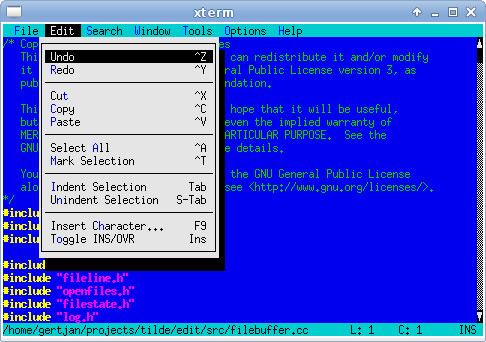
Tilde is a text editor for the console/terminal, which provides an intuitive interface for
people accustomed to GUI environments such as Gnome, KDE and Windows. For example, the
short-cut to copy the current selection is Control-C, and to paste the previously copied text
the short-cut Control-V can be used. As another example, the File menu can be accessed by
pressing Meta-F.
However, being a terminal-based program there are limitations. Not all terminals provide
sufficient information to the client programs to make Tilde behave in the most intuitive way.
When this is the case, Tilde provides work-arounds which should be easy to work with.
The main audience for Tilde is users who normally work in GUI environments, but sometimes
require an editor for a console/terminal environment. This may be because the computer in
question is a server which does not provide a GUI, or is accessed remotely over SSH. Tilde
allows these users to edit files without having to learn a completely new interface, such as vi
or Emacs do. A result of this choice is that Tilde will not provide all the fancy features that
Vim or Emacs provide, but only the most used features.
NewsTilde version
1.1.2 released
This release fixes a bug where Tilde would discard read lines before an invalid character,
while requested to continue reading.
23-May-2020
Tilde version 1.1.1 released
This release fixes a build failure on C++14 and later compilers
Alt + , - switch mc 's layout from left-right to top-bottom.
Mind = blown. Useful for operating on files with long names.
Alt + t - switch the panel's listing mode in a loop: default, brief, long,
user-defined. "long" is especially useful, because it maximises one panel so that it takes
full width of the window and longer filenames fit on screen.
Alt + i - synchronize the active panel with the other panel. That is, show
the current directory in the other panel.
Ctrl + u - swap panels.
Alt + o - if the currently selected file is a directory, load that directory
on the other panel and move the selection to the next file. If the currently selected file is
not a directory, load the parent directory on the other panel and moves the selection to the
next file. This is useful for quick checking the contents of a list of directories.
Ctrl + PgUp (or just left arrow, if you've enabled Lynx-like
motion , see later) - move to the parent directory.
Alt + Shift + h - show the directory history. Might be easier to navigate
than going back one entry at a time.
Alt + y - move to the previous directory in history.
Alt + u - move to the next directory in history.
Common actions
Ctrl + Space - calculate the size of the selected directories. Press this
shortcut when the selection is on .. to calculate the size of all the
directories in the current directory.
Ctrl + x s (that is press Ctrl + x , let it go and then press s ) -
create a symbolic link (change s to l for a hardlink). I find it
very useful and intuitive - the link will, of course, be created in the other panel. You can
change it's destination and name, like with any other file operation.
Ctrl + x c - open the chmod dialog.
Ctrl + x o - open the chown dialog.
Panel options
Show backup files and Show hidden files - I keep both
enabled, as I often work with configuration files, etc.
Lynx-like motion - mentioned above, makes left arrow go to parent
directory, while the right arrow enters the directory under selection. Faster than
Home , Enter , Home , Enter , etc.
This options is quite smart, that is if the shell command line is not empty, the arrows
work as usual and allow moving the cursor in the command line.
Bonus assignments
Define your own listing mode ( Right/Left -> Listing mode...
-> User defined ). Hit F1 to see available columns and
options.
Play around in tree mode: Right/Left -> Tree or
Command -> Directory tree .
the Midnight Commander's built-in editor turned out to be. Below is one of the features of
mc 4.7, namely the use of the ctags / etags utilities together with mcedit to navigate through
the code.
Code Navigation Training
Support for this functionality appeared in mcedit from version 4.7.0-pre1.
To use it, you need to index the directory with the project using the ctags or etags utility,
for this you need to run the following commands:
$ cd /home/user/projects/myproj

    $ find . -type f -name "*.[ch]" | etags -lc --declarations -
or $ find . -type f -name "*.[ch]" | ctags --c-kinds=+p --fields=+iaS --extra=+q -e
-L-
After the utility completes, a TAGS file will appear in the root directory of our project,
which mcedit will use.
Well, practically all that needs to be done in order for mcedit to find the definition of the
functions of variables or properties of the object under study.
Using
Imagine that we need to determine the place where the definition of the locked property
of an edit object is located in some source code of a rather large project.
    /* Succesful, so unlock both files */

    if (different_filename) {

    if (save_lock)

    edit_unlock_file (exp);

    if (edit->locked)

    edit->locked = edit_unlock_file (edit->filename);

    } else {

    if (edit->locked || save_lock)

    edit->locked = edit_unlock_file (edit->filename);

    }
Using ubuntu 10.10 the editor in mc (midnight commander) is nano. How can i switch to the
internal mc editor (mcedit)?
Isaiah ,
Press the following keys in order, one at a time:
F9 Activates the top menu.
o Selects the Option menu.
c Opens the configuration dialog.
i Toggles the use internal edit option.
s Saves your preferences.
Hurnst , 2014-06-21 02:34:51
Run MC as usual. On the command line right above the bottom row of menu selections type
select-editor . This should open a menu with a list of all of your installed
editors. This is working for me on all my current linux machines.
, 2010-12-09 18:07:18
You can also change the standard editor. Open a terminal and type this command:
sudo update-alternatives --config editor
You will get an list of the installed editors on your system, and you can chose your
favorite.
AntonioK , 2015-01-27 07:06:33
If you want to leave mc and system settings as it is now, you may just run it like
$ EDITOR=mcedit
> ,
Open Midnight Commander, go to Options -> Configuration and check "use internal editor"
Hit save and you are done.
Jan 14, 2018 · If you used Norton Commander back in the day you probably remember
this DOS utility with a side -by-side directory list. It saved my life back in the early
days of PCs. I discovered Midnite Commander a few years ago which functions as a functional
equivalent to Norton Commander in Linux. There is also an AIX version so now that I have
SSH working I thought I would give it a try.
It is developed since 2014 by Alexander Koblov ( [email protected] ). while still in beta, now, in version 0.9, it
is a full featured GUI-based OFM that can be used in production environment. Pretty stable. Like
Total Commander it is written in Pascal.
Official website is https://doublecmd.sourceforge.io/
Compare and synchronize directories symmetrically or asymmetrically
This feature is one that can be very useful. It shows files by directory and
sub-directory. It compares them by date/time stamp and by file size. One can focus on files
that are different, or ones that are identical.
Two panes
Panes can be duplicated from one side to the other. Panes can represent original
directories compared to copied or backed-up ones. These can then be matched in more detail in
the synchronize directory feature.
Tabbed navigation
Tabs are for directories. Sets of tabs can be saved to files that can be reloaded to
produce the same two panels and their tabs that one set up and saved. Tabs can be configured
to allow no changes to them, or to open sub-directories in new tabs, so that the original tab
remains intact and available.
I want to insert some items into mc menu (which is opened by F2) grouped together. Is it
possible to insert some sort of separator before them or put them into some submenu?
Probably, not.
The format of the menu file is very simple. Lines that start with anything but
space or tab are considered entries for the menu (in order to be able to use
it like a hot key, the first character should be a letter). All the lines that
start with a space or a tab are the commands that will be executed when the
entry is selected.
But MC allows you to make multiple menu entries with same shortcut and title, so you can
make a menu entry that looks like separator and does nothing, like:
a hello
  echo world
- --------
b world
  echo hello
- --------
c superuser
  ls /
Skip to content
April 24, 2011
by
Admin
Important
This is an edited version of a post that originally appeared on a blog called The Michigan
Telephone Blog, which was written by a friend before he decided to stop blogging. It is
reposted with his permission. Comments dated before the year 2013 were originally posted
to his blog.
If you've installed
Midnight
Commander
and haven't changed the default colors, when you try to access a dropdown menu you
may see this:
Midnight
Commander -- Original Colors
REALLY hard to read that menu, isn't it? Wouldn't you rather see this?
Midnight
Commander -- Changed Colors
To fix the unreadable menus, just make sure Midnight Commander is
not
open,
then use any text editor (such as nano) to open ~/.mc/ini:
nano ~/.mc/ini
Assuming that there is no existing [Colors] section in the file, just add this at the bottom
of the file (if the second line exceeds the blog column width, just use copy and paste to get it
all):
If there is an existing [Colors] section, you can try tweaking it using the parameters shown
above. If you have a very recent version of Midnight Commander (which you probably will have if
you are running Ubuntu), then instead of
menu=
you'll need to use
menunormal=
, as shown here:
Note that for some reason the base_color parameter must appear, or the other items are
ignored. Save the change, exit the editor, and open Midnight Commander. If you then close
Midnight Commander, you may find that the position of the [Colors] section has moved within the
ini file -- apparently Midnight Commander rewrites the file when you close it -- but if you don't
like the changes you can remove the [Colors] section to reverse the change.
The above would compress the current directory (%d) to a file also in the current directory. If you want to compress the directory
pointed to by the cursor rather than the current directory, use %f instead:
tar -czf %f_$(date '+%%Y%%m%%d').tar.gz %f
mc handles escaping of special characters so there is no need to put %f in quotes.
By the way, midnight commander's special treatment of percent signs occurs not just in the user menu file but also at the command
line. This is an issue when using shell commands with constructs like ${var%.c} . At the command line, the same as
in the user menu file, percent signs can be escaped by doubling them.
It is documented in the help, the node is "Edit Menu File" under "Command Menu"; if you
scroll down you should find "Addition Conditions":
If the condition begins with '+' (or '+?') instead of '=' (or '=?') it is an addition
condition. If the condition is true the menu entry will be included in the menu. If the
condition is false the menu entry will not be included in the menu.
This is preceded by "Default conditions" (the = condition), which determine
which entry will be highlighted as the default choice when the menu appears. Anyway, by way
of example:
+ t r & ! t t
t r means if this is a regular file ("t(ype) r"), and ! t t
means if the file has not been tagged in the interface.
I need to know how to check the current colour for mc and how to change it.
I google it and they talk about changeing some initial file /.mc/ini which i have no idea
(no one ever gives full filename.)and i cant find it at all. Wasted an hour of my life. I
just need the simplest way to change it, not another 10+ steps to change a stupid
colour.
gengisdave
12-22-2014 03:22 AM
in some distros (mine, e.g.) it is located in ~/.local/mc/ini
sycamorex
12-22-2014 03:24 AM
This is the full filename. Mind you on my distro it's in ~/.config/mc/ini
Find / Create this file and add the following (obviously change the colour values):
The syntax is: variable=foreground_colour,background_colour
Code:
[Colors]

          base_color=lightgray,green:normal=green,default:selected=white,gray:marked=yellow,default:markselect=yellow,gray:directory=blue,default:executable=brightgreen,default:link=cyan,default:device=brightmagenta,default:special=lightgray,default:errors=red,default:reverse=green,default:gauge=green,default:input=white,gray:dnormal=green,gray:dfocus=brightgreen,gray:dhotnormal=cyan,gray:dhotfocus=brightcyan,gray:menu=green,default:menuhot=cyan,default:menusel=green,gray:menuhotsel=cyan,default:helpnormal=cyan,default:editnormal=green,default:editbold=blue,default:editmarked=gray,blue:stalelink=red,default
Also, have a look at this: http://blog.mybox.ro/2010/05/10/skin...ght-commander/
Editing
Midnight Commander's color scheme In a previous
post I was sort of laying out a "formula" on how to transform your Midnight Commander
default color scheme into a trasnparent skin, without talking too much about how you can change
the other colors.
To my great shame, I didn't pay too much attention to this blog or to the comments asking
for further advice. I found Mateus' comment rather late (just now!) and decided to dig further,
in order to find out how exactly to deal with more refined color changes, while still keeping
the transparent background (in both in Midnight Commander and its editor).
So the first thing to know is which are the colors that Midnight Commander supports; the
available colors are:
black
gray
lightgray
white
red
brightred
green
brightgreen
blue
brightblue
magenta
brightmagenta
cyan
brightcyan
brown
yellow
default
The " default " color is the one giving out the nice transparency.
Now, there are certain "components" in Midnight Commander's display that can have their
colors altered. Here they are:
Each and every one of these "components" can have its own colors set accordingly to the
user's wish. Each component is assigned a color pair and must be followed by a colon (':') in
order to separate it from the color pair of the next component. Here's how this basic syntax
must look like:
component=foreground_color,background_color:
When you start modifying the color scheme in your Midnight Commander configuration file
(located at ~/.mc/ini ), you just have to add a section called " [Colors] " and proceed with
enumerating the color pairs. So you'd have something like this:
For increased readability, I will "truncate" that long line, adding a backslash ('\') to
indicate that in fact what follows on the next line should be adjacent to the text on the
previous line. This being said, the [Colors] section could look like this:
Now that you've gotten the hang of this, let's see how the [Colors] section looks like in
the default Midnight Commander color scheme (you know, the "ugly" one, with blue and dull
cyan):
IMPORTANT NOTE: For visual impact's sake and due to Blogspot breaking long lines, I wrote
each color pair on a single row, followed by a backslash ('\'). Please note that this does NOT
work in the ~/.mc/ini file, so the final [Colors] section in your Midnight Commander
configuration file MUST be a SINGLE line with no spaces and with each color pair separated from
the next one by a colon (':').
Now let's see. What you want to change first of all is most of the background of these
"components", such that the display will be one with a neat looking transparent background. So
first of all you might want to make a few changes to these color pairs by replacing the
background color "blue" with "default". After doing these changes, your [Colors] section will
look a bit like this:
Now you've got the basic "Midnight Commander transparent scheme" that was the result of
this
post .
Proceeding to Mateus' question, regarding how to change the rest of the colors now, it's
about the same as before. What he didn't like there (and as a matter of fact I don't quite like
it, either) is the dull cyan that's still seen in the following places:
the bottom line (the one displaying the F1...F10 function keys);
the line that signifies the current selection, the "prompt" which shows you on which
file/directory you're "on" at a given moment;
the uppermost line (the "menu" line);
the menus themselves, once you open them.
To "fix" issues 1, 2, and 3 it is sufficient to alter the value of the " selected "
parameter. Notice how it is initially
selected=black,cyan:\
My personal choice is to replace the background cyan, which I don't really like, with green.
To do this, I'll change this color pair to
selected=black,green:\
You can, of course, change the foreground color as well. For me, it's alright to keep the
foreground (the text) "black". You can change it to whatever suits your taste.
To "fix" issue number 4 in the list above, you need to change the " menu " parameter. To get
it transparent, just change the "cyan" background to "default". Make other adjustments as you
see fit. In other words, change
menu=white,cyan:\
into, for instance,
menu=ligthgray,default:\
However, there are a few "leftovers" from the default color scheme.
One of them is the parameter regarding the hotkeys in the menus (the "underlined" character
on most of the menu options, showing you what key you can press in order to access that option
faster than by moving to it with the arrow keys). This color pair is called " menuhot ". I
changed it from
menuhot=yellow,cyan:\
into
menuhot=yellow,default:\
Another thing which might bother you is the color of the line in the panel you're in when
you've "selected all" files (when you've pressed the "*" key). This parameter is called "
markselect ". I changed it from
markselect=yellow,cyan:\
into
markselect=white,green:\
The color pair of the selected buttons in dialogs is called " dfocus ". I changed mine
from
dfocus=black,cyan:\
into
dfocus=black,green:\
In the "focused" buttons or options, the underlined character is called " dhotfocus ". I
changed mine from
dhotfocus=blue,cyan:\
into
dhotfocus=brightgreen,green:\
since the background color was already green, after I modified the " dfocus " color
pair.
The other buttons or options in the dialogs which have hotkeys assigned to them, but which
are not "focused" (the buttons/options that you're not located on at a given moment) are still
displayed in blue on a light gray background. This color pair is referred to as " dhotnormal ".
Since the blue looks a bit odd there, I changed
dhotnormal=blue,lightgray:\
into
dhotnormal=brightgreen,default:\
Well, this is nice, in window titles and on normal (unfocused) hotkeys I get the transparent
background. The problem now is that the rest of the dialog window is still light gray. To
change this (to make the window transparent as well), you only need to alter the " dnormal "
color pair, such as changing it from
dnormal=black,lightgray:\
into
dnormal=white,default:\
You may notice that the input fields stay cyan, as well; you find these fields in quite a
lot of dialog boxes. To alter this, I changed
input=black,cyan:\
into
input=black,green:\
One thing which I consider useful is to have symbolic links displayed in bright cyan (as in
the colored listings in the terminal). So I just changed
link=lightgray,default:\
into
link=brightcyan,default:\
Now, regarding the rest of the color pairs, I don't really know what they do. However, if at
some point after using Midnight Commander more with this new, neat, transparent/green color
scheme you'll notice unwanted leftovers, you can try out other changes in the color pairs
values, one at a time, until you determine the troublesome one.
After operating the changes above, my [Colors] section in ~/.mc/ini now looks like this:
I need to direct you to the " IMPORTANT NOTE " above. The final [Colors] section above is
written like this - one pair on each row, followed by a backslash - for clarity's sake. The
actual final [Colors] section in your ~/.mc/ini file will have to be a one-liner, with no
blanks and no backslashes. So it will probably look similar to this:
Note #1: In the above 'code' block, there is only one line below [Colors] . I truncated the
line with the backslash because of blogspot rendering issues. You just write all that on one
single line, without the "\" (backslash-es).
Note #2: At the end of this line, the " editnormal,=default: " option means that mcedit will
have transparent background in your console, as well.
To my great shame, I didn't pay too much attention to this blog or to the comments asking
for further advice. I found Mateus' comment rather late (just now!) and decided to dig further,
in order to find out how exactly to deal with more refined color changes, while still keeping
the transparent background (in both in Midnight Commander and its editor).
So the first thing to know is which are the colors that Midnight Commander supports; the
available colors are:
black
gray
lightgray
white
red
brightred
green
brightgreen
blue
brightblue
magenta
brightmagenta
cyan
brightcyan
brown
yellow
default
The " default " color is the one giving out the nice transparency.
Now, there are certain "components" in Midnight Commander's display that can have their
colors altered. Here they are:
Each and every one of these "components" can have its own colors set accordingly to the
user's wish. Each component is assigned a color pair and must be followed by a colon (':') in
order to separate it from the color pair of the next component. Here's how this basic syntax
must look like:
component=foreground_color,background_color:
When you start modifying the color scheme in your Midnight Commander configuration file
(located at ~/.mc/ini ), you just have to add a section called " [Colors] " and proceed with
enumerating the color pairs. So you'd have something like this:
For increased readability, I will "truncate" that long line, adding a backslash ('\') to
indicate that in fact what follows on the next line should be adjacent to the text on the
previous line. This being said, the [Colors] section could look like this:
Now that you've gotten the hang of this, let's see how the [Colors] section looks like in
the default Midnight Commander color scheme (you know, the "ugly" one, with blue and dull
cyan):
IMPORTANT NOTE: For visual impact's sake and due to Blogspot breaking long lines, I wrote
each color pair on a single row, followed by a backslash ('\'). Please note that this does NOT
work in the ~/.mc/ini file, so the final [Colors] section in your Midnight Commander
configuration file MUST be a SINGLE line with no spaces and with each color pair separated from
the next one by a colon (':').
Now let's see. What you want to change first of all is most of the background of these
"components", such that the display will be one with a neat looking transparent background. So
first of all you might want to make a few changes to these color pairs by replacing the
background color "blue" with "default". After doing these changes, your [Colors] section will
look a bit like this:
Now you've got the basic "Midnight Commander transparent scheme" that was the result of
this
post .
Proceeding to Mateus' question, regarding how to change the rest of the colors now, it's
about the same as before. What he didn't like there (and as a matter of fact I don't quite like
it, either) is the dull cyan that's still seen in the following places:
the bottom line (the one displaying the F1...F10 function keys);
the line that signifies the current selection, the "prompt" which shows you on which
file/directory you're "on" at a given moment;
the uppermost line (the "menu" line);
the menus themselves, once you open them.
To "fix" issues 1, 2, and 3 it is sufficient to alter the value of the " selected "
parameter. Notice how it is initially
selected=black,cyan:\
My personal choice is to replace the background cyan, which I don't really like, with green.
To do this, I'll change this color pair to
selected=black,green:\
You can, of course, change the foreground color as well. For me, it's alright to keep the
foreground (the text) "black". You can change it to whatever suits your taste.
To "fix" issue number 4 in the list above, you need to change the " menu " parameter. To get
it transparent, just change the "cyan" background to "default". Make other adjustments as you
see fit. In other words, change
menu=white,cyan:\
into, for instance,
menu=ligthgray,default:\
However, there are a few "leftovers" from the default color scheme.
One of them is the parameter regarding the hotkeys in the menus (the "underlined" character
on most of the menu options, showing you what key you can press in order to access that option
faster than by moving to it with the arrow keys). This color pair is called " menuhot ". I
changed it from
menuhot=yellow,cyan:\
into
menuhot=yellow,default:\
Another thing which might bother you is the color of the line in the panel you're in when
you've "selected all" files (when you've pressed the "*" key). This parameter is called "
markselect ". I changed it from
markselect=yellow,cyan:\
into
markselect=white,green:\
The color pair of the selected buttons in dialogs is called " dfocus ". I changed mine
from
dfocus=black,cyan:\
into
dfocus=black,green:\
In the "focused" buttons or options, the underlined character is called " dhotfocus ". I
changed mine from
dhotfocus=blue,cyan:\
into
dhotfocus=brightgreen,green:\
since the background color was already green, after I modified the " dfocus " color
pair.
The other buttons or options in the dialogs which have hotkeys assigned to them, but which
are not "focused" (the buttons/options that you're not located on at a given moment) are still
displayed in blue on a light gray background. This color pair is referred to as " dhotnormal ".
Since the blue looks a bit odd there, I changed
dhotnormal=blue,lightgray:\
into
dhotnormal=brightgreen,default:\
Well, this is nice, in window titles and on normal (unfocused) hotkeys I get the transparent
background. The problem now is that the rest of the dialog window is still light gray. To
change this (to make the window transparent as well), you only need to alter the " dnormal "
color pair, such as changing it from
dnormal=black,lightgray:\
into
dnormal=white,default:\
You may notice that the input fields stay cyan, as well; you find these fields in quite a
lot of dialog boxes. To alter this, I changed
input=black,cyan:\
into
input=black,green:\
One thing which I consider useful is to have symbolic links displayed in bright cyan (as in
the colored listings in the terminal). So I just changed
link=lightgray,default:\
into
link=brightcyan,default:\
Now, regarding the rest of the color pairs, I don't really know what they do. However, if at
some point after using Midnight Commander more with this new, neat, transparent/green color
scheme you'll notice unwanted leftovers, you can try out other changes in the color pairs
values, one at a time, until you determine the troublesome one.
After operating the changes above, my [Colors] section in ~/.mc/ini now looks like this:
I need to direct you to the " IMPORTANT NOTE " above. The final [Colors] section above is
written like this - one pair on each row, followed by a backslash - for clarity's sake. The
actual final [Colors] section in your ~/.mc/ini file will have to be a one-liner, with no
blanks and no backslashes. So it will probably look similar to this:
Koszti Lajos Midnight Commander is the most pupular file manager on
unix like systems. It's fast and it has all features what you need. But it's only blue and we
know, that everyone loves the eyecandy, everyone likes customizing his/her own desktop. But is
there any way to custimize the mc ?
Yes, and I try to show you, how can you create your theme .
You can change the Midnight Commander colors if you edit the ~/.mc/ini file, where you have
to add a new section, named [Colors] . You should define the new colors in this section, for
example:
Help colors: helpnormal, helpitalic, helpbold, helplink, helpslink
Viewer color: viewunderline
Special highlighting colors: executable, directory, link, stalelink, device, special,
core
Editor colors: editnormal, editbold, editmarked
And which are the colors? I don't know all, but here are some of them: white, gray, blue, green, yellow, magenta, cyan, red, brown, birghtgreen, brightblue,
brightmagenta, brightcyan, brightred, default
On the screenshot you can see, that the directory color is blue, the files are green, the
executable files are birghtgreen and the selected line is white on a gray background.
And here is a small shell script, which will help for you to test your new theme:
#!/bin/sh mc --colors
normal=green,default:selected=brightmagenta,gray:marked=yellow,default:markselect=yellow,gray:directory=blue,default:executable=brightgreen,default:link=cyan,default:device=brightmagenta,default:special=lightgray,default:errors=red,default:reverse=green,default:gauge=green,default:input=white,gray:dnormal=green,gray:dfocus=brightgreen,gray:dhotnormal=cyan,gray:dhotfocus=brightcyan,gray:menu=green,default:menuhot=cyan,default:menusel=green,gray:menuhotsel=cyan,default:helpnormal=cyan,default:editnormal=green,default:editbold=blue,default:editmarked=gray,blue:stalelink=red,default
Save it as mccolortest.sh, make it executable with the chmod +x mccolortest.sh
command, and run it with the ./mccolortest.sh command. If you want to change a color,
just edit this file. When you done, copy the colors and paste it below the [Colors]
section in the ~/.mc/ini . If it doesn't exists, make it yourself.
For more information of the mc redesigning check its manual page .
Also, in 4.8.3 here, I copied the first example scheme line and my colors are different. I
can't even set the background of the select bar to gray (or "grey"): it gets replaced with
black. Also, the panel headings remain blue here, unlike the (first) screenshot, and I can
see no corresponding tag in the line anyway.
Good intro, regardless. Someone should post a pointer to a more up-to-date one, though, as
Google seems to find this old thread within the top few hits. Király! ;)
The colors are depends on the color settings of your terminal. I don't have those settings
anymore which was when I posted this article, but here is my current. If I'm right, it's
similar to that. Put it into your .Xdefaults
Midnight Commander supports skins starting from 4.7.0-pre3 version. You can download a
skin with black as a main color from here:
http://zool.in.ua/software/bluemoon/
I am using MC on my router ASUS WL-500GP and I am developing php scripts on it. but as I
see MC in openwrt (kmaikaze 8.09) does not use syntax-highlighting and it is very
unconfortable.
Do you know how could I turn it on? I have already downloaded php.syntax file and put it into
/usr/share/syntax dir but it does not seem to work. is it possible that some support is not
compiled into my version or the syntax file must be compiled to another format?
Br Zé.
hei ajnasz, your color theme so very nice, keep my eye on my pc longer than usual. Well, i
don't have much time to do more explore with this tricks. I think your taste so cool. If you
have any kind of theme, i should be try it. :-)
I didn't find anything about it. By the way, since the extension doesn't determinate the
file type in UNIX like systems, it wouldn't make any sense to do it.
Don't be silly. Mp3 is just music, txt is text, doc is document. The only thing, which is
not exactly determinable is the executables, but whatever, it has +x flag.
Also, you should know that most modern terminal applications allow you to redefine the
exact shade of those 16 colors.
Some of them (such as the Gnome or KDE terminals) may have a place under their preferences
where you can redefine the colors.
Older terminals, such as aterm, use ~/.Xdefaults for this. You can edit that file and add
lines like this: "aterm*color1: OrangeRed" (without the quotes). What I've done with that is
tell aterm that the "color1" (which was red) should now be "OrangeRed". See
/usr/share/X11/rgb.txt for valid color names. You can use *color0 through *color15. So when
you'll say "red" in MC's ini file, and if you use aterm, it will get replaced by color1 in
~/.Xdefaults and changed to OrangeRed. (Sorry, I don't remember the mappings between the
names used by MC and 0-15 in Xdefaults by heart.)
"... You can create hard links and symbolic links using C-x l and C-x s keyboard shortcuts. However, these two shortcuts invoke two completely different dialogs. ..."
"... he had also uploaded a sample mc user menu script ( local copy ), which works wonderfully! ..."
You can create hard links and symbolic links using C-x l and C-x s keyboard shortcuts.
However, these two shortcuts invoke two completely different dialogs.
While for C-x s you get 2 pre-populated fields (path to the existing file, and path to the
link – which is pre-populated with your opposite file panel path plus the name of the
file under cursor; simply try it to see what I mean), for C-x l you only get 1 empty field:
path of the hard link to create for a file under cursor. Symlink's behaviour would be much more
convenient
Fortunately, a good man called Wiseman1024 created a feature request in the MC's bug tracker 6
years ago. Not only had he done so, but he had also uploaded a sample mc user
menu script ( local copy ), which
works wonderfully! You can select multiple files, then F2 l (lower-case L), and hard-links to
your selected files (or a file under cursor) will be created in the opposite file panel. Great,
thank you Wiseman1024 !
Word of warning: you must know what hard links are and what their limitations are
before using this menu script. You also must check and understand the user menu code before
adding it to your mc (by F9 C m u , and then pasting the script from the file).
Word of hope: 4 years ago Wiseman's feature request was assigned to Future Releases
version, so a more convenient C-x l will (sooner or later) become the part of mc. Hopefully
With tar.gz to extract a file archiver first creates an intermediary tarball x.tar file from
x.tar.gz by uncompressing the whole archive then unpack requested files from this intermediary
tarball. In tar.gz archive is large unpacking can take several hours or even days.
@ChristopheDeTroyer Tarballs are compressed in such a way that you have to decompress
them in full, then take out the file you want. I think that .zip folders are different, so if
you want to be able to take out individual files fast, try them. – GKFX
Jun 3 '16 at 13:04
Yes, just give the full stored path of the file after the tarball name.
Example: suppose you want file etc/apt/sources.list from etc.tar
:
tar -xf etc.tar etc/apt/sources.list
Will extract sources.list and create directories etc/apt under
the current directory.
You can use the -t listing option instead of -x , maybe along
with grep , to find the path of the file you want
You can also extract a single directory
tar has other options like --wildcards , etc. for more advanced
partial extraction scenarios; see man tar
2. Extract it with the Archive Manager
Open the tar in Archive Manager from Nautilus, go down into the folder hierarchy to find
the file you need, and extract it.
On a server or command-line system, use a text-based file manager such as Midnight
Commander ( mc ) to accomplish the same.
3. Using Nautilus/Archive-Mounter
Right-click the tar in Nautilus, and select Open with ArchiveMounter.
The tar will now appear similar to a removable drive on the left, and you can
explore/navigate it like a normal drive and drag/copy/paste any file(s) you need to any
destination.
Midnight Commander uses virtual filesystem ( VFS ) for displying
files, such as contents of a .tar.gz archive, or of .iso image.
This is configured in mc.ext with rules such as this one ( Open is
Enter , View is F3 ):
If you've used an *nix system, at some point you've stumbled
upon Midnight Commander , a
file manager based on the venerable Norton Commander. You're probably familiar with the basic
operations ( F5 for copying, F6 for moving, F8 for
deleting, etc.) and how to switch panels (ummm, the Tab key). But mc
offers so much more than that. This article aims to show all the useful (YMMV) shortcuts and
functionalities that are often overlooked. Most of them can be accessed using the menu (
F9 ), but who has the time to do that?
Before we get started, let's establish some facts. This article was written and tested on
the following software:
Midnight Commander 4.8.13
GNU bash 4.2.53
Oh, and make sure you're running a modern and UTF-8 friendly terminal - for example,
rxvt-unicode.
Hold your horses
There's actually one thing I'd recommend doing before you run mc .
mc has the ability to exit to its current directory. Meaning, you can navigate the
filesystem using mc (sometimes it's easier than cd ing into that one
directory buried deep down somewhere ) and when you quit mc (
F10 ), your shell will automagically cd to that directory. This is
done thanks to the mc-wrapper script that should be bundled with your installation
of mc . The exact location is dependent on your distribution - in mine (Gentoo)
it's /usr/libexec/mc/ , in Ubuntu supposedly it's in
/usr/share/mc/bin/ . Once found, modify your ~/.bashrc :
alias mc='. /usr/libexec/mc/mc-wrapper.sh'
Restart your shell, launch mc , change to another directory, exit and your
shell should be set to that new directory.
Selecting files
Insert ( Ctrl + t alternatively) - select files (for example,
for copying, moving or deleting).
+ - select files based on a pattern.
\ - un select files based on a pattern.
* - reverse selection. If nothing was selected, all files will get
selected.
Accessing the shell
There's a shell awaiting your command at the bottom of the screen - just start typing
(when no other command dialog is open, of course).
Since Tab is bound to switching panels (or moving the focus in dialogs), you
have to use Esc Tab to use autocompletion. Hit it twice to get all the possible
completions (just like in a shell). This works in dialogs too.
If you want inspect the output of the command, do some input or just prefer a bigger
console, no need to quit mc . Just hit Ctrl + o - the effect will
be similar to putting mc in the background but with a nice perk. Your current
working directory from mc will be passed on to the shell and vice versa! Hit
Ctrl + o again to return to mc .
Ctrl + Enter or Alt + Enter - copy the currently selected
file's name to the shell.
Ctrl + Shift + Enter - same as above, but the full path is copied.
Internal viewer ( F3 ) and editor ( F4 )
The internal viewer has many built in modes for "previewing" the content of the file. Try
"viewing" a binary, an archive, a DOC document or an image. In some cases, external programs
are needed in order for this "previewing" to work.
If you want to preview the "raw" contents of the file, hit Shift + F3 .
While the internal viewer and editor are powerful, sometimes you want to use your
preferred software ( cough vim cough ). You can do so by setting the
PAGER (for viewer) and EDITOR (for editor) variables (for example,
in your ~/.bashrc file). Then toggle the Options -> Configuration ->
Use interal edit/view option (access the top menu by pressing F9 ).
Panels
Alt + , - switch mc 's layout from left-right to top-bottom.
Mind = blown. Useful for operating on files with long names.
Alt + t - switch the panel's listing mode in a loop: default, brief, long,
user-defined. "long" is especially useful, because it maximises one panel so that it takes
full width of the window and longer filenames fit on screen.
Alt + i - synchronize the active panel with the other panel. That is, show
the current directory in the other panel.
Ctrl + u - swap panels.
Alt + o - if the currently selected file is a directory, load that directory
on the other panel and move the selection to the next file. If the currently selected file is
not a directory, load the parent directory on the other panel and moves the selection to the
next file. This is useful for quick checking the contents of a list of directories.
Ctrl + PgUp (or just left arrow, if you've enabled Lynx-like
motion , see later) - move to the parent directory.
Alt + Shift + h - show the directory history. Might be easier to navigate
than going back one entry at a time.
Alt + y - move to the previous directory in history.
Alt + u - move to the next directory in history.
Searching files
Alt + ? - shows the full Find dialog.
Alt + s or Ctrl + s - quick search mode. Start typing and the
selection will move to the first matching file. Press the shortcut again to jump to another
match. Use wildcards ( * , ? ) for easier matching.
Common actions
Ctrl + Space - calculate the size of the selected directories. Press this
shortcut when the selection is on .. to calculate the size of all the
directories in the current directory.
Ctrl + x s (that is press Ctrl + x , let it go and then press s ) -
create a symbolic link (change s to l for a hardlink). I find it
very useful and intuitive - the link will, of course, be created in the other panel. You can
change it's destination and name, like with any other file operation.
Ctrl + x c - open the chmod dialog.
Ctrl + x o - open the chown dialog.
Virtual File System (VFS)
mc has a concept known as Virtual File System. Try "entering" an archive (
*.tar.gz , *.rpm or even *.jar ) - you'll be able to
browse the contents of the archive like a normal folder, without unpacking it first. You
extract selected files from the archive by just copying them to the other panel. Bonus points:
try "entering" a *.patch file.
This concept is even more powerful when you realize that remote locations can be viewed the
same way. A quick way to browse an FTP location is to just cd to it: cd
ftp://mirrors.tera-byte.com/pub/gentoo (first Gentoo FTP mirror I found). You'll be able
to interact with files as you normally do. To exit this remote location, cd to a
local directory. Just typing cd will suffice as it will take you to your home
directory.
VFS works for SFTP and Samba shares too. Check the manpages for more information on how to
specify user/pass, etc.
Useful options
Configuration
Verbose operation and Compute totals - so that operations
like copy/move have a more detailed progress dialogs.
Layout
Equal split - uncheck to define your own ratio for panels. Maybe you
prefer one panel bigger than the other? Useful especially if you keep one of the panels
in tree mode (or maybe info/quick view, too).
Uncheck Hintbar visible - one more line available, one less line of
noise.
Panel options
Show backup files and Show hidden files - I keep both
enabled, as I often work with configuration files, etc.
Lynx-like motion - mentioned above, makes left arrow go to parent
directory, while the right arrow enters the directory under selection. Faster than
Home , Enter , Home , Enter , etc.
This options is quite smart, that is if the shell command line is not empty, the arrows
work as usual and allow moving the cursor in the command line.
File highlight -> File types is useful, as it uses a
different color for example for executable files. Permissions , for me, is
not that useful, but I can definitely see it's use, for example, for sysadmins.
Appearance
Only one option here, Skins . You can check out different skins shipped
with mc - just select one from the list. I prefer gotar ,
because it plays well with my solarized terminal colors.
Useful tip - set up a different skin when logged in as the root user.
It'll be easier to differentiate between root's and normal user's session, when you're
swapping between them (as is often the case).
Bonus assignments
Define your own listing mode ( Right/Left -> Listing mode...
-> User defined ). Hit F1 to see available columns and
options.
Play around in tree mode: Right/Left -> Tree or
Command -> Directory tree .
Compare directories ( Ctrl + x d )
Fill up the directory hotlist ( Ctrl + \ )
Well, that was a lot to take in. Of course, this list is not complete (that's what man
mc is there for), but I've selected the commands and functionalities that are the most
useful to me . Embrace the ones you find useful, forget the rest and learn about the
other ones I've missed!
Another tool that can save you time is Midnight Commander's user menu. Go back to
/tmp/test where you created nine files. Press F2 and bring up the user menu. Select
Compress the current subdirectory (tar.gz) . After you choose the name for the archive,
this will be created in /tmp (one level up from the directory being
compressed). If you highlight the .tar.gz file and press ENTER you'll notice it will open
like a regular directory. This allows you to browse archives and extract files by simply
copying them ( F5 ) to the opposite panel's working directory.
To find out the size of a directory (actually, the size of all the files it contains),
highlight the directory and then press CTRL+SPACE .
To search, go up in your directory tree until you reach the top level, / ,
called root directory. Now press F9 , then c , followed by f . After the Find File dialog
opens, type *.gz . This will find any accessible gzip archive on the system. In
the results dialog, press l (L) for Panelize . All the results will be fed to one of your
panels so you can easily browse, copy, view and so on. If you enter a directory from that
list, you lose the list of found files, but you can easily return to it with F9 , l (L) then
z (to select Panelize from the Left menu).
Managing files is not always done locally. Midnight Commander also supports accessing
remote filesystems through SSH's Secure File Transfer Protocol, SFTP . This way you
can easily transfer files between servers.
Press F9 , followed by l (L), then select the SFTP link menu entry. In the dialog box
titled SFTP to machine enter sftp://[email protected] . Replace
example with the username you have created on the remote machine and
203.0.113.1 with the IP address of your server. This will work only if the
server at the other end accepts password logins. If you're logging in with SSH keys, then
you'll first need to create and/or edit ~/.ssh/config . It could look
something like this:
~/.ssh/config
1
2
3
4
5
Host sftp_server
HostName 203.0.113.1
Port 22
User your_user
IdentityFile ~/.ssh/id_rsa
You can choose whatever you want as the Host value, it's only an identifier.
IdentityFile is the path to your private SSH key.
After the config file is setup, access your SFTP server by typing the identifier value
you set after Host in the SFTP to machine dialog. In this example, enter
sftp_server .
Midnight Commander how to compress a file/directory; Make a tar archive with midnight
commander
To compress a file in Midnight Commader (e.g. to make a tar.gz archive) navigate
to the directory you want to pack and press 'F2'. This will bring up the 'User menu'. Choose
the option 'Compress the current subdirectory'. This will compress the WHOLE directory you're
currently in - not the highlighted directory.
Last modified
2
years ago Integration mc with mc2(Lua)
Description I think that it is necessary that code base mc and mc2 correspond
each other. mooffie? can you check that patches from andrew_b easy merged with mc2 and if some
patch conflict with mc2 code hold this changes by writing about in corresponding ticket.
zaytsev can you help automate this( continues integration, travis and so on). Sorry, but some
words in Russian:
Ребята, я не
пытаюсь давать
ЦУ, Вы делаете
классную
работу. Просто
яхотел
обратить
внимание, что
Муфья пытается
поддерживать
свой код в
актуальном
состоянии, но
видя как у него
возникают
проблемы на
ровном месте
боюсь
энтузиазм у
него может
пропасть.
I have asked what plans does mooffie have for mc 2 sometime ago and never got an
answer. Note that I totally don't blame him for that. Everyone here is working at their own
pace. Sometimes I disappear for weeks or months, because I can't get a spare 5 minutes not even
speaking of several hours due to the non-mc related workload. I hope that one day we'll figure
out the way towards merging it, and eventually get it done.
In the mean time, he's working together with us by offering extremely important and
well-prepared contributions, which are a pleasure to deal with and we are integrating them as
fast as we can, so it's not like we are at war and not talking to each other.
Anyways, creating random noise in the ticket tracking system will not help to advance your
cause. The only way to influence the process is to invest serious amount of time in the
development.
Now, I assume most of you here aren't users of MC.
So I won't bore you with description of how Lua makes MC a better file-manager. Instead, I'll just list some details that may
interest
any developer who works on extending some application.
And, as you'll shortly see, you may find mc^2 useful even if you aren't a user of MC!
So, some interesting details:
* Programmer Goodies
- You can restart the Lua system from within MC.
- Since MC has a built-in editor, you can edit Lua code right there and restart Lua. So it's somewhat like a live IDE:
- It comes with programmer utilities: regular expressions; global scope protected by default; good pretty printer for Lua tables;
calculator where you can type Lua expressions; the editor can "lint" Lua code (and flag uses of global variables).
- It installs a /usr/bin/mcscript executable letting you use all the goodies from "outside" MC:
- You can program a UI (user interface) very easily. The API is fun
yet powerful. It has some DOM/JavaScript borrowings in it: you can
attach functions to events like on_click, on_change, etc. The API
uses "properties", so your code tends to be short and readable:
Hello,
Is it possible to customize the columns in the single panel view ?
For my default (two panel) view, I have customized it using:
-> Listing Mode
(*) User defined:
half type name | size:15 | mtime
however, when I switch to the single panel view, there are different
columns (obviously):
Permission Nl Owner Group Size Modify time Name
For instance, I need to change the width of "Size" to 15.
No, you can't change the format of the "Long" listing-mode.
(You can make the "User defined" listing-mode display in one panel (by
changing "half" to "full"), but this is not what you want.)
So, you have two options:
(1) Modify the source code (search panel.c for "full perm space" and
tweak it); or:
(2) Use mc^2. It allows you to do this. (It already comes with a
snippet that enlarges the "Size" field a bit so there'd be room for
the commas (or other locale-dependent formatting) it adds. This makes
reading long numbers much easier.)
Subject : Re: Help: meaning of the panelize command in left/right menus
Date : Fri, 17 Feb 2017 15:00:16 +0100
On Thu, Feb 16, 2017 at 01:25:22PM +1300, William Kimber wrote:
Briefly, if you do a search over several directories you can put all those
files into a single panel. Not withstanding that they are from different
directories.
I'm not sure I understand what you mean here; anyway I noticed that if you do a
search using the "Find file" (M-?) command, choose "Panelize" (at the bottom
of the "Find File" popup window), then change to some other directory (thus
exiting from panelized mode), if you now choose Left -> Panelize, you can recall
the panelized view of the last "Find file" results. Is this what you mean?
However this seems to work only with panelized results coming from the
"Find file" command, not with results from the "External panelize" command:
if I change directory, and then choose Left -> Panelize I get an empty panel.
Is this a bug?
Cri
Re: Help: meaning of the panelize command in left/right menus
From : Cristian Rigamonti <cri linux it>
To : mc gnome org
Subject : Re: Help: meaning of the panelize command in left/right menus
Date : Fri, 17 Feb 2017 15:00:16 +0100
On Thu, Feb 16, 2017 at 01:25:22PM +1300, William Kimber wrote:
Briefly, if you do a search over several directories you can put all those
files into a single panel. Not withstanding that they are from different
directories.
I'm not sure I understand what you mean here; anyway I noticed that if you do a
search using the "Find file" (M-?) command, choose "Panelize" (at the bottom
of the "Find File" popup window), then change to some other directory (thus
exiting from panelized mode), if you now choose Left -> Panelize, you can recall
the panelized view of the last "Find file" results. Is this what you mean?
However this seems to work only with panelized results coming from the
"Find file" command, not with results from the "External panelize" command:
if I change directory, and then choose Left -> Panelize I get an empty panel.
Is this a bug?
Cri
Hello,
Is it possible to customize the columns in the single panel view ?
For my default (two panel) view, I have customized it using:
-> Listing Mode
(*) User defined:
half type name | size:15 | mtime
however, when I switch to the single panel view, there are different
columns (obviously):
Permission Nl Owner Group Size Modify time Name
For instance, I need to change the width of "Size" to 15.
No, you can't change the format of the "Long" listing-mode.
(You can make the "User defined" listing-mode display in one panel (by
changing "half" to "full"), but this is not what you want.)
So, you have two options:
(1) Modify the source code (search panel.c for "full perm space" and
tweak it); or:
(2) Use mc^2. It allows you to do this. (It already comes with a
snippet that enlarges the "Size" field a bit so there'd be room for
the commas (or other locale-dependent formatting) it adds. This makes
reading long numbers much easier.)
Hi!
My mc version:
$ mc --version
GNU Midnight Commander 4.8.19
System: Fedora 24
I just want to tell you that %f macro in mcedit is not correct. It
contains the current file name that is selected in the panel but not
the actual file name that is opened in mcedit.
I created the mcedit item to run C++ program:
+= f \.cpp$
r Run
clear
app_path=/tmp/$(uuidgen)
if g++ -o $app_path "%f"; then
$app_path
rm $app_path
fi
echo 'Press any key to exit.'
read -s -n 1
Imagine that I opened the file a.cpp in mcedit.
Then I pressed alt+` and switched to panel.
Then I selected (or even opened in mcedit) the file b.cpp.
Then I pressed alt+` and switched to mcedit with a.cpp.
Then I executed the "Run" item from user menu.
And... The b.cpp will be compiled and run. This is wrong! Why b.cpp???
I executed "Run" from a.cpp!
I propose you to do the new macros for mcedit.
%opened_file
- the file name that is opened in current instance of mcedit.
%opened_file_full_path
- as %opened_file but full path to that file.
I think that %opened_file may be not safe because the current
directory may be changed in mc panel. So it is better to use
%opened_file_full_path.
%opened_file_dir
- full path to directory where %opened_file is.
%save
- save opened file before executing the menu commands. May be useful
in some cases. For example I don't want to press F2 every time before
run changed code.
Thanks for the mc.
Best regards, Sergiy Vovk.
I'd like mc to open /home/keith/Documents/ in the left panel as well whenever I start
mc up, so both panels are showing the /home/keith/Documents/ directory.
Is there some way to tell mc how to do this please?
I think you could use: `mc <path> <path>`, for instance:
`mc /home/keith/Documents/ /tmp`, but of course this requires you to know
the second path to open in addition to your ~/Documents. Not really
satisfying?
Regards,
Hi wwp,
Thanks for your suggestion and that seems to work OK - I just start mc with the following
command:
mc ~/Documents
and both panes are opened at the ~Documents directories now which is fine.
Description I think that it is necessary that code base mc and mc2 correspond
each other. mooffie? can you check that patches from andrew_b easy merged with mc2 and if some
patch conflict with mc2 code hold this changes by writing about in corresponding ticket.
zaytsev can you help automate this( continues integration, travis and so on). Sorry, but some
words in Russian:
Ребята, я не
пытаюсь давать
ЦУ, Вы делаете
классную
работу. Просто
яхотел
обратить
внимание, что
Муфья пытается
поддерживать
свой код в
актуальном
состоянии, но
видя как у него
возникают
проблемы на
ровном месте
боюсь
энтузиазм у
него может
пропасть. Change
Historycomment:1 Changed 2
years ago by zaytsev-work
I have asked what plans does mooffie have for mc 2 sometime ago and never got an
answer. Note that I totally don't blame him for that. Everyone here is working at their own
pace. Sometimes I disappear for weeks or months, because I can't get a spare 5 minutes not even
speaking of several hours due to the non-mc related workload. I hope that one day we'll figure
out the way towards merging it, and eventually get it done.
In the mean time, he's working together with us by offering extremely important and
well-prepared contributions, which are a pleasure to deal with and we are integrating them as
fast as we can, so it's not like we are at war and not talking to each other.
Anyways, creating random noise in the ticket tracking system will not help to advance your
cause. The only way to influence the process is to invest serious amount of time in the
development. comment:2
Changed 2
years ago by zaytsev
Now, I assume most of you here aren't users of MC.
So I won't bore you with description of how Lua makes MC a better
file-manager. Instead, I'll just list some details that may interest
any developer who works on extending some application.
And, as you'll shortly see, you may find mc^2 useful even if you
aren't a user of MC!
So, some interesting details:
* Programmer Goodies
- You can restart the Lua system from within MC.
- Since MC has a built-in editor, you can edit Lua code right there
and restart Lua. So it's somewhat like a live IDE:
- It comes with programmer utilities: regular expressions; global scope
protected by default; good pretty printer for Lua tables; calculator
where you can type Lua expressions; the editor can "lint" Lua code (and
flag uses of global variables).
- It installs a /usr/bin/mcscript executable letting you use all the
goodies from "outside" MC:
- You can program a UI (user interface) very easily. The API is fun
yet powerful. It has some DOM/JavaScript borrowings in it: you can
attach functions to events like on_click, on_change, etc. The API
uses "properties", so your code tends to be short and readable:
I defined my own listing mode and I'd like to make it permanent so that on the next mc
start my defined listing mode will be set. I found no configuration file for mc.
,
You have probably Auto save setup turned off in
Options->Configuration menu.
You can save the configuration manually by Options->Save setup .
Panels setup is saved to ~/.config/mc/panels.ini .
Now, I assume most of you here aren't users of MC.
So I won't bore you with description of how Lua makes MC a better
file-manager. Instead, I'll just list some details that may interest
any developer who works on extending some application.
And, as you'll shortly see, you may find mc^2 useful even if you
aren't a user of MC!
So, some interesting details:
* Programmer Goodies
- You can restart the Lua system from within MC.
- Since MC has a built-in editor, you can edit Lua code right there
and restart Lua. So it's somewhat like a live IDE:
- It comes with programmer utilities: regular expressions; global scope
protected by default; good pretty printer for Lua tables; calculator
where you can type Lua expressions; the editor can "lint" Lua code (and
flag uses of global variables).
- It installs a /usr/bin/mcscript executable letting you use all the
goodies from "outside" MC:
- You can program a UI (user interface) very easily. The API is fun
yet powerful. It has some DOM/JavaScript borrowings in it: you can
attach functions to events like on_click, on_change, etc. The API
uses "properties", so your code tends to be short and readable:
On Fri, 27 Jul 2018 17:01:17 +0300 Sergey Naumov via mc-devel wrote:
I'm curious whether there is a way to change default configuration that is
generated when user invokes mc for the first time?
For example, I want "use_internal_edit" to be true by default instead of
false for any new user.
In vanilla mc the initial value of use_internal_edit is true. Some distros
(Debian and some others) change this to false.
If there is a way to do it, then is it possible to just use lines that I
want to change, not the whole configuration, say
[Midnight-Commander]
use_internal_edit=true
Before first run, ~/.config/mc/ini doesn't exist.
If ~/.config/mc/ini doesn't exist, /etc/mc/mc.ini is used.
If /etc/mc/mc.ini doesn't exist, /usr/share/mc/mc.ini is used.
You can create one of these files with required default settings set.
Unfortunately, there is no info about /etc/mc/mc.ini in the man page.
I'll fix that at this weekend.
Yes, it does, if it has been compiled accordingly.
http://www.linux-databook.info/wp-content/uploads/2015/04/MC-02.jpeg
On Thu, 15 Nov 2018, Fourhundred Thecat wrote:
Hello,
I need to connect to server where I don't have shell access (no ssh)
the server only allows sftp. I can connect with winscp, for instance.
does mc support sftp as well ?
thanks,
_______________________________________________
mc mailing list
https://mail.gnome.org/mailman/listinfo/mc
Hi, I'm wondering why following happens:
In Ubuntu and FreeBSD, when I am pressing Ctrl+J in MC, it puts name
of file on which file cursor is currently on. But this doesn't work in
CentOS and RHEL.
How to fix that in CentOS and RHEL?
Ivan.
Never heard about Ctrl+j, I always used Alt+Enter for that purpose.
Alt+a does the same thing for the path, BTW (just in case you didn't
know). :-)
HTH,
Thomas
_______________________________________________
mc-devel mailing list
https://mail.gnome.org/mailman/listinfo/mc-devel
"... Sometimes, though, a tool is just too fun to pass up; such is the case for Midnight Commander! Of course, we also had numerous requests for it, and that helped, too! Today, let's explore this useful utility. ..."
Quite often, I'm asked how open source deliveries are prioritized at IBM. The answer isn't
simple. Even after we estimate the cost of a project, there are many factors to consider. For
instance, does it enable a specific solution to run? Does it expand a programming language's
abilities? Is it highly-requested by the community or vendors?
Sometimes, though, a tool is just too fun to pass up; such is the case for Midnight
Commander! Of course, we also had numerous requests for it, and that helped, too! Today, let's
explore this useful utility.
... ... ...
Getting Started
Installing Midnight Commander is easy. Once you have the yum package manager , use it to install the 'mc'
package.
In order for the interface to display properly, you'll want to set the LC_ALL environment
variable to a UTF-8 locale. For instance, "EN_US.UTF-8" would work just fine. You can have this
done automatically by putting the following lines in your $HOME/.profile file (or
$HOME/.bash_profile):
Once that's done, you can run 'mc -c' from your SSH
terminal . (You didn't expect this to work from QSH, did you?) If you didn't set up your
environment variables, you can just run 'LC_ALL=EN_US.UTF-8 /QOpenSys/pkgs/bin/mc -c' instead.
I recommend the '-c' option because it enables colors.
A Community Effort
As with many things open source, IBM was not the only contributor. In this particular case, a
"tip of the hat" goes to Jack Woehr. You may remember Jack as the creator of Ublu ,
an open source programming language for IBM i. He also hosts his own RPM repository with lynx,
a terminal-based web browser (perhaps a future topic?). The initial port of Midnight Commander
was collaboratively done with work from both parties. Jack also helped with quality assurance
and worked with project owners to upstream all code changes. In fact, the main code stream for
Midnight Commander can now be built for IBM i with no modifications.
Now that we've delivered hundreds of open source packages, it seems like there's something
for everybody. This seems like one of those tools that is useful for just about anyone. And
with a name like "Midnight Commander," how can you go wrong? Try it today!
autojump is a faster way to navigate your filesystem. It works by maintaining a database of the directories you use the most from
the command line.
Directories must be visited first before they can be jumped to. USAGE
j is a convenience wrapper function around autojump. Any option that can be used with autojump can be used with j and vice versa.
Jump To A Directory That Contains foo:
j foo
Jump To A Child Directory:
Sometimes it's convenient to jump to a child directory (sub-directory of current directory) rather than typing out the full
name.
jc bar
Open File Manager To Directories (instead of jumping):
Instead of jumping to a directory, you can open a file explorer window (Mac Finder, Windows Explorer, GNOME Nautilus, etc.)
to the directory instead.
jo music
Opening a file manager to a child directory is also supported:
jco images
Using Multiple Arguments:
Let's assume the following database:
30 /home/user/mail/inbox
10 /home/user/work/inbox
j in would jump into /home/user/mail/inbox as the higher weighted entry. However you can pass multiple arguments to autojump
to prefer a different entry. In the above example, j w in would then change directory to /home/user/work/inbox.
For more options refer to help:
autojump --help
KNOWN ISSUES
•
autojump does not support directories that begin with -.
•
For bash users, autojump keeps track of directories by modifying $PROMPT_COMMAND. Do not overwrite $PROMPT_COMMAND:
export PROMPT_COMMAND="history -a"
Instead append to the end of the existing $PROMPT_COMMAND:
export PROMPT_COMMAND="${PROMPT_COMMAND:+$PROMPT_COMMAND ;} history -a"
There's a lovely little utility called autojump for *nix consoles that makes the 'cd'
command very smart. More that just auto-completion, it's a kind of "auto guessing." Hence,
autojump. There is some beginning Windows support, but instead I turned to Tim Kellogg's open
source PowerShell implementation " Jump-Location ."
What a joy.
First, I was like "jump-location?" I'm not going to type that. But then, of course, duh.
Aliases.
Jump-Location is aliased to just j , which means I can now do awesome stuff like this:
c:\> j sc
c:\users\scott> j g
c:\users\AppData\Local\GitHub> j des
c:\users\scott\Desktop>
But there's more. It's actually watching how long you are in a directory and keeping stats.
You can see the weighted stats with "jumpstat" and the "database" is just a text file in
~\jump-location.txt.
If "j d" isn't enough to get me into C:\GitHub\DisProject then I can do "j g d" and I'm
there. It's amazing.
Installation is easy, and I hope it gets on PsGet soon for even easier installation. Just unzip, unblock, ensure
that your PowerShell execution policy allows scripts, and run ./install.ps1.
NOTE : Don't run install from your desktop, or a temp folder. Put the Jump-Location folder
somewhere where it will live, and it's going to add a line like this to your user profile
("C:\Users\YOU\Documents\WindowsPowerShell\Microsoft.PowerShell_profile.ps1") like this, so
you'll want to install from a final path:
Port of NCD (Norton Change Directory) for debian/ubuntu
[ Log in to get rid of
this advertisement] Does anyone know of a current port of ncd (Norton Change
Directory) for Debian/Ubuntu systems? Preferably accessible through the package
manager so it can easily be added to newly installed systems.
My best effords to find a similar utility has led me to:
"... IF you're using putty in either Xorg or Windows (i.e terminal within a gui) , it's possible to use the "conventional" right-click copy/paste behavior while in mc. Hold the shift key while you mark/copy. ..."
"... Putty has ability to copy-paste. In mcedit, hold Shift and select by mouse ..."
open the other file in the editor, and navigate to the target location
press Shift+F5 to open Insert file dialog
press Enter to paste from the default file location (which is same as the
one in Save block dialog)
NOTE: There are other environment related methods, that could be more conventional
nowadays, but the above one does not depend on any desktop environment related clipboard,
(terminal emulator features, putty, Xorg, etc.). This is a pure mcedit feature which works
everywhere.
If you get unwanted indents in what was pasted then while editing file in Midnight Commander
press F9 to show top menu and in Options/Generals menu uncheck Return does
autoindent option. Yes, I was happy when I found it too :) – Piotr Dobrogost
Mar 30 '17 at 17:32
IF you're using putty in either Xorg or Windows (i.e terminal within a gui) , it's possible
to use the "conventional" right-click copy/paste behavior while in mc. Hold the shift key
while you mark/copy.
LOL - did you actually read the other answers? And your answer is incomplete, you should
include what to do with the mouse in order to "select by mouse".
According to help in MC:
Ctrl + Insert copies to the mcedit.clip, and Shift +
Insert pastes from mcedit.clip.
It doesn't work for me, by some reason, but by pressing F9 you get a menu,
Edit > Copy to clipfile - worked fine.
"... "what did I just press and what did it do?" ..."
"... Underneath it's got lots of powerful features like syntax highlighting, bracket matching, regular expression search and replace, and spell checking. ..."
"... I use Mcedit for most of my day-to-day text editing, although I do switch to heavier weight GUI-based editors when I need to edit lots of files at once. ..."
I've always hated the Vi vs Emacs holy war that many Unix users like to wage and I
find that both editors have serious shortcomings and definitely aren't something I'd recommend
a beginner use. Pico and Nano are certainly easier to use, but they always a feel a bit lacking
in features and clunky to me.
Mcedit runs from the command line but has a colourful GUI-like interface, you can use the
mouse if you want, but I generally don't.
If you're old enough to have used DOS, then it's very reminiscent of the "edit" text editor
that was built into MS-DOS 5 and 6, except it's full of powerful features that still make it a
good choice in 2018. It has a nice intuitive interface based around the F keys on
the keyboard and a pull-down menu which can be accessed by pressing F9 .
It's really easy to use and you're told about all the most important key combinations on
screen and the rest can all be discovered from the menus. I find this far nicer than Vi or
Emacs where I have to constantly look up key combinations or press a key by mistake and then
have the dreaded "what did I just press and what did it do?" thought.
Underneath it's got lots of powerful features like syntax highlighting, bracket
matching, regular expression search and replace, and spell checking.
I use Mcedit for most of my day-to-day text editing, although I do switch to heavier
weight GUI-based editors when I need to edit lots of files at once. I just wish more
people knew about it and then it might be installed by default on more of the shared systems
and HPCs that I have to use!
I haven't found anything on the topic in the Internet. The only line from
.mc/ini that looks related to the question is keymap=mc.keymap but I
have no idea what to do with it.
$ man-section mc | head -n20
mc (1)
--
Name
Usage
Description
Options
Overview
Mouse support
Keys
Redefine hotkey bindings
8th section... is that possible? Lets look
man mc (scroll,scroll,scroll)
Redefine hotkey bindings
Hotkey bindings may be read from external file (keymap-file). A keymap-
file is searched on the following algorithm (to the first one found):
1) command line option -K <keymap> or --keymap=<keymap>
2) Environment variable MC_KEYMAP
3) Parameter keymap in section [Midnight-Commander] of config file.
4) File ~/.config/mc/mc.keymap
5) File /etc/mc/mc.keymap
6) File /usr/share/mc/mc.keymap
Bingo!
cp /etc/mc/mc.keymap ~/.config/mc/
Now edit the key mappings as you like and save ~/.config/mc/mc.keymap when done
For more info, read the Keys ( man mc ) section and the three sections following that.
If the Find file dialog (accessible with Alt+? ) shows no results, check
the current directory for symbolic links. Find file does not follow symbolic links, so
use bind mounts (see mount(8) ) instead, or the External
panelize command.
Midnight Commander does not support a trash can by default. Using
libtrash
Install the libtrashAUR
package, and create an mc alias in the initialization file of your shell (e.g.,
~/.bashrc or ~/.zshrc ):
alias mc='LD_PRELOAD=/usr/lib/libtrash.so.3.3 mc'
To apply the changes, reopen your shell session or source the shell
initialization file.
Default settings are defined in /etc/libtrash.conf.sys . You can overwrite
these settings per-user in ~/.libtrash , for example:
TRASH_CAN = .Trash
INTERCEPT_RENAME = NO
IGNORE_EXTENSIONS= o;exe;com
UNCOVER_DIRS=/dev
Now files deleted by Midnight Commander (launched with mc ) will be moved to the
~/.Trash directory.
Warning:
Applications launched from mc inherit LD_PRELOAD , which may cause
problems with some applications. [1]
With GLOBAL_PROTECTION = YES set (default), files deleted outside the home
directory are moved to the trash, even if they are on a different partition. Depending on the
file, this may cause a significant delay.
Many people don't know that mc has a multi-window text-editor built-in (eerily disabled by
default) with macro capability and all sorts of goodies. run
If I do $EDITOR some_file then I get the file open in vim in another tmux
windows - exactly what I wanted.
Sadly, when I try to edit in MC it goes blank for a second and then returns to normal MC
window. MC doesn't seem to keep any logs and I don't get any error message.
The question(s)
Do you know what I'm doing wrong?
Do you have a usable workaround for what I want?
Should I create a feature request/bug for MC?
Tags :midnight-commanderAnswers 1
You are defining a shell function, which is unknown for mc when it is trying to
start the editor.
The correct way is to create a bash script, not a function. Then set EDITOR
value to it, for example:
In Midnight Commander, is it possible to exclude some directories/patterns/... when doing search? ( M-? ) I'm specifically
interested in skipping the .hg subdirectory.
Answers 1In the "[Misc]" section of your ~/.mc/ini file, you can specify the directories you wish to skip in the "find_ignore_dirs" setting.
To specify multiple directories, use a colon (":") as the delimiter.
You can get
tab-completion by pressing ESC then TAB . You can also get the currently
highlighted file/subdir name onto the command line with ESC-ENTER.
I recently installed openSUSE 13.1 and set up the mc in typical why by aliasing
mc with mc-wrapper.sh to have it exit into the last working directory in
mc instance. However this does not seem to be working. I tried to debug the
mc-wrapper.sh script - the echo commands.
MC_USER=`id | sed 's/[^(]*(//;s/).*//'`
MC_PWD_FILE="${TMPDIR-/tmp}/mc-$MC_USER/mc.pwd.$$"
/usr/bin/mc -P "$MC_PWD_FILE" "$@"
if test -r "$MC_PWD_FILE"; then
MC_PWD="`cat "$MC_PWD_FILE"`"
if test -n "$MC_PWD" && test -d "$MC_PWD"; then
echo "will cd in : $MC_PWD"
cd $MC_PWD
echo $(pwd)
fi
unset MC_PWD
fi
rm -f "$MC_PWD_FILE"
unset MC_PWD_FILE
echo $(pwd)
To my surprise, mc-wrapper-sh does change the directory and is in the directory
before exiting but back in bash prompt the working directory is the one from which the script
was invoked.
Can it be that some bash settings is required for this to work?
If MC displays funny characters, make sure the terminal emulator uses UTF8 encoding.
Smooth scrolling
vi ~/.mc/ini (per user) or /etc/mc/mc.ini (system-wide):
panel_scroll_pages=0
Make both panels display the same directory
ALT+i. If NOK, try ESC+i
Navigate through history
ESC+y to go back to the previous directory, ESC+u to go the next
Options > Configuration > Lynx-like motion doesn't go through the navigation history
but rather jumps in/out of a directory so the user doesn't have to hit PageUp followed by
Enter
Loop through all items starting with the same letter
CTRL+s followed by the letter to jump to the first occurence, then keep hitting CTRL+s to
loop through the list
"... MC_HOME variable can be set to alternative path prior to starting mc. Man pages are not something you can find the answer right away =) ..."
"... A small drawback of this solution: if you set MC_HOME to a directory different from your usual HOME, mc will ignore the content of your usual ~/.bashrc so, for example, your custom aliases defined in that file won't work anymore. Workaround: add a symlink to your ~/.bashrc into the new MC_HOME directory ..."
That turned out to be simpler as one might think. MC_HOME variable can be set to alternative
path prior to starting mc. Man pages are not something you can find the answer right away =)
You have to share the same user name on remote server (access can be distinguished by rsa
keys) and want to use your favorite mc configuration w/o overwriting it. Concurrent sessions
do not interfere each other.
A small drawback of this solution: if you set MC_HOME to a directory different from your
usual HOME, mc will ignore the content of your usual ~/.bashrc so, for example, your custom
aliases defined in that file won't work anymore. Workaround: add a symlink to your ~/.bashrc
into the new MC_HOME directory – Cri
Sep 5 '16 at 10:26
If you mean, you want to be able to run two instances of mc as the same user at the same
time with different config directories, as far as I can tell you can't. The path is
hardcoded.
However, if you mean, you want to be able to switch which config directory is being used,
here's an idea (tested, works). You probably want to do it without mc running:
Create a directory $HOME/mc_conf , with a subdirectory, one
.
Move the contents of $HOME/.config/mc into the
$HOME/mc_conf/one subdirectory
Duplicate the one directory as $HOME/mc_conf/two .
Create a script, $HOME/bin/switch_mc :
#!/bin/bash
configBase=$HOME/mc_conf
linkPath=$HOME/.config/mc
if [ -z $1 ] || [ ! -e "$configBase/$1" ]; then
echo "Valid subdirecory name required."
exit 1
fi
killall mc
rm $linkPath
ln -sv $configBase/$1 $linkPath
Run this, switch_mc one . rm will bark about no such file,
that doesn't matter.
Hopefully it's clear what's happening there -- this sets a the config directory path as a
symlink. Whatever configuration changes you now make and save will be int the
one directory. You can then exit and switch_mc two , reverting to
the old config, then start mc again, make changes and save them, etc.
You could get away with removing the killall mc and playing around; the
configuration stuff is in the ini file, which is read at start-up (so you can't
switch on the fly this way). It's then not touched until exit unless you "Save setup", but at
exit it may be overwritten, so the danger here is that you erase something you did earlier or
outside of the running instance.
that works indeed, your idea is pretty clear, thank you for your time However my idea was to
be able run differently configured mc's under the same account not interfering each other. I
should have specified that in my question. The path to config dir is in fact hardcoded, but
it is hardcoded RELATIVELY to user's home dir, that is the value of $HOME, thus changing it before mc start DOES change the config dir location - I've checked that. the drawback is
$HOME stays changed as long as mc runs, which could be resolved if mc had a kind of startup
hook to put restore to original HOME into – Tagwint
Dec 18 '14 at 16:52
mc
/ mcedit has a config option called auto_save_setup which is enabled
by default. This option automatically saves your current setup upon exiting. The problem occurs
when you try to edit ~/.config/mc/ini using mcedit . It will
overwrite whatever changes you made upon exiting, so you must edit the
~/.config/mc/ini using a different editor such as nano .
at the bottom (top, if ineffective) of your ~/.bashrc file. Thus you can load skins as
in
mc -S sand256.ini
In
/home/you/.config/mc/ini
have the lines:
[Midnight-Commander]
skin=sand256
for preset skin. Newer mc version offer to choose a preset skin from within the menu and
save it in the above ini file, relieving you of the above manual step.
Many people don't know that mc has a multi-window text-editor built-in (eerily disabled by
default) with macro capability and all sorts of goodies. run
mc -e my.txt
to edit directly.
Be aware that many skins break the special characters for sorting filenames reverse up/down
unless one works hard with locale parameters and what not. Few people in the world know how to
do that properly. In below screenshot you see "arrowdown n" over the filename list to indicate
sort order. In many xterm, you will get ??? instead so you might resort to unskin and go to
"default skin" setting with ugly colours.
The below CTRL-O hotkey starts what mc calls a subshell. If you run mc a second time in a
"subshell", mc will not remind you of the CTRL-O hotkey (as if the world only knows 3 hotkeys)
but will start mc with no deeper "subshell" iteration possible, unless one modifies the
sources.
mcdiff: Internal diff viewer of GNU Midnight Commander.Index of
mcdiff man page
Read mcdiff man page on Linux: $ man 1 mcdiffNAME mcdiff - Internal diff
viewer of GNU Midnight Commander. USAGEmcdiff [-bcCdfhstVx?] file1 file2
DESCRIPTION
mcdiff is a link to mc , the main GNU Midnight Commander executable. Executing GNU
Midnight Commander under this name requests starting the internal diff viewer which compares
file1 and file2 specified on the command line.
OPTIONS
-b
Force black and white display.
-c
Force color mode on terminals where mcdiff defaults to black and white.
Specify a different color set. See the Colors section in mc
(1) for more information.
-d
Disable mouse support.
-f
Display the compiled-in search paths for Midnight Commander files.
-t
Used only if the code was compiled with S-Lang and terminfo: it makes the Midnight
Commander use the value of the TERMCAP variable for the terminal information instead
of the information on the system wide terminal database
-V
Displays the version of the program.
-x
Forces xterm mode. Used when running on xterm-capable terminals (two screen modes, and
able to send mouse escape sequences).
COLORS The default colors may be changed by appending to the MC_COLOR_TABLE
environment variable. Foreground and background colors pairs may be specified for example with:
Something I discovered which I REALLY appreciated was the hide/view of hidden files can be
toggled by pressing ALT-. (ALT-PERIOD). Be aware that often the RIGHT ALT key is NOT seen as an
ALT key by the system, so you usually need to use Left-ALT-. to toggle this. I forgot about the
Right-ALT weirdness and thought I'd broken mc one day. {sigh} Such a blonde...
Just checked (xev!), I guess the ALT-. toggle is mapped to ALT_L-., and the right ALT key
gives an ALT_R keycode... which doesn't match the mc mapping, causing it to not work... now I
know why! Hooray!
1) If the panels are active and I issue a command that has a lot of
output, it appears to be lost forever.
i.e., if the panels are visible and I cat something (i.e., cat /proc/cpuinfo), that info is
gone forever once the panels get redrawn.
If you use Cygwin's mintty
terminal, you can use its Flip Screen context menu command (or Alt+F12 shortcut) to
switch between the so-called alternate screen, where fullscreen applications like mc
normally run, and the primary screen where output from commands such as cat
appears.
You can create hard links and symbolic links using C-x l and C-x s keyboard shortcuts.
However, these two shortcuts invoke two completely different dialogs.
While for C-x s you get 2 pre-populated fields (path to the existing file, and path to the
link – which is pre-populated with your opposite file panel path plus the name of the
file under cursor; simply try it to see what I mean), for C-x l you only get 1 empty field:
path of the hard link to create for a file under cursor. Symlink's behaviour would be much more
convenient
Fortunately, a good man called Wiseman1024 created a feature request in the MC's bug tracker 6
years ago. Not only had he done so, but he had also uploaded a sample mc user
menu script ( local copy ), which
works wonderfully! You can select multiple files, then F2 l (lower-case L), and hard-links to
your selected files (or a file under cursor) will be created in the opposite file panel. Great,
thank you Wiseman1024 !
Word of warning: you must know what hard links are and what their limitations are
before using this menu script. You also must check and understand the user menu code before
adding it to your mc (by F9 C m u , and then pasting the script from the file).
Word of hope: 4 years ago Wiseman's feature request was assigned to Future Releases
version, so a more convenient C-x l will (sooner or later) become the part of mc.
Hopefully.
If you ever need to select lots (hundreds, thousands) of files by their
modification date, and your directory contains many more files (thousands, tens of thousands),
then angel_il has the answer for you:
touch -d "Jun 01 00:00 2011″ /tmp/.date1
enter into your BIG dir
press C-x ! (External panelize)
add new command like a "find . -type f \( -newer /tmp/.date1 \) -print"
I've used a slightly different approach, specifying desired date right in the command line
of External Panelize:
enter your directory with many files
press C-x ! (External Panelize)
add a command like find . -type f -newermt "2017-02-01 23:55:00" -print (
man find for more details)
In both cases, the created panel will only have files matching your search condition.
Providing a great GUI for complex routers or Linux admin is hard. Of course there has to be a CLI, that's how pros get the job
done. But a great GUI is one that teaches a new user to eventually graduate to using CLI.
Notable quotes:
"... Providing a great GUI for complex routers or Linux admin is hard. Of course there has to be a CLI, that's how pros get the job done. But a great GUI is one that teaches a new user to eventually graduate to using CLI. ..."
"... What would be nice is if the GUI could automatically create a shell script doing the change. That way you could (a) learn about how to do it per CLI by looking at the generated shell script, and (b) apply the generated shell script (after proper inspection, of course) to other computers. ..."
"... AIX's SMIT did this, or rather it wrote the commands that it executed to achieve what you asked it to do. This meant that you could learn: look at what it did and find out about which CLI commands to run. You could also take them, build them into a script, copy elsewhere, ... I liked SMIT. ..."
"... Cisco's GUI stuff doesn't really generate any scripts, but the commands it creates are the same things you'd type into a CLI. And the resulting configuration is just as human-readable (barring any weird naming conventions) as one built using the CLI. I've actually learned an awful lot about the Cisco CLI by using their GUI. ..."
"... Microsoft's more recent tools are also doing this. Exchange 2007 and newer, for example, are really completely driven by the PowerShell CLI. The GUI generates commands and just feeds them into PowerShell for you. So you can again issue your commands through the GUI, and learn how you could have done it in PowerShell instead. ..."
"... Moreover, the GUI authors seem to have a penchant to find new names for existing CLI concepts. Even worse, those names are usually inappropriate vagueries quickly cobbled together in an off-the-cuff afterthought, and do not actually tell you where the doodad resides in the menu system. With a CLI, the name of the command or feature set is its location. ..."
"... I have a cheap router with only a web gui. I wrote a two line bash script that simply POSTs the right requests to URL. Simply put, HTTP interfaces, especially if they implement the right response codes, are actually very nice to script. ..."
Deep End's Paul Venezia speaks out against the
overemphasis on GUIs in today's admin tools,
saying that GUIs are fine and necessary in many cases, but only after a complete CLI is in place, and that they cannot interfere
with the use of the CLI, only complement it. Otherwise, the GUI simply makes easy things easy and hard things much harder. He writes,
'If you have to make significant, identical changes to a bunch of Linux servers, is it easier to log into them one-by-one and run
through a GUI or text-menu tool, or write a quick shell script that hits each box and either makes the changes or simply pulls down
a few new config files and restarts some services? And it's not just about conservation of effort - it's also about accuracy. If
you write a script, you're certain that the changes made will be identical on each box. If you're doing them all by hand, you aren't.'"
Providing a great GUI for complex routers or Linux admin is hard. Of course there has to be a CLI, that's how pros get
the job done. But a great GUI is one that teaches a new user to eventually graduate to using CLI.
A bad GUI with no CLI is the worst of both worlds, the author of the article got that right. The 80/20 rule applies: 80% of
the work is common to everyone, and should be offered with a GUI. And the 20% that is custom to each sysadmin, well use the CLI.
maxwell demon:
What would be nice is if the GUI could automatically create a shell script doing the change. That way you could (a) learn
about how to do it per CLI by looking at the generated shell script, and (b) apply the generated shell script (after proper inspection,
of course) to other computers.
0123456 (636235) writes:
What would be nice is if the GUI could automatically create a shell script doing the change.
While it's not quite the same thing, our GUI-based home router has an option to download the config as a text file so you can
automatically reconfigure it from that file if it has to be reset to defaults. You could presumably use sed to change IP addresses,
etc, and copy it to a different router. Of course it runs Linux.
Alain Williams:
AIX's SMIT did this, or rather it wrote the commands that it executed to achieve what you asked it to do. This meant that
you could learn: look at what it did and find out about which CLI commands to run. You could also take them, build them into a
script, copy elsewhere, ... I liked SMIT.
Ephemeriis:
What would be nice is if the GUI could automatically create a shell script doing the change. That way you could (a) learn
about how to do it per CLI by looking at the generated shell script, and (b) apply the generated shell script (after proper inspection,
of course) to other computers.
Cisco's GUI stuff doesn't really generate any scripts, but the commands it creates are the same things you'd type into
a CLI. And the resulting configuration is just as human-readable (barring any weird naming conventions) as one built using the
CLI. I've actually learned an awful lot about the Cisco CLI by using their GUI.
We've just started working with Aruba hardware. Installed a mobility controller last week. They've got a GUI that does something
similar. It's all a pretty web-based front-end, but it again generates CLI commands and a human-readable configuration. I'm still
very new to the platform, but I'm already learning about their CLI through the GUI. And getting work done that I wouldn't be able
to if I had to look up the CLI commands for everything.
Microsoft's more recent tools are also doing this. Exchange 2007 and newer, for example, are really completely driven by
the PowerShell CLI. The GUI generates commands and just feeds them into PowerShell for you. So you can again issue your commands
through the GUI, and learn how you could have done it in PowerShell instead.
Anpheus:
Just about every Microsoft tool newer than 2007 does this. Virtual machine manager, SQL Server has done it for ages, I think
almost all the system center tools do, etc.
It's a huge improvement.
PoV:
All good admins document their work (don't they? DON'T THEY?). With a CLI or a script that's easy: it comes down to "log in
as user X, change to directory Y, run script Z with arguments A B and C - the output should look like D". Try that when all you
have is a GLUI (like a GUI, but you get stuck): open this window, select that option, drag a slider, check these boxes, click
Yes, three times. The output might look a little like this blurry screen shot and the only record of a successful execution is
a window that disappears as soon as the application ends.
I suppose the Linux community should be grateful that windows made the fundemental systems design error of making everything
graphic. Without that basic failure, Linux might never have even got the toe-hold it has now.
skids:
I think this is a stronger point than the OP: GUIs do not lead to good documentation. In fact, GUIs pretty much are limited
to procedural documentation like the example you gave.
The best they can do as far as actual documentation, where the precise effect of all the widgets is explained, is a screenshot
with little quote bubbles pointing to each doodad. That's a ridiculous way to document.
This is as opposed to a command reference which can organize, usually in a pretty sensible fashion, exact descriptions of what
each command does.
Moreover, the GUI authors seem to have a penchant to find new names for existing CLI concepts. Even worse, those names
are usually inappropriate vagueries quickly cobbled together in an off-the-cuff afterthought, and do not actually tell you where
the doodad resides in the menu system. With a CLI, the name of the command or feature set is its location.
Not that even good command references are mandatory by today's pathetic standards. Even the big boys like Cisco have shown
major degradation in the quality of their documentation during the last decade.
pedantic bore:
I think the author might not fully understand who most admins are. They're people who couldn't write a shell script if their
lives depended on it, because they've never had to. GUI-dependent users become GUI-dependent admins.
As a percentage of computer users, people who can actually navigate a CLI are an ever-diminishing group.
/etc/init.d/NetworkManager stop
chkconfig NetworkManager off
chkconfig network on
vi/etc/sysconfig/network
vi/etc/sysconfig/network-scripts/eth0
At least they named it NetworkManager, so experienced admins could recognize it as a culprit. Anything named in CamelCase is
almost invariably written by new school programmers who don't grok the Unix toolbox concept and write applications instead of
tools, and the bloated drivel is usually best avoided.
Darkness404 (1287218) writes: on Monday October 04, @07:21PM (#33789446)
There are more and more small businesses (5, 10 or so employees) realizing that they can get things done easier if they had
a server. Because the business can't really afford to hire a sysadmin or a full-time tech person, its generally the employee who
"knows computers" (you know, the person who has to help the boss check his e-mail every day, etc.) and since they don't have the
knowledge of a skilled *Nix admin, a GUI makes their administration a lot easier.
So with the increasing use of servers among non-admins, it only makes sense for a growth in GUI-based solutions.
Svartalf (2997) writes: Ah... But the thing is... You don't NEED the GUI with recent Linux systems- you do with Windows.
oatworm (969674) writes: on Monday October 04, @07:38PM (#33789624) Homepage
Bingo. Realistically, if you're a company with less than a 100 employees (read: most companies), you're only going to have
a handful of servers in house and they're each going to be dedicated to particular roles. You're not going to have 100 clustered
fileservers - instead, you're going to have one or maybe two. You're not going to have a dozen e-mail servers - instead, you're
going to have one or two. Consequently, the office admin's focus isn't going to be scalability; it just won't matter to the admin
if they can script, say, creating a mailbox for 100 new users instead of just one. Instead, said office admin is going to be more
focused on finding ways to do semi-unusual things (e.g. "create a VPN between this office and our new branch office", "promote
this new server as a domain controller", "install SQL", etc.) that they might do, oh, once a year.
The trouble with Linux, and I'm speaking as someone who's used YaST in precisely this context, is that you have to make a choice
- do you let the GUI manage it or do you CLI it? If you try to do both, there will be inconsistencies because the grammar of the
config files is too ambiguous; consequently, the GUI config file parser will probably just overwrite whatever manual changes it
thinks is "invalid", whether it really is or not. If you let the GUI manage it, you better hope the GUI has the flexibility necessary
to meet your needs. If, for example, YaST doesn't understand named Apache virtual hosts, well, good luck figuring out where it's
hiding all of the various config files that it was sensibly spreading out in multiple locations for you, and don't you dare use
YaST to manage Apache again or it'll delete your Apache-legal but YaST-"invalid" directive.
The only solution I really see is for manual config file support with optional XML (or some other machine-friendly but still
human-readable format) linkages. For example, if you want to hand-edit your resolv.conf, that's fine, but if the GUI is going
to take over, it'll toss a directive on line 1 that says "#import resolv.conf.xml" and immediately overrides (but does not overwrite)
everything following that. Then, if you still want to use the GUI but need to hand-edit something, you can edit the XML file using
the appropriate syntax and know that your change will be reflected on the GUI.
That's my take. Your mileage, of course, may vary.
icebraining (1313345) writes: on Monday October 04, @07:24PM (#33789494) Homepage
I have a cheap router with only a web gui. I wrote a two line bash script that simply POSTs the right requests to URL.
Simply put, HTTP interfaces, especially if they implement the right response codes, are actually very nice to script.
devent (1627873) writes:
Why Windows servers have a GUI is beyond me anyway. The servers are running 99,99% of the time without a monitor and normally
you just login per ssh to a console if you need to administer them. But they are consuming the extra RAM, the extra CPU cycles
and the extra security threats. I don't now, but can you de-install the GUI from a Windows server? Or better, do you have an option
for no-GUI installation? Just saw the minimum hardware requirements. 512 MB RAM and 32 GB or greater disk space. My server runs
sirsnork (530512) writes: on Monday October 04, @07:43PM (#33789672)
it's called a "core" install in Server 2008 and up, and if you do that, there is no going back, you can't ever add the GUI
back.
What this means is you can run a small subset of MS services that don't need GUI interaction. With R2 that subset grew somwhat
as they added the ability to install .Net too, which mean't you could run IIS in a useful manner (arguably the strongest reason
to want to do this in the first place).
Still it's a one way trip and you better be damn sure what services need to run on that box for the lifetime of that box or
you're looking at a reinstall. Most windows admins will still tell you the risk isn't worth it.
Simple things like network configuration without a GUI in windows is tedious, and, at least last time i looked, you lost the
ability to trunk network poers because the NIC manufactuers all assumed you had a GUI to configure your NICs
prichardson (603676) writes: on Monday October 04, @07:27PM (#33789520) Journal
This is also a problem with Max OS X Server. Apple builds their services from open source products and adds a GUI for configuration
to make it all clickable and easy to set up. However, many options that can be set on the command line can't be set in the GUI.
Even worse, making CLI changes to services can break the GUI entirely.
The hardware and software are both super stable and run really smoothly, so once everything gets set up, it's awesome. Still,
it's hard for a guy who would rather make changes on the CLI to get used to.
MrEricSir (398214) writes:
Just because you're used to a CLI doesn't make it better. Why would I want to read a bunch of documentation, mess with command
line options, then read whole block of text to see what it did? I'd much rather sit back in my chair, click something, and then
see if it worked. Don't make me read a bunch of man pages just to do a simple task. In essence, the question here is whether it's
okay for the user to be lazy and use a GUI, or whether the programmer should be too lazy to develop a GUI.
ak_hepcat (468765) writes: <[email protected] minus author> on Monday October 04, @07:38PM (#33789626) Homepage Journal
Probably because it's also about the ease of troubleshooting issues.
How do you troubleshoot something with a GUI after you've misconfigured? How do you troubleshoot a programming error (bug)
in the GUI -> device communication? How do you scale to tens, hundreds, or thousands of devices with a GUI?
CLI makes all this easier and more manageable.
arth1 (260657) writes:
Why would I want to read a bunch of documentation, mess with command line options, then read whole block of text to see what
it did? I'd much rather sit back in my chair, click something, and then see if it worked. Don't make me read a bunch of man pages
just to do a simple task. Because then you'll be stuck at doing simple tasks, and will never be able to do more advanced tasks.
Without hiring a team to write an app for you instead of doing it yourself in two minutes, that is. The time you spend reading
man
fandingo (1541045) writes: on Monday October 04, @07:54PM (#33789778)
I don't think you really understand systems administration. 'Users,' or in this case admins, don't typically do stuff once.
Furthermore, they need to know what he did and how to do it again (i.e. new server or whatever) or just remember what he did.
One-off stuff isn't common and is a sign of poor administration (i.e. tracking changes and following processes).
What I'm trying to get at is that admins shouldn't do anything without reading the manual. As a Windows/Linux admin, I tend
to find Linux easier to properly administer because I either already know how to perform an operation or I have to read the manual
(manpage) and learn a decent amount about the operation (i.e. more than click here/use this flag).
Don't get me wrong, GUIs can make unknown operations significantly easier, but they often lead to poor process management.
To document processes, screenshots are typically needed. They can be done well, but I find that GUI documentation (created by
admins, not vendor docs) tend to be of very low quality. They are also vulnerable to 'upgrades' where vendors change the interface
design. CLI programs typically have more stable interfaces, but maybe that's just because they have been around longer...
maotx (765127) writes: <[email protected]> on Monday October 04, @07:42PM (#33789666)
That's one thing Microsoft did right with Exchange 2007. They built it entirely around their new powershell CLI and then built
a GUI for it. The GUI is limited in compared to what you can do with the CLI, but you can get most things done. The CLI becomes
extremely handy for batch jobs and exporting statistics to csv files. I'd say it's really up there with BASH in terms of scripting,
data manipulation, and integration (not just Exchange but WMI, SQL, etc.)
They tried to do similar with Windows 2008 and their Core [petri.co.il] feature, but they still have to load a GUI to present
a prompt...Reply to This
Charles Dodgeson (248492) writes: <[email protected]> on Monday October 04, @08:51PM (#33790206) Homepage Journal
Probably Debian would have been OK, but I was finding admin of most Linux distros a pain for exactly these reasons.
I couldn't find a layer where I could do everything that I needed to do without worrying about one thing stepping on another.
No doubt there are ways that I could manage a Linux system without running into different layers of management tools stepping
on each other, but it was a struggle.
There were other reasons as well (although there is a lot that I miss about Linux), but I think that this was one of the leading
reasons.
(NB: I realize that this is flamebait (I've got karma to burn), but that isn't my intention here.)
- The console isn't there unless you open it manually, at which point it overlays
the panels. To me one of the main benefits of an OFM is that you have a console
always available as well as the panels (from which you can pick file names
or paths (Ctrl+Enter, Ctrl+[, Ctrl+]). If I want only one or the other I'd use Explorer
and cmd instead of Far.
- The context menu (curiously opened with F9, which normally triggers the application
menu of the OFM, from which you can access settings, view options, etc.) is not usable
with the keyboard, which kinda defeats its purpose in such a tool.
- Bulk selection keys Num+ and Num- don't work, although they are documented.
- Alt+Left/Right is perhaps not the best idea for a hotkey in a browser. Sometimes
it performs its intended function, when pressed in the wrong panel it instead performs
the browser's function for going around the history. I'd say either find better hotkeys
or always disable the browser's function, instead of contextual.
- Page↑/Page↓ curiously move less than a page, which means when pressing Page↓
with the cursor at the top, the list doesn't scroll.
- When using a keyboard layout where `/~ is a dead key (e.g. US International),
the dead key will remain active for the first key pressed in the console, leading
to things like à instead of a. This may not be circumventable from within a web application,
but perhaps a better hotkey can be chosen instead to make up for the deficiencies
of handling input in web applications. This issue also would go away once the console
is always there instead of having to be toggled.
- The feedback button in the live demo doesn't work.
- Yes, there is such thing: console opens on a modal, but it would not be changed
in the nearest future in Cloud Commander, anyways console(
https://github.com/cloudcmd/console
) could be used independently to build a fork from cloudcmd dependencies which
are mostly located on npm. I can help with it but I have no time to do it myself.
It is a good idea about picking file names or paths (Ctrl+Enter, Ctrl+[, Ctrl+]).
Actually you already can paste path to current directory with Ctrl + P, but using
this hotkeys would be more convenient.
- You right about menu. It is a simplest possible component
https://github.com/coderaiser/menu-io
, anyways it could be improved, pull requests are welcome.
- I can not reproduce Page↑/Page↓ bug, maybe it is related to screen size? What
screen resolution do you have?
- I'll think about dead key, looks like it should be handled separately.
- It is strange, I can't reproduce feedback button bug either. What browser and
OS do you have? Could you look at Network Panel and Console of Developer Tools of
your browser? Is there something red?
I'm sorry to not being able to help out with pull requests. My grasp of JavaScript isn't
good enough and work leaves me with little time to devote to other projects, sadly. I
hope a bit of input from a bit of a usability perspective is still welcome, though :-)
As for Page↑/Page↓: 1680×1050 here. Could reproduce it in both Firefox and Chrome.
As for dead keys: It may require rethinking input handling, depending on how you're
doing it currently. Input is usually on two different levels: Key presses and text input.
While you usually cannot reliably turn the former into text and cannot get a pressed
key from the latter (could also have been an IME or multiple keypresses), you usually
should be able to handle a key press (for opening the console) and not have it result
in state changes for text input handling (which would be required for input on the console).
Feedback button now works, but didn't for me when I wrote that comment either on Firefox
or Chrome on Windows 10. I didn't consider checking the dev tools, though, sorry. But
seems to be resolved now.
I have been trying to break a FAR manager addiction for many many years, despite being
a linux user exclusively for the last 10, FAR is the most useful shell I have ever used.
mc doesn't cut it.
"mc" stands for midnight commander, which is itself a clone of Norton commander, which
was sold by Symantec in the 80s and 90s. Norton commander was popular enough that by
the time it was discontinued it had been ported to many other platforms (midnight commander
being one of the ports for unix systems). Over time, Norton commander became the prototype
for the "orthodox file manager", the category of file managers with two side-by-side
file browser windows: many of the same key bindings for this category of file manager
are the same as the original Norton commander keybindings.
Midnight commander (and more generally an orthodox file manager) is especially useful
for moving files from one system to another, as it usually supports browsing to remote
file systems over ssh or ftp, and gives you a simultaneous view of where you're moving
files from and to on the same screen.
I've tried some of these programs, but muCommander
beat them all. Others were paid and not looking very good.
muCommander looks simple, but is pretty powerful.
My mental model is: left pane is source, right pane is destination. It's simple for files and
directories, and comes handy when you make a backup to your external harddrive (you do backup, don't
you?)
It has a support for modern stuff too: S3, HDFS and HTTP:
If you're a normal user and you only care about files, it won't be fun for you, but nerds should
try "HTTP". You can type a website address there and muCommander will fetch and analyze the site
and show its resources as files. So if there's a reference to style.css it'll show it
to you and you can copy the file to the local filesystem. It's pretty cool.
You should start playing with it and I think you'll like it.
Nimble Commander is built with efficiency in mind to ensure the minimum consumption of system
resources. Written mostly in C++, it provides blazing performance and instantaneous user
interface response. For instance, handling dozens of windows and tabs is no big deal.
Following the strong traditions of orthodox dual-panel file managers, Nimble Commander
provides quick keyboard access to file management operations. To save your time, there are
keyboard shortcuts for more than a hundred actions.
Nimble Commander is designed to be flexible and comfortable for a vast range of uses. Colors,
sizes, fonts, presentation types, filename trimming, quick search behavior, external tools,
terminal emulator position, hotkeys layout – you can customize all of that.
Far Manager
is
currently in its third version. It was originally written by Eugene Roshal, but is
now maintained by the Far Group. Like Midnight Commander, it too, is text-only.
Unlike the developers of Midnight Commander, the developers of Far Manager did
something about the inadequacy of the Windows command console. They wrote a
companion to Far, called
ConEmu
, a terminal emulator that is worth a review in its own right.
What sets Far Manager apart from most other Orthodox File Managers is the
plugin support. Far Manager includes plugins for FTP, file archiving, and text
editor support. Despite its text-only nature, the user interface
can be customized
to be
pleasing to the eye and the plugin architecture has been expanded to include the
.NET architecture. Among other things, this means that there is a plugin that can
display pictures in the console window by using DirectX.
Far Manager is offered as freeware under a revised BSD license.
GNOME COMMANDER: The bulk rename utility is a very handy feature for managing your files
Thanks to the GnomeVFS virtual filesystem, GCMD can connect to Samba and NFS shares, and transfer
files over FTP and SSH. Also helpful are the quick access device buttons. GCMD seems to be big on
using metadata attached with files. It has a comprehensive bulk file rename utility that can use
the metadata attached with the file.
For example you can use the date/time info from a JPEG's Exif data or album/artist info from the
MP3's metadata to rename the files with these details. The advanced rename utility also supports
regular expressions and gives a preview of the filenames as they'll appear once the batch rename
operation is complete. It's really impressive and offers a great amount of flexibility and control.
GCMD currently ships with two plugins – File Roller and CVS. Since GCMD can't handle compressed
archives, the File Roller plugin plugs that hole, allowing it to create and extract Zip, Tar, 7z,
bz2, Rar, RPM, Deb, and other archive types. But GCMD relies on the graphical Meld tool to help users
see the difference and merge files between two files.
If you've got Meld on your box, GCMD will let you compare two files and synchronise directories.
However, the command line lacks autocompletion and the gaps in the documentation aren't helpful.
Version: 1.2.7
Website: www.nongnu.org/gcmd
Price: Free under GPL
Verdict: Powerful metatag rename utility, but lacks documentation and plugins.
Rating: 7/10
Pat Farrell
mentioned
Nikolai Bezroukov's "A Second Look at the Cathedral and
Bazaar" text via which I found another very interesting text: The
Orthodox File Manager (OFM) Paradigm. Dr. Bezroukov
said
,
"Although originated in the USA, the OFMs became mostly a European
phenomenon with a very strong following in Eastern Europe (especially
in former USSR countries), Scandinavian countries and Germany."
It's true that once learned them in a former USSR country I was never
able to depart with them and until now have very vague idea of
Windows's native interface, because I always have one of these
wonderful pieces of software installed. I don't know how one can live
without them.
In case you wonder what "Orthodox File Managers" are (I never heard
this term before) examples include Norton Commander, Total Commander,
Midnight Commander, Northern Captain etc.
Uncontrolled vocabularies
"I try my best to make *all* my posts nice, even when I feel upset" --
Philippe Maquet
Ernest Friedman-Hill
author and iconoclast
Sheriff
The majority of Americans use Reform file managers, but there are
pockets of Conservative file managers as well.
[Jess in Action]
[AskingGoodQuestions]
Pat Farrell
Rancher
Ernie's answer jumped into my brain when I saw the title, he just beat
me to it, and was probably better phrased.
I had not heard the phrase before this
thread
, and haven't used any of such file managers.
I generally change computer too often to get very interested in
customizing them. About all I do is install cygwin on all windows
boxes so I can type ls and grep.
I've become a shell guy, as the gui stuff changes too often.
I think a lot of the customization is really closer to religion, be it
orthodox, reform or conservative, or even Catholic versus Calvanist. I
can't even figure out why Linux folks argue over KDE vs Gnome.
Another neat feature of muCommander (and a number of other file managers, I might add)
is its ability to store bookmarks of places you've been, and would like to go again, specifically
directories. These can be local (on your own hard drive), or over the network via FTP or other protocols.
For example, you can bookmark the directory where you keep your favorite heavily-annotated plaintext
copy of Charlie Stross's science fiction novel Accelerando , so you can go back to it for
a few moments' reading in your spare time between work emails. This is a silly example, but you get
the point. All kidding aside, I often keep a couple of "types" of bookmarks: those directories that
I visit most often, such as "Documents" or "Videos", and a few "temporary" ones that point to directories
where I keep what I'm currently reading, or bits of code I'm working on. Please note that as of version
0.8.5, you cannot bookmark files.
You can use the "Bookmarks" menu visible at the top of the program window if you prefer to point-and-click.
Below I'll list a few bookmark-related keyboard shortcuts:
<Ctrl> + <B>
Bookmark current location
<Alt> + <4>
Show navigable "quick list" of bookmarks
<Ctrl> + <Shift> + <B>
Open bookmarks list in file manager pane (this allows for file manager operations on your bookmarks
collection, such as copying via <F5> (what is it with me and copying? I must do lots
of backups). However, I don't necessarily recommend this unless you know exactly what you're doing
as I recently had to stop muCommander from "copying" an entire open-source-software FTP site onto
my Desktop. So YMMV.).
Network Usage – Virtual File Systems and FTP
As mentioned, you can set up muCommander to display various types of network locations in one of
your file manager windows just as easily as it can display local files. This is quite handy, I'm
sure you'll agree, even when you don't need to copy a whole FTP server's contents onto your Desktop.
Hopefully, you're smarter than I am, and you'll no doubt be choosing only a few files and directories
at a time to shuffle around.
Kidding aside, this is a great feature of the program, and it can be accessed in two ways (that
I know of): by clicking on the button to the left of the "address bar" atop one pane of your main
window, or alternatively by using the <Ctrl> + <G> keyboard shortcut which will allow
you to type in the address of the FTP server (or any other location) you want.
There are of course other network protocols than FTP that muCommander supports. You can learn
more about them by clicking on the button mentioned above and playing around a bit. Go on, you know
you want to! Remember, the best way to learn about a program is often by breaking something
A Note on Searching
One area in which muCommander is still improving is file search (though it does have this ability
in a limited fashion, as I'll discuss below). For example, if I'm focused on a pane of the main window
and start to type, muCommander will narrow down into a list of highlighted files which begin with
the characters I've typed.
Example: I have a directory named "Rich," so I start typing "ri" and the "file cursor" (which
is another name for the highlighted thingy we see) jumps to folder "Rich." Tap Enter, Bob's your
uncle, and you're browsing the directory. This is extremely handy for super-fast file navigation
during your day-to-day usage, and I use it constantly. So be sure not to overlook this feature to
add some speed and precision to your movements, as you will be able to literally jump from one directory
to another as fast as you can type.
In fact, when I'm navigating areas of the directory tree that I know well, I can often type faster
than I can see what's happening on the screen, so I just keep going and wait for muCommander to catch
up, since I know where I'm going to end up! But I digress too much on "fast directory navigation",
so let's get back to our discussion of searching
As of this writing (using muCommander 0.8.5), however, I cannot search for files using UNIX-style
globbing or regular expressions natively within muCommander itself (someone please correct me if
I'm wrong on this – see my email address at the top of this document). I can, however, work around
this slight limitation quite easily using my command shell, and muCommander provides a nice, quick
access to this important feature using <Ctrl> + <R> , as in "Run a command" (easy enough
to remember, I think).
Let's say that I would like to be able to do a search for all of the files and directories inside
a given directory which have the word "perl" somewhere in the name so I can perform some operation
on them (yes, it's a trivial example, but I have actually needed to do this frequently). Using the
standard muCommander "quick search" described above, I cannot, since not every item will begin with
the letters "perl," and in fact I have a file called "perl-one-liners.txt" and another called "dominus-higher-order-perl.pdf",
since I like to sort books by author surname, then title (Please don't ask me why, it's just one
of those things). All in all, there are several dozen files in the directory in question to choose
from whose names contain "perl" (also not important, but you get the drift). Anyway, I can do this
search very easily using the system commands by typing the following:
<Ctrl> + <R> (open shell interface, which by the way keeps a nice little command
history for you)
ls | grep perl (this assumes you have Cygwin or perhaps a copy of grep.exe hanging
around on Windows, whereas Linux/Mac folk should need no explanations) OR =dir | find /i "perl"=
(for the DOS crowd)
Once I've discovered the file(s) I'm looking for, I can go through and mark them for file operations
using the above-mentioned "quick search" feature and the space bar. If there are a lot of these files
I want to do something with, sometimes it's easier to save the search results into a temporary file
so that I know which filenames to type for the quick search.
As you can see, muCommander can leverage your computer's existing search capabilities pretty nicely
to do what you need it to. You can probably dream up some better solutions to these kinds of problems
than I can, but this is a place to start.
If you like me have the problem, when you know that a file exists somewhere, but know neither the
location, nor the exact name of the file, that might be helpful for you and your team. If also allows
to compare directories for differences and two versions of the same file for differences, And since
number of files that I deal with increases exponentially this problem is getting worse and worse. In
this sense this tool help to remain sane and find some presentation, quote, config file, or whatever
file I need more quickly. It also can be useful for copying PowerPoint presentations to your Windows
phone
Notable quotes:
"... Use "Everything" tool for much faster search on NTFS drives, also on network shares if possible ..."
"... Regular expressions supported in more types: Unicode UTF-8+UTF-16, Office XML ..."
"... Opens Quick View in separate Lister window, updates contents when going to other file ..."
I recently stumbled upon about
Classifier
app, which automatically organize files in your current
directory, by classifying them into folders of Xls, Docs, .png, .jpeg,
vidoe, music, pdfs, images, ISO, etc.
If i'm not wrong, all our download folder is pretty Sloppy compare
with others because most of the downloaded files are sitting over
there and we can't delete blindly, which leads to lose some important
files. Also not possible to create bunch of folders based on the files
and move appropriate files into folder manually.
So, what to do to avoid this ? Better to organize files with help
of classifier, later we can delete unnecessary files easily.
Classifier app was written in Python.
How to Organize directory ? Simple navigate to corresponding
directory, where you want to organize/classify your files and run the
classifier
command, it will take few mins or more depends
on the directory files count or quantity.
Make a note, there is no undo option, if you want to go back. So,
finalize before run classifier in directory. Also, it wont move
folders.
Install Classifier in Linux through pip
pip is a recommended tool for installing Python packages in Linux.
Use pip command instead of package manager to get latest build.
For Debian based systems.
$ sudo apt-get install python-pip
For RHEL/CentOS based systems.
$ sudo yum install python-pip
For Fedora
$ sudo dnf install python-pip
For openSUSE
$ sudo zypper install python-pip
For Arch Linux based systems
$ sudo pacman -S python-pip
Finally run the pip tool to install Classifier on Linux.
$ sudo pip install classifier
Organize pattern files into specific folders
First i will go with default option which will organize pattern
files into specific folders. This will create bunch of directories
based on the file types and move them into specific folders.
See my directory, how its looking now (Before run classifier
command).
$ pwd
/home/magi/classifier
$ ls -lh
total 139M
-rw-r--r-- 1 magi magi 4.5M Mar 21 21:21 Aaluma_Doluma.mp3
-rw-r--r-- 1 magi magi 26K Mar 21 21:12 battery-monitor_0.4-xenial_all.deb
-rw-r--r-- 1 magi magi 24K Mar 21 21:12 buku-command-line-bookmark-manager-linux.png
-rw-r--r-- 1 magi magi 0 Mar 21 21:43 config.php
-rw-r--r-- 1 magi magi 25 Mar 21 21:13 core.py
-rw-r--r-- 1 magi magi 101K Mar 21 21:12 drawing.svg
-rw-r--r-- 1 magi magi 86M Mar 21 21:12 go1.8.linux-amd64.tar.gz
-rw-r--r-- 1 magi magi 28 Mar 21 21:13 index.html
-rw-r--r-- 1 magi magi 27 Mar 21 21:13 index.php
-rw-r--r-- 1 magi magi 48M Apr 30 2016 Kabali Tamil Movie _ Official Teaser _ Rajinikanth _ Radhika Apte _ Pa Ranjith-9mdJV5-eias.webm
-rw-r--r-- 1 magi magi 28 Mar 21 21:12 magi1.txt
-rw-r--r-- 1 magi magi 66 Mar 21 21:12 ppa.py
-rw-r--r-- 1 magi magi 1.1K Mar 21 21:12 Release.html
-rw-r--r-- 1 magi magi 45K Mar 21 21:12 v0.4.zip
Navigate to corresponding directory where you want to organize
files, then run
classifier
command without any option to
achieve it.
$ classifier
Scanning Files
Done!
See the Directory look, after run classifier command
$ ls -lh
total 44K
drwxr-xr-x 2 magi magi 4.0K Mar 21 21:28 Archives
-rw-r--r-- 1 magi magi 0 Mar 21 21:43 config.php
-rw-r--r-- 1 magi magi 25 Mar 21 21:13 core.py
drwxr-xr-x 2 magi magi 4.0K Mar 21 21:28 DEBPackages
drwxr-xr-x 2 magi magi 4.0K Mar 21 21:28 Documents
-rw-r--r-- 1 magi magi 28 Mar 21 21:13 index.html
-rw-r--r-- 1 magi magi 27 Mar 21 21:13 index.php
drwxr-xr-x 2 magi magi 4.0K Mar 21 21:28 Music
drwxr-xr-x 2 magi magi 4.0K Mar 21 21:28 Pictures
-rw-r--r-- 1 magi magi 66 Mar 21 21:12 ppa.py
-rw-r--r-- 1 magi magi 1.1K Mar 21 21:12 Release.html
drwxr-xr-x 2 magi magi 4.0K Mar 21 21:28 Videos
Make a note, this will organize only general category files such
docs, audio, video, pictures, archive, etc and wont organize .py,
.html, .php, etc.,.
Classify specific file types into specific folder
To Classify specific file types into specific folder, just add
-st
(mention the file type) &
-sf
(folder
name) followed by classifier command.
For best understanding, i'm going to move
.py
,
.html
&
.php
files into
Development
folder. See the exact command to achieve it.
If the folder doesn't exit, it will create the new one and organize
the files into that. See the following output. It created
Development
directory and moved all the files inside the
directory.
$ ls -lh
total 28K
drwxr-xr-x 2 magi magi 4.0K Mar 21 21:28 Archives
drwxr-xr-x 2 magi magi 4.0K Mar 21 21:28 DEBPackages
drwxr-xr-x 2 magi magi 4.0K Mar 21 21:51 Development
drwxr-xr-x 2 magi magi 4.0K Mar 21 21:28 Documents
drwxr-xr-x 2 magi magi 4.0K Mar 21 21:28 Music
drwxr-xr-x 2 magi magi 4.0K Mar 21 21:28 Pictures
drwxr-xr-x 2 magi magi 4.0K Mar 21 21:28 Videos
For better clarification, i have listed Development folder files.
$ ls -lh Development/
total 12K
-rw-r--r-- 1 magi magi 0 Mar 21 21:43 config.php
-rw-r--r-- 1 magi magi 25 Mar 21 21:13 core.py
-rw-r--r-- 1 magi magi 28 Mar 21 21:13 index.html
-rw-r--r-- 1 magi magi 27 Mar 21 21:13 index.php
-rw-r--r-- 1 magi magi 0 Mar 21 21:43 ppa.py
-rw-r--r-- 1 magi magi 0 Mar 21 21:43 Release.html
To Organize files by Date. It will organize current directory files
based on the date.
$ classifier -dt
To save organized files in different location, add
-d
(source directory) &
-o
(destination directory) followed
by classifier command.
Although Midnight Commander is a text mode application it can make use of
mouse. The openSUSE delivered mc will make use of the mouse when used
with a GUI
console, without any further configuration needed.
The text mode terminal that we
get when booting in
runlevels 2 or 3 is a bit different story. You have to install the package
gpm ("general purpose mouse") which is also called
mouse server. The gpm is used in Linux to receive movements and clicks from mouse. Start
gpm and then start Midnight commander.
If you come to the text terminal using Ctrl + Alt + F1, then
gpm will not work as another driver that belongs to
GUI (X
Server) claims control over the mouse.
... ... ...
FTP browsing
This is file browsing on remote FTP server just as it is on your computer.
Press F9 to select drop down menus on the top of the screen.
Press Alt + L if you want to use left side panel, or Alt + R
for right panel.
Press Alt + P for input box where you have enter server name. Enter for instance
ftp.gwdg.de/pub
and press Enter.
Now mc will try anonymous connection to remote machine. If machine responds, you'll get
directory listing of /pub on remote server.
It is possible to do the same from mc command line by typing:
cd /#ftp:ftp.gwdg.de/pub
Archive browsing
Archive in classic meaning is compressed file. In Linux you can recognize them by suffix like:
tgz, tar.gz, tbz, tar.bz2
and many more, but above few are the most used
Highlight the file
Press Enter
That's it. Midnight Commander will decompress file for you and present it's internal structure
like any other directory. If you want to extract one or all files from archive mark what you want
toextract and use F5 to copy in another panel. Done.
RPM browsing
The package installation files for any SUSE are
RPM and
mc will let you browse them.
Highlight the file
Press Enter
You'll see few files:
/INFO
CONTENTS.cpio
HEADER
*INSTALL
*UPGRADE
Browse to see details of your RPM.
The CONTENTS.cpio is actual archive with files, and if you want to see within:
Highlight the file
Press Enter
(You know the drill)
The *INSTALL and *UPGRADE will do what the name tells, but if you want only to extract one or
more files from CONTENTS.cpio than use F5 to copy them in the directory in the
other panel.
PuTTY and line drawing
PuTTY is terminal application used to access remote computers running Linux via ssh (SSH
tunnels from Microsoft Windows see details). The line drawing in Midnight Commander, YaST and
another applications that draw lines using special characters can be displayed wrong as something
else. The solution is to change settings:
menu: Window > Translation:
Received data assumed to be in which character set: UTF-8
Handling of line drawing characters: Use Unicode for line drawing
If that doesn't help, you may set this too:
menu: Connection > Connection-type string: linux
menu: Terminal > Keyboard > The Function keys and keypad: Linux
+ t r & ! t t
d Diff against file of same name in other directory
if [ "%d" = "%D" ]; then
echo "The two directores must be different"
exit 1
fi
if [ -f %D/%f ]; then # if two of them, then
diff -up %f %D/%f | sed -e 's/\(^-.*\)/\x1b[1;31m\1\x1b[0m/g' \
-e 's/\(^\+.*\)/\x1b[1;32m\1\x1b[0m/g' \
-e 's/\(^@.*\)/\x1b[36m\1\x1b[0m/g' | less -R
else
echo %f: No copy in %D/%f
fi
D Diff current directory against other directory
if [ "%d" = "%D" ]; then
echo "The two directores must be different"
exit 1
fi
diff -up %d %D | sed -e 's/\(^-.*\)/\x1b[1;31m\1\x1b[0m/g' \
-e 's/\(^\+.*\)/\x1b[1;32m\1\x1b[0m/g' \
-e 's/\(^@.*\)/\x1b[36m\1\x1b[0m/g' | less -R
fi
- Regular Expression search/replace from panels - Grep, Renaming, Renumbering in panels -
Regular Expression search/replace in Editor - Editor filtering, transliteration - Scripting
languages support - Many, many more
This FAR plugin allows you to do with registry keys and variables exactly the same things as
with directories and files.There are two operation modes: "keys as directories" and "keys as
files". The keys treated as files have the standard .REG format; REGEDIT.EXE is called
automatically to transform keys to files and to import them back to registry (when editing or
copying)...
The simple network sniffer that runs as a plugin for Far Manager. Intercepted IP4 packets are
represented as files in the emulated file system. Latest versions are available on the site
http://farplugs.sourceforge.net
Plugin that allows you to run processes with various privileges. Analogue command "sudo" / "su"
in linux. Relevant for MS Vista/Seven systems with enabled UAC.
mc-light dark theme Mc-light (aka midnight commander MP ) is lightweight unix file manager.
Its theme is awesome I've ever seen. Original screenshots you can see at http://mc.linuxinside.com/cgi-bin/dir.cgi#SCREENS
I'd changed only cursor color to green.
With this plugin you can:- manage access control lists for files and folders;- manage shares;-
manage local and global users and groups;- manage rights.
sfp connection via sftp:// works, but not too reliably. Still you can do simple things.
Currently mc supports FISH (copying files over SSH), however, it seems that it does not work
on some servers, namely if you don't have shell accound on the machine and only scp/sftp is
allowed (for example sourceforge servers used for uploading released files)
FISH does not work, as does not work using ssh to connect (you are kicked out after connecting
with message that shell access is denied), but commandline scp and sftp works here.
If would be nice to add support for scp and/or sftp to help transfer files to/from server
where shell is not available.
Midnight Commander from current git origin/master doesn't mention SFTP support in mc -V
output.
$ LC_ALL=C mc -V
GNU Midnight Commander 4.8.3-95-g8ca27aa
Built with GLib 2.24.2
Using the S-Lang library with terminfo database
With builtin Editor
With subshell support as default
With support for background operations
With mouse support on xterm and Linux console
With support for X11 events
With internationalization support
With multiple codepages support
Virtual File Systems: cpiofs, tarfs, sfs, extfs, ftpfs, fish
Data types: char: 8; int: 32; long: 64; void *: 64; size_t: 64; off_t: 64;
Changed 5 years ago by slavazanko
Votes for changeset changed from slavazanko andrew_b to committed-master
Although Midnight Commander is a text mode application it can make use of
mouse. The openSUSE delivered mc will make use of the mouse when used
with a GUI
console, without any further configuration needed.
The text mode terminal that we get when booting in
runlevels 2 or 3 is a bit different story. You have to install the package
gpm ("general purpose mouse") which is also called
mouse server. The
gpm is used in Linux to receive movements and clicks from mouse. Start gpm and
then start Midnight commander.
If you come to the text terminal using Ctrl + Alt + F1, then
gpm will not work as another driver that belongs to
GUI (X
Server) claims control over the mouse.
... ... ...
FTP browsing
This is file browsing on remote FTP server just as it is on your computer.
Press F9 to select drop down menus on the top of the screen.
Press Alt + L if you want to use left side panel, or Alt + R
for right panel.
Press Alt + P for input box where you have enter server name.
Enter for instance
ftp.gwdg.de/pub
and press Enter.
Now mc will try anonymous connection to remote machine. If machine
responds, you'll get directory listing of /pub on remote server.
It is possible to do the same from mc command line by typing:
cd /#ftp:ftp.gwdg.de/pub
Archive browsing
Archive in classic meaning is compressed file. In Linux you can recognize
them by suffix like:
tgz, tar.gz, tbz, tar.bz2
and many more, but above few are the most used
Highlight the file
Press Enter
That's it. Midnight Commander will decompress file for you and present it's
internal structure like any other directory. If you want to extract one or all
files from archive mark what you want toextract and use F5 to copy in
another panel. Done.
RPM browsing
The package installation files for any SUSE are
RPM and
mc will let you browse them.
Highlight the file
Press Enter
You'll see few files:
/INFO
CONTENTS.cpio
HEADER
*INSTALL
*UPGRADE
Browse to see details of your RPM.
The CONTENTS.cpio is actual archive with files, and if you want to
see within:
Highlight the file
Press Enter
(You know the drill)
The *INSTALL and *UPGRADE will do what the name tells, but if you want only
to extract one or more files from CONTENTS.cpio than use F5 to
copy them in the directory in the other panel.
PuTTY and line
drawing
PuTTY is terminal application used to access remote computers running Linux
via ssh (SSH
tunnels from Microsoft Windows see details). The line drawing in Midnight
Commander, YaST and another applications that draw lines using special
characters can be displayed wrong as something else. The solution is to change
settings:
menu: Window > Translation:
Received data assumed to be in which character set: UTF-8
Handling of line drawing characters: Use Unicode for line drawing
If that doesn't help, you may set this too:
menu: Connection > Connection-type string: linux
menu: Terminal > Keyboard > The Function keys and keypad: Linux
+ t r & ! t t
d Diff against file of same name in other directory
if [ "%d" = "%D" ]; then
echo "The two directores must be different"
exit 1
fi
if [ -f %D/%f ]; then # if two of them, then
diff -up %f %D/%f | sed -e 's/\(^-.*\)/\x1b[1;31m\1\x1b[0m/g' \
-e 's/\(^\+.*\)/\x1b[1;32m\1\x1b[0m/g' \
-e 's/\(^@.*\)/\x1b[36m\1\x1b[0m/g' | less -R
else
echo %f: No copy in %D/%f
fi
D Diff current directory against other directory
if [ "%d" = "%D" ]; then
echo "The two directores must be different"
exit 1
fi
diff -up %d %D | sed -e 's/\(^-.*\)/\x1b[1;31m\1\x1b[0m/g' \
-e 's/\(^\+.*\)/\x1b[1;32m\1\x1b[0m/g' \
-e 's/\(^@.*\)/\x1b[36m\1\x1b[0m/g' | less -R
fi
WinSCP is a very good, flexible SFTP client, SCP client, FTPS client and FTP client
for Windows. It uses PuTTY format of SSH keys. It can execute PuTTYgen and Pageant (from
Tools menu on Login dialog). With a
built-in editor that works for remote files it beats competition such as FAR or Total Commander.
The most important advantage of WinSCP over similar tools is that several sessions are supported
simultaneously and you can "stack" them in a way you wish. Switching is via convenient
horizontal tabs.
WinSCP provides
very convenient integrated environment for working with Linux servers because it
integrates well with Putty (a unique feature of WinSCP). No need to remember passwords anymore. It can launch
Putty with the parameters stored on in WinSCP "sessions" allowing you to connect
without further authentication. This ability to launch Putty with authentication settings taken from existing "session" in WinSCP
makes it perfect launcher for Putty even if you do not use WinSCP features much.
Multiple sessions
can be creates – one for each of your machines. Directories can
be compared and newer file transferred to remote server or from the remote
server with one click.
You can also compare individual files, which few other OFMs can do.
WinSCP take working with "directories favorites" to a new level. This is actually a very weak
feature of FAR and it is absent from Total Commander. In WinSCP you can store frequently used
directories inside you session or globally. The
same true for windows desktop. If also provides you an ability to store favorites in two ways: per
session and globally. computer). This makes it a better sysadmin tool then many other OFMs, as
navigating to the necessary directory in other OFMs is a more cumbersome process.
Important:
WinSCP
allows to edit files on the remote machine using built-in editor which is more
user friendly that anything I know. This is unique capability to use standard windows style editor
for editing files directly on Linux/Unix server. This is a notepad class editor,
simple but very functional:
If your file requires a more complex editor you can configure if for specific
extension, for example for *.pl you can use Nodepad++ which allow you to use Perl aware
editor on remote files without manually transferring files back and forth.
for some extensions instead of editor you can use some other application for
example viewer.
There is a setting to allow to open
command line at the bottom. The results of the command entered are displayed in a separate screen.
There is a built-in history of commands in this screen. Actually a pretty neat implementation of the
"third" windows of OFM in GUI environment.
WinSCP also allows to view hidden
files and directoriesCtrl-Alt-H. Attributes of files can be not only viewed and changed
but also changed recursively.
Standard for OFMs command line at the
bottom can be activated viaShift-Ctrl-N. Execution of
command invoke the third window which has history of commands.
You can
synch directories between Windows
desktop and remote server and several other more complex things that enhance your productivity (it
is a scriptable tool)
Like in any OFM files can be
displayed using mask (basic regular expressions) like in ls.
In many corporation this is a default tool for working with
Linux servers
A new release of mc^2 is out. It's mainly a maintenance release,
so there aren't many exciting new features.
http://www.typo.co.il/~mooffie/mc-lua/docs/html/
News:
The C side:
- The branch is rebased against mc 4.8.17.
The Lua side:
- A few minor bug fixes.
- New module: "dynamic skin"
It lets you change the skin automatically depending on
the directory you're in.
So, for example, when you're examining an old backup disk
you've mounted, or when you're on a remote machine, or when
you're browsing a panelized or filtered listing, or when
you're in a read-only directory, you can get a very
noticeable visual indication reminding you of this.
- New module: "colon"
It lets you type :commands :like :these on the
command-line (or in the editor). Like in 'vi'.
E.g., you can rename files by typing:
:s/\.jpe?g/jpg/i
(This launches Visual Rename, where you can inspect
the changes before committing them.)
- The snapshots module can now save/restore panelized listings.
_______________________________________________
mc-devel mailing list
https://mail.gnome.org/mailman/listinfo/mc-devel
"... Copy & move operations now use an adaptive buffer, just like the corresponding coreutils commands, which will significantly improve the performance (hopefully!) for many of our users. ..."
This is a maintenance release that includes bugfixes for a bunch of very annoying bugs that surfaced
in the previous version (FISH, patchfs, segfault and tcsh detection on FreeBSD) and brings several
new features.
Copy & move operations now use an adaptive buffer, just like the corresponding coreutils commands,
which will significantly improve the performance (hopefully!) for many of our users. Move to
the new high-level mouse API has not only simplified our code, but also resolved a number of long-standing
mouse bugs. Finally, the new panel centered scrolling mode is weird, but fun; try it out!
For a detailed list of changes since the last version, please refer to the release notes.
We are glad to finally announce the release of mc-4.8.15!
This new version brings several critical bugfixes to the search / find
file functionality, as well as a large number of other fixes and
improvements.
Please note, that the minimum required version of glib is now 2.26.0!
I would like to thank everybody who contributed to this release (and, in
particular, Andrew and Slava), including our dedicated translators!
In other news, we are very happy to welcome a long standing contributor
Egmont Koblinger as a new committer.
We are very much in need for dedicated maintainers to carefully review
and integrate user contributions, process bug reports and generally
improve on our aging code base, and accepting a new committer is an
important step towards improving current situation.
If you're looking for an orthodox dual-panel file manager - it worth it to take a look at
Files (Files Lite / Files Pro on Mac App Store): http://filesmanager.info/
It is hotkeys-centric, supports both FTP and SFTP, provides a bunch of selecting/filtering
options and a multi-rename tool was added recently.
If you've downloaded and are using MuCommander, you probably know very well what a file
manager is, and why you might want to use something better than the one bundled with your
particular system. You are most likely a pretty competent computer user. Since that's the case,
I'll keep this little guide as brief as I can. By the time you've finished reading it, you will
know about the following:
basic file and directory operations
interacting with non-local files via ftp, etc., using the vfs (virtual file system) capabilities
which are baked into muCommander
how to integrate muCommander with your operating system's shell for greater power and
flexibility
batch renaming of files (and directories?)
other things I'll think of as we go along!
File Manager Overview
As mentioned above, you may already be familiar with the two-pane "commander" interface to file
managers. It was pioneered by Norton Commander, a popular DOS program from the mid-1980s that has
spawned many clones over the years. muCommander is yet another of these "clones", though I
hesitate somewhat to call it that, since it is an interesting program in its own right.
As you can see when you open muCommander, there are two file windows (or "panes") containing
lists of files and directories. Try pressing "TAB" a few times to switch back and forth between
them. You should see your focus change from one to the other, with a bright blue bar highlighting
your current file selection.
The window you are in at this moment is the "active" window; the opposite is the "passive." When
you are in the active window and perform a file operation such as copy or move, the highlighted
file is copied/moved to the passive window. Try this a couple of times, if you like, to see how
it works (I recommend copying some files around with <F5> so you don't lose anything important).
Each window has a "location bar" at the top which tells you where you are. To the left of that is
a button with the name of the directory you're in. Try clicking on it and you'll see that a list
of options are available such as other places in your local filesystem as well as network options
like FTP, Samba shares and the like (I'm assuming you know what these are; if you don't, you can
read about them on Wikipedia, among other places).
... ... ...
Bookmarks
Another neat feature of muCommander (and a number of other file managers, I might add) is its
ability to store bookmarks of places you've been, and would like to go again, specifically
directories. These can be local (on your own hard drive), or over the network via FTP or other
protocols.
For example, you can bookmark the directory where you keep your favorite heavily-annotated
plaintext copy of Charlie Stross's science fiction novel Accelerando, so you can go back to it
for a few moments' reading in your spare time between work emails. This is a silly example, but
you get the point. All kidding aside, I often keep a couple of "types" of bookmarks: those
directories that I visit most often, such as "Documents" or "Videos", and a few "temporary" ones
that point to directories where I keep what I'm currently reading, or bits of code I'm working
on. Please note that as of version 0.8.5, you cannot bookmark files.
You can use the "Bookmarks" menu visible at the top of the program window if you prefer to
point-and-click. Below I'll list a few bookmark-related keyboard shortcuts:
•<Ctrl> + <B>
Bookmark current location
•<Alt> + <4>
Show navigable "quick list" of bookmarks
•<Ctrl> + <Shift> + <B>
Open bookmarks list in file manager pane (this allows for file manager operations on your
bookmarks collection, such as copying via <F5> (what is it with me and copying? I must do lots of
backups). However, I don't necessarily recommend this unless you know exactly what you're doing
as I recently had to stop muCommander from "copying" an entire open-source-software FTP site onto
my Desktop. So YMMV.).
... ... ...
muCommander is an excellent computer program. Because it is written in Java, it is portable
across Windows, Mac, and Linux systems (I say this from experience – I didn't just read it on the
website! :-) It can replace one or more of the other programs that one might usually need: FTP
client, file navigator, batch renaming tool, and more. It is truly a wonderful program that can
solve many needs, and with a little command customization and study on your part it can be made
into a devastatingly effective tool that you can bring with you anywhere (anywhere computerwise,
that is – and there's even a portable version!).
As mentioned above, the best way to learn about muCommander is to mess around. Try different
things that seem like they should work, read the keyboard shortcuts from the menus, and above all
else, keep good backups of your important files (preferably using muCommander, of course!), in
order to let the crashes fall where they may…
I realize this is very late to the discussion, but I don't think the original question was
answered.
I recently switched to using an orthodox file manager: Krusader. "The deal" with OFM's is this.
They are most efficient when used with the keyboard and have a very specific set of common key
bindings and behaviors not found in managers like Konqueror or other Explorer-type file managers.
They are most efficient when you are already familiar with using the shell, as they assist in
constructing complex command lines involving many unrelated files. But they make performing the
most common functions as simple as a single key press.
The interface of an orthodox file manager consists of three basic elements: two symmetrical panes
showing the content of two directories side-by-side and a command line below. The current directory
of the command line is tied to the current directory of the active pane and vice versa. Ctrl-down
and Ctrl-up changes focus between the active pane and the command line. Tab toggles the states
of the two panes between active and inactive. When the command line is active, Ctrl-enter inserts
the file names highlighted in the active pane and Ctrl-Shift-enter does the same using the complete
path to the highlighted files.
Basic file management commands are bound to the function keys F2 through F10. Copy and move operations
start in the active pane and target the inactive pane. For example, to move a file, highlight
it in the active pane and press F6. It will be moved to the directory in the inactive pane. Viewing
and opening files and directories is as simple as moving the cursor bar to them and pressing enter.
The highlight is toggled with the space bar. Files are most-easily targeted by simply typing their
name. The cursor bar jumps to the first file that matches what you type.
Viewing, editing, renaming, and deleting, as well as making directories, are bound to function
keys, making them a single key press to initiate. This is quite different from Explorer-type managers,
which require using tool bar buttons, pull-down menus, or context menus for most of these operations.
And copying or moving files using one of those managers is a much more cumbersome operation.
Explorer-type managers' one advantage is a graphical tree view of the directory structure, usually
in a pane on the left, but their lack of convenience features for common file operations seems
to make them better suited to viewing the file system rather than managing it.
Aside from the keyboard operation of orthodox file managers, they are remarkably consistent in
layout, behavior, and key bindings between implementations on all platforms. If you know one,
you will be able to instantly use another on a different OS with no need to learn anything. They
minimize the number of key strokes for most file operations, making them competitive with the
shell in terms of efficiency.
But that is only the beginning of their features. Most also offer integrated archive management
and VFS features, letting you browse archives and ISO files as directories, for example. You can
read more about orthodox file managers at The Orthodox File Manager (OFM) Paradigm.
Configuring an Explorer-type manager to show two directories side-by-side will not give you an
OFM. You still won't have key bindings for the most-common file operations linked to the two panes
and other behaviors that make these file managers so efficient to use.
The ideas behind Norton Commander have been formalized into the concept of the
Orthodox File Manager. These file managers
have two panes and a command area. The command area is either an actual command line in the case
of text-only programs, or buttons and menubars in the case of graphical equivalents. The two panes
show different parts of the file system. This is convenient because one often wants to move or copy
files between different parts of the filesystem, and Orthodox File Managers provide quick commands
for doing this to selected files.
... ... ...
After trying out these alternatives, I still prefer Directory Opus, but if I had to choose, I would
go with FreeCommander. Like its name, it's free, and it has a good selection of features. I give
Far Manager an honorable mention because of the plugin architecture and extensibility.
Although
I wouldn't want to see Microsoft kill another category of software by embrace & extend, I wonder
why Redmond hasn't folded features of Orthodox File Managers into Windows Explorer. There's a market
for it.
This software has been a cottage industry for more than twenty years. Until Microsoft changes
its mind, we can enjoy the competition among the little players in this market niche.
This is a graphical, dual-panel file manager with support for operations (copy, move, delete).
This software has built-in support for SSH and FTP. This is not free software but you can download
a demo version from the program site.
Today I discovered another commander, the
Moroshka File Manager. It has multiple
tabs. Looks great. In particular the footer of the main-window is neat.
I used to maintain the RPMs in the past, but after Fedora picked up the speed this wasn't strictly
necessary anymore, and I've never restored the nightly RPM build job after the old server became
unavailable.
--
Sincerely yours,
Yury V. Zaytsev
Hello Yury,
I've made a subproject for mc on my home at obs, so there's only mc and no other packages that
could mess up a bit existing installs.
To sum up:
CentOS 7, Scientific Linux 6,7, Fedora 20,21,22 packages are available. (F22 was
added a couple hours ago on obs).
I have for now limited builds to i586 and x86_64. Is there any interest in enabling other archs for
Fedora ? ppc ppc64 s390x local armv6l armv7l aarch64 ppc64p7 ppc64le are available (in the gui at
least, I'm pretty sure there is not that much supported platforms).
I don't plan on supporting
nightly builds (it'd require quite a bunch of work and I'm afraid I can't afford it).
I created an account on trac, but I must be blind (and/or dumb) because I can't see where to edit
a page. Here's the content though:
== Redhat-based distros ==
Binary and source packages for:
'''CentOS 7''', For some strange reason, CentOS 6 did not build, complaining about lack
of libssh2-devel >= 1.2.5 though package does exist and is in base repo.
'''Scientific Linux 6''',
'''Scientific Linux 7''',
'''Fedora 20''',
'''Fedora 21''',
'''Fedora 22''' (both i386 and amd64. amd64 only for C7 and SL7):
One of my favorite features of Midnight Commander-and of my other favorite file managers-is the
ability to drill down into the contents of various types of archive files like zip, rpm, tar, tgz,
cpio and others. Simply highlight the desired archive file and press the Enter key. Midnight Commander
shows the complete contents of the archive. You can navigate through the directory hierarchy inside
the archive and open text files and scripts to view their content.
Midnight Commander makes it possible to directly copy individual files from the archive out to replace
damaged or missing ones. I have used this capability many times to recover a damaged file from a
backup tarball or to copy a good copy of a damaged executable or configuration file out of an rpm.
This image shows some
git-related fields. This saves you from having to do "git status" repeatedly.
We also see here that the Size field was
redefined (again, using Lua alone) to show commas (or some other means the locale rules
dictate), to make it easier to read.
Let's analyze what we see in the picture:
The git branch name is is displayed at the bottom of
the panel (it's not a field). The working directory is dirty (we have local modifications), which
is why it's displayed in red.
The When, Author, and Message fields tell us
the details of the last commit of the file. For example, arg.c was last committed
22 days ago by Andrew. The commit's ID (shown at the mini status) is 8c88aa01ad.
The St[atus] field is the realy useful field here (and is probably the
only field you'll want displayed, especially since it has little performance penalty). It's
a two-character field showing the status of the file (see
git-status(1)
for the letters' meaning):
We've modified cons.handler.c.
We've renamed help.h to helping.h and also modified it.
We've added newfile.c (but not yet committed it).
We've created output.html, which is not tracked by git.
The subtree under man2hlp too has been modified in some way, to which the
** hints.
On the right panel: defs.js is ignored (by being listed in .gitignore),
and a few other files are not tracked by git (indicated by ??). The working directory
there is clean (displayed in green).
More fields; BiDi
This image shows some
multimedia fields. We see the Durat[ion] of videos / songs, the
Bi[trate] and, for videos, the Hei[ght] in pixels. These
fields are sortable.
These fields are aggressively cached, so it's feasible to use them even on slow machines.
The Name field was
redefined to support BiDi languages like Arabic and Hebrew: the letters order is reversed
and, for Arabic, character shaping is performed.
Note the
drop-shadow effect for dialogs, and how the Sort order dialog was
moved away from the center to make the screenshot more useful. This "pyrotechnic" is implemented
with just a few lines of Lua code. No "code bloat" is involved here.
Visual Rename
Sometimes you wish to rename a bunch of files using some regexp. MC
can do this but with MC it's like shooting in the dark: you don't know the
names you'll end up with till you perform the rename, and then you may discover, to your dismay,
that you'll be overwriting some files!
Visual Rename solves this by showing you, as you type, how your files will end up. It also
warns you if clashes (overwriting files) will occur. You can also rename files down a directory
tree by "panelize"ing first.
You may even plug in your own code. No more wasting time on writing those little shell/ruby/perl
script to rename files!
Also note the "Panelize" button. There's a special mode that makes Visual Rename act somewhat
like a
filter-as-you-type feature.
local myfs = {

  prefix = "myfs",

  readdir = function ()
    return { "one.txt", "two.txt", "three.txt" }
  end,

  file = function (_, path)
    if path == "one.txt" then
      return "Mary had a little lamb.\nHis fleece was white as snow."
    end
  end

}

fs.register_filesystem(myfs)
results in:
You'll also
find bundled filesystems for SQLite, MySQL and MHT.
Editor
The editor too can benefit from scripting, as we'll see here.
The speller script shown here interacts with your actual speller
via the aspell / ispell / hunspell / spell binary.
This is very different than MC's current approach of linking against a certain C library, an
approach which deprives you of the freedom to choose a speller, and of the freedom to decide
whether this feature is actually enabled (as it's a compile-time decision).
Note, in the picture,
that misspellings are only highlighted when they occur in comments (and string literals). We
certainly don't want "misspellings" occurring in the main code (e.g. "g_getenv") to be highlighted.
The Visual Rename we've seen earlier also works in the editor,
where it's known as Visual Replace. It lets you see all the changes in advance, making
it a safe alternative to the potentially hazardous "Replace All".
The idea behind the "modeline" feature -of embedding meta information in
the text- can be used for implementing various creative ideas.
Here we've embedded the names
of the characters of a novel at the start of the text. Our
"actors" script then colors them up. Males are in bluish color; females in pinkish.
In this picture we also happen to be editing the source code of the game. We can
edit Lua code right inside MC and then ask it to reload the Lua subsystem when we want to see
the effects of our modified code. We don't need to restart MC.
Notice, in the picture, several things borrowed from the JavaScript world:
set_interval and
on_click. Additionally, Lua is a dynamic language, which makes it possible to use
different styles of programming.
This feature saves you a huge amount of keystrokes because
you no longer need to navigate among directories. There's also a "Goto" button which makes
this box an alternative to the "Directory hotlist" box.
Files you're currently editing are marked with "*". You can switch to them right from this
box, which makes it a replacement for MC's "Screens" box.
Files edited in other MC processes are marked with "!".
You can even provide your own code to alter the list. E.g., you can add there files edited
in Vim or gedit. Or you can populate it with all the files in your project.
You also see here
alternative xterm titles. Note the terminal's three tabs: MC's builtin xterm titles would
have wasted precious
space. Here we have "[M] /path/to/dir" shown for the filemanager, and "[E] edited-file.txt"
for the editor. You may customize this. E.g., you can add the process ID to the title.
Note that we're editing the "TODO" file in the left tab. Indeed, our Recently visited
files box indicates (with a "!") that this file is being edited by another process.
Snapshots
Want to save the state of your panels? You have it:
snapshots.
This feature is somewhat like tabs, and somewhat like the "Directory hotlist".
Note the "sb" snapshot, which doesn't record a directory (indicated by <none>).
We use it to easily restore a sorting order and a custom listing format.
The "p" snapshot, on the other hand, records nothing but directory paths (indicated by a
missing +).
Calculator
Tired of running irb, python, ghci,
etc. every time you need to evaluate some formula? Sure you are.
You're not limited to math formulas: any Lua expression works.
Find-as-you-type; clock
This image shows two accessories:
You can
search in any listbox widget. Here we demonstrate this with the Directory Hotlist dialog,
but it works anywhere.
("broo" matches "Brooks" because the search is case insensitive unless you type an uppercase
letter. If the search string isn't found, the "Search" box is painted in alert colors (typically
red).)
You can inject your own widgets into the filemanager (this is just a "by
product" of our fine user interface API).
The
ticker module injects widgets that show you the output of shell commands and have this
display updated every X seconds.
In this picture we see two tickers. The top one (the reddish) shows some RSS feeds. The
bottom one (the khaki) shows a random line from a text file (useful for people learning some
[human] language and needing to improve their vocabulary, for example).
The user can easily improvise a clock by using a ticker, but there's
already one.
Some other potential uses for this ability:
A bar with extra information about the selected file or files.
A tab bar.
Access-warning
We can inject widgets to the editor too. Here we use this ability to inject,
besides a scrollbar, a
label warning you about files you won't be able to save.
(This label, as the scrollbar,
doesn't come on top of the text: it's docked south of it.)
I've just published a branch of MC with Lua support:
http://www.typo.co.il/~mooffie/mc-lua/docs/html/
See the "screenshots" link.
Also see the "other documents" link for background (especially "HISTORY").
Many, many tickets can be solved with mc^2, but I don't want to spam the ticket queue with my
posts, so I've prepared a list of some such tickets (see "other documents" -> "TICKETS").
(But in a few tickets I *will* comment: in tickets I believe a constructive discussion could ensue,
or where I feel people are truly in need of a solution.)
==
Now, I guess I'll be attacked for one reason or another. Let me save your time by attacking myself
for you:
==
Q: "Is this a 'fork' of MC? Are you trying to split the community?"
A: No, this is not a "fork" (as per Wikipedia's definition). It's intended to be "food for thought"
for the MC community. My hope is that eventually the principle behind mc^2 will be adopted by MC.
==
Q: "Is seems that you've invested a lot of time in this. Gosh, why waste human resources?! Especially
on something that nobody's going to use?"
A: The time I "waste" here is negligible in comparison to the time and efforts wasted by tens
of people who have tried to contribute code to MC over the years.
The principle behind mc^2, if adopted by MC, is going to put an end to this waste of human resources.
==
Q: "But why use Lua?!?! Why not pick the language that starts with 'P'?! Why not make it work
with any language?!??!"
A: Let's not talk about languages/VMs *right now*. Please, as much as it's tempting.
Right now, the language is not the issue. The issue is the principle, of having some extension
language.
The language/VM is obviously something everybody will have something to say about. You will. But
not now.
If every passerby here will now emit his "2 cents" opinion/rant, it will kill the vision/project.
It will start a Holy War. It will derail the discussion from the mainroad to the gutters. It's the
least constructive thing that could happen. It means death.
In the future, when we know the principle will be regarded favorably by MC's maintainers, we could
open this issue and discuss things.
One thing's for sure: You can't give an opinion about the subject without considering it for at
least a week (or a month, I'd say). There are various facets to consider. There are threads of thoughts
to be picked and discarded. There are insights to be acquired. You can't just barge in with "use
Python!!", "use Parrot!", "use GObject!". As the Chinese saying goes, "Opinions are like belly buttons:
everybody has one". It should take more, much more, than an "opinion" to affect the discussion.
So, again: let's not talk about languages now.
(For the record: I recorded my reasons for choosing Lua in "other documents" -> "HISTORY".)
Also see the "other documents" link for background (especially "HISTORY"). Many, many tickets
can be solved with mc^2, but I don't want to spam the ticket queue with my posts, so I've prepared
a list of some such tickets (see "other documents" -> "TICKETS"). (But in a few tickets I *will*
comment: in tickets I believe a constructive discussion could ensue, or where I feel people are truly
in need of a solution.) == Now, I guess I'll be attacked for one reason or another. Let me save your
time by attacking myself for you: == Q: "Is this a 'fork' of MC? Are you trying to split the community?"
A: No, this is not a "fork" (as per Wikipedia's definition). It's intended to be "food for thought"
for the MC community. My hope is that eventually the principle behind mc^2 will be adopted by MC.
== Q: "Is seems that you've invested a lot of time in this. Gosh, why waste human resources?! Especially
on something that nobody's going to use?" A: The time I "waste" here is negligible in comparison
to the time and efforts wasted by tens of people who have tried to contribute code to MC over the
years. The principle behind mc^2, if adopted by MC, is going to put an end to this waste of human
resources. == Q: "But why use Lua?!?! Why not pick the language that starts with 'P'?! Why not make
it work with any language?!??!" A: Let's not talk about languages/VMs *right now*. Please, as much
as it's tempting. Right now, the language is not the issue. The issue is the principle, of having
some extension language. The language/VM is obviously something everybody will have something to
say about. You will. But not now. If every passerby here will now emit his "2 cents" opinion/rant,
it will kill the vision/project. It will start a Holy War. It will derail the discussion from the
mainroad to the gutters. It's the least constructive thing that could happen. It means death. In
the future, when we know the principle will be regarded favorably by MC's maintainers, we could open
this issue and discuss things. One thing's for sure: You can't give an opinion about the subject
without considering it for at least a week (or a month, I'd say). There are various facets to consider.
There are threads of thoughts to be picked and discarded. There are insights to be acquired. You
can't just barge in with "use Python!!", "use Parrot!", "use GObject!". As the Chinese saying goes,
"Opinions are like belly buttons: everybody has one". It should take more, much more, than an "opinion"
to affect the discussion. So, again: let's not talk about languages now. (For the record: I recorded
my reasons for choosing Lua in "other documents" -> "HISTORY".)
DOS Navigator- Excellent multi-window file manager- now freeware.
NDN- DOS Navigator file manager offshoot with Win9x LFN support, other enhancements.
3c. DOS Navigator Open Source (DN OSP)- DOS Navigator file manager offshoot with Win9x
t, other enhancements.
File Maven- File manager with PC-to-PC file transfer capabilities.
Terminate Commander- Good file manager tuned for use with comm programs.
Pinco's Commander- Dual pane file manager with fast XMS copy, RAR archive support.
Tutordo- Good file manager/shell with mouse support.
PC Valet- Small file manager with built-in file viewer, hex editor, and more.
PMS (2)- Small program launcher/ file manager with built-in editor.
Tree86 Lite- Directory tree and file management utility.
DirMatch - dual pane directory comparer that lists the contents of two directories side by
side.
Commander Homepage -- collection
of OFM links (mainly DOS/Win9x) by
"Robert Ornorff" <[email protected]>. A
very nice page; contains information that complements this page [Link
updated Jan. 13, 2000]
I am going to try to include a link to every "Commander" available. However, I
primarily use Windows 95/98 and only somewhat beyond the "novice" stage in Linux, so the selection
listed here may be somewhat biased. A Commander program has to have the two panel interface and the
standard F key assignments: F3 - View, F4 - Edit, F5 - Copy, F6 - Rename/Move, F7 - Make Directory,
and F8 - Delete. Also, support for whatever compressed archive is standard for the OS, ZIP for DOS/Windows,
tar.gz for Unix, etc. The ever present command line is also a super handy feature.
If you're a webmaster and have FTP access to your web server, updating your
web page should be very simple. You can use Windows Commander to easily synchronize the files
on your computer with your web server. Just connect to the FTP server in one pane, and open
the directory with the local copy of your files in the other pane. Now, press Shift+F2 to compare
the two directories. All the files that are newer than the ones in the opposing directory are
selected. If the file doesn't exist at all in the other pane, it is also selected. Now, go
to the pane with the local files, and press F5 to copy all of the files that are not up to
date.
Dos Navigator -- one of the best of DOS OFMs.
Since it become open sourced several programmers are trying to upgrade it. At least two derivatives
already work with long file names!
VC was not updated for several years so it's
assumed to be dead, but it still have some adepts and reincarnation is still possible ;-). Here are
some useful sites:
Volkov Commander -- official German and English
homepage maintained by
Daniel R. Egner.
Among other things contains the latest versions of VC, a newsletter, a photo of the Vsevolod Volkov
-- the famous author of VC, zip file with various icons for VC and an interesting collection of
links about other OFMs. Attention: the site was redesigned (and IMHO greatly improved)
in Jan.1999.
VC Official Polish Homepage --
site with good collection of
utilities for OFMss.
Among them hiew -- a viewer that is often used as an external viewer for VC, Edit 4.4. BTW this
site contains all alpha versions for v.5 and a
keyboard reference. Great
job !
An Unofficial Volkov Commander
Site maintained by Finn Ekberg Christiansen. Contains interesting icons for VC as well as
good collection of links.
XTree Fan Page More On XTree Links
-- Page of our friends -- fans of Xtree file manager... Please visit it. You can never fully understand
OFM managers without trying Xtree-clone. Xtree introduced two great ideas:
"history everywhere" approach -- this is actually the second greatest idea of Xtree that eventually
found its way into best OFMs is the idea that each and every operation should have history available.
ZTree -- Xtree managed to survived Symantec
acquisition (the XTree company was bought by Central Point who were themselves immediately
swallowed up by Symantec with usual result... Their first move was to bring out a XTree Gold
4 for Windows and then, as usual, to abandon the product...) See also
ZTreeWin Unofficial Homepage
and Zedtek
Tree86 Lite- Directory tree and file management utility.
UnixTree XTreeGold
look-alike for the Unix and Linux systems by Rob Juergens
Ytree
XTree look-alike file and archive browser for UNIX by Werner Bregulla
ZTreeBold
Text mode XTreeGold clone for OS/2 by Kim Henkel
ZTreeWin
Text mode XTreeGold clone for 32 bit Windows by Kim Henkel
F is a freeware multi-platform text-mode file manager with many features. Main F functions:
multiple file windows display, full support for ZIP archives, integration with built-in file viewer
and editor, network support.
Also, I was surprised to find out that tomorrow, February 6, is NC5's ninth birthday. Weird. Could
it be that many others like myself felt a point of anguish and somehow projected it into the collective
unconscious? Or does NC5 have a psychic presence among us, in our hearts and minds? I don't know,
but here's to you, old buddy!
I'm so glad to find someone else who is nostalgic for the days of Norton
Commander. Back in those days, you were either an XTree Gold man or an NC man ... I was definitely
an NC man through and through. My fingers would fly through the keystrokes with NC, and hapless customers
would stand by open-mouthed :)
I was so disappointed when I discovered that NC for Windows was slow and ugly. After a careful
search, I settled on Servant Salamander and I haven't looked back since. God bless you, Norton Commander!
PS. Yes, I too keep a copy of NC4 and NC5 on my hard disk for no reason other than nostalgia :)
Posted by Eric Pircher on June 20, 2006 05:39 AM
Norton Commander 5.5 for DOS with Long File Names really exists. Look at Wikipedia to proof that
is true.
Posted by TurricaN on November 24, 2005 11:52 AM
Well, turns out you are right, TurricaN. I don't know if it was you, but the other day a guy e-mailed
me a copy of NC 5.5 with LFN support.
I have to say that I was severely disappointed in this version. Unlike NC 5.0 and its predecessors,
NC 5.5 needs to be installed and cannot be moved around with ease; it does not interact well with
Windows, crashes a lot and is very slow.
P.S. TurricaN, just because someone says something on Wikipedia, it is not necessarily
true.
NC 5.5 inability to move and crashes exists only in NT line of WIndows, while in Windows 9x/ME
this is not in the case. For Windows NT better use NC 2.01 for Windows.
Posted by TurricaN on November 28, 2005 04:50 AM
Win 9x/ME is utter crap, without argument; the first good, stable Windows version was Win2K, which
is NT-based. I will have you know that NC 5.0 works perfectly on all NT-based systems, even
though it does need tweaking to work with LFN.
Now, if I still wanted to use an orthodox file manager, I'd use FAR, by far (pun not intended)
the superior NC clone, in all regards; NC for Windows is not a true OFM.
A long time ago, on another computing platform, Peter Norton Computing released Norton Commander.
This became my favorite file management program. As I wandered further and further into the UNIX
realm, I found it hard to believe that a program like this wasn't available on UNIX. Finally, I came
across Midnight Commander, as shown in Figure A. It offers more features than Norton Commander and,
unlike Norton Commander, it runs on a variety of different computing platforms.
Xtree was another original file manager that created a strong following and almost cult-like devotion.
Like OFMs Xtree users were able to achieve very high productivity in command line environment and it
can became the style of thinking about filesystem, more merely a file manager. Like OFMs Xtree was re-implemented
on most other operating systems, including Unix. See
UnixTree Homepage - XTree alike filemanager for
Unix - Linux...
Along with tree-like representation of the DOS filesystem Xtree was/is a pioneer that introduced
two very important concepts that later and often incompletely found their way to other file managers
including OFM:
History for all commands
The idea of Virtual File System (from the first version Xtree users were able to work with files
in any subtree as if they all were in one directory).
As far as I can remember the original version was very small(34K ?) and did all this staff and more...
It was really amazing masterpiece of programming.
Please take a look on the homepage of
Jeff Johnson, the author of
the original XTree and XTreeGold (Thank you Jeff, for your great work !)
...A couple of months later we had hundreds of floppy disks and several
hard disks cram-packed with files and no idea where anything was. We had no way to manage all
the files - and there hangs the tale.
You see nobody had a way of managing files. At least
not any reasonably easy way. There just weren't any utilities to do it. there was a utility
for CP/M written by a friend of ours, Mike Karas, that we had been using, and some command-line-oriented
programs, but none of them addressed the concept of managing a directory structure. You know,
paths and stuff like that...
XTree Fan Page More On XTree Links
-- Page of our friends -- fans of Xtree file manager... Please visit it. You can never fully understand
OFM managers without trying Xtree-clone. Actually two greatest achievements of Xtree eventually found
their way into OFMs. And if "history everywhere" -- each operation should have history available
was implemented more or less adequately, the idea of "flat directory tree" or XtreeVFS) is still
not implemented properly in most managers (most limit themselves to Panelize command).
ZTree -- Xtree clone that continues the
line despite Symantec acquisition of Central Point (the XTree company was bought by Central Point
who were themselves immediately swallowed up by Symantec with usual result... Their first move
was to bring out a (much inferior) XTree Gold 4 for Windows, then, as usual, they abandon the
product...). See also ZTreeWin
Unofficial Homepage and Zedtek
UPX 1.07 has been released - featuring major compression speed improvements
Visit the
UPX Message Board for discussions about problems, features, GUI frontends, and more.
We'd like to hear from you if you are a happy author that uses UPX to compress your programs!
Please announce your files on the new
UPX Application Board.
The UCL compression
library has been released. UCL is a re-implementation of some especially efficient
NRV compression algorithms.
This is the first step of the UPX source code release as UCL contains all of UPX's stub decompressors.
http://upx.tsx.org now is the official
(and hopefully permanent) UPX redirector.
{*****} [Oct. 26, 1999]
WebDrive FTP Client Software by RiverFront
Software -- a revolutionary FTP client that makes an autonomous FTP VFS implementation in OFMs redundant.
This was probably the most important breakthrough for the 1999 and paradoxically it was produced by
the company that has nothing to do with OFM development. Currently limited to Windows 9x/NT environment.
Highly recommended. Shareware $39. Suggested by Eric Pement <[email protected]>.
WebDrive is a Windows 95/98 FTP software client that allows you to map
an Internet FTP site to a local drive utilizing the standard FTP protocol. This enables you to connect
to an FTP site and perform familiar file operations like copy, xcopy, and directory functions with
the Windows explorer, a DOS box, or any other application like Microsoft Word, Excel, etc. WebDrive
instantly FTP enables any application that reads or writes files by allowing the application to read
files from or write files to the FTP site.
Until now, in order to upload or download files from an FTP site, you
needed to run a client FTP utility that presented a user interface to manually select the files to
transfer. The WebDrive FTP client makes the FTP site an extension of the file system which enables
you to use any application to upload or download files to the FTP site transparently. For more details,
click here
Hiew 6.04 by Eugen Suslikov.
Great external viewer for classic OFMs. Frequently used with VC...
Polish Official VC site/Utilities
-- indisputably the best collection of add-ons to DOS-based OFMs. Many will work in Linux's DOSEMU mode).
I do not need to compile my own ;-). Please pay special attention to the following:
Gpm 1.0 -- Vsevolod
Volkov driver that allows to select a part of the screen text by mouse and then paste it to this
or another application (DOS, Windows 3.1X, Windows 9X, Windows NT, OS/2, Linux's DOSEMU).
View 16.0(a) --
File viewer for DOS, allows you to view: WordPerfect 5.0-7.0, Word 1.0-6.0 and 97,Word
for DOS, Wordstar, HTML, Notepad, Publisher, Ami Pro, Write, RTF, ASCII, ANSI, UNIX, ClarisWorks.
You can see a quick preview of the first part of files.
Volkov Commander -- official German and English
homepage maintained by
Daniel R. Egner.
Among other things contains the latest versions of VC, a newsletter, a photo of the Vsevolod Volkov
-- the famous author of VC, zip file with various icons for VC and an interesting collection of links
about other OFMs. Attention: the site was redesigned (and IMHO greatly improved) in Jan.1999.
Dos Navigator -- one of the best of DOS OFMs.
Since it become open sourced several programmers are trying to upgrade it. At least two derivatives
already work with long file names!
...
Publisher: Gyula Bibernáth File Name: gynav125.zip Downloads: 11 since 4/23/2001
File Size: 1304715 File Date: 2001-04-26 04:52:00 Description: A NortonCommander
clone. A NortonCommander clone for the win32 platform- Parallel file operations
(copy, search) - Built in txt, rtf, bmp, avi viewer - ...
... Publisher:
Simtel Legacy File Name: rc150.zip Downloads: 16 since 4/23/2001 File Size: 214675 File Date:
1995-08-29 23:00:00 Description: Clone of NortonCommander w/some new features
Clone of NortonCommander w/some new features
... Publisher:
Brian Havard File Name: fcw212.zip Downloads: 48 since 4/23/2001 File Size: 262045 File Date:
2000-01-06 05:17:00 Description: File Commander/W v2.12: NC style file manager File
Commander is a NortonCommander style 32 bit text mode file manager and
shell. It allows you to locate, copy ...
... Publisher:
Nico Cuppen File Name: nc531.zip Downloads: 7 since 4/23/2001 File Size: 793246 File Date:
1999-12-13 13:28:00 Description: Nico's Commander: File/Zip manager Nico's Commander
is a Windows 95/98/NT file manager that resembles the old NortonCommander. It
offers a dual directory/folder display ...
... : 1
since 4/23/2001 File Size: 786720 File Date: 1998-01-16 00:00:00 Description: NeuralCommander:
File manager for Win 95/NT NeuralCommander is a NortonCommander like file manager
running under Windows 95/NT.
...
;amp; data disk catalog CD Navigator v4.1 is a disk catalog program for
DOS. Handles audio, data, mixed CDs and support floppy cataloging. Looks like NortonCommander. ...
http://www.simtel.net/pub/pd/551.shtml
, 17294 bytes
... .zip
Downloads: 4 since 4/23/2001 File Size: 2250155 File Date: 2000-11-01 14:43:00 Description:
Powerful but easy-to use file manager Explorer or NortonCommander. Besides usual
file management (copy/move/delete etc), it contains built-in viewer for 9 most popular graphic
formats, and 11 sound/music</fo
The Last but not LeastTechnology is dominated by
two types of people: those who understand what they do not manage and those who manage what they do not understand ~Archibald Putt.
Ph.D
FAIR USE NOTICEThis site contains
copyrighted material the use of which has not always been specifically
authorized by the copyright owner. We are making such material available
to advance understanding of computer science, IT technology, economic, scientific, and social
issues. We believe this constitutes a 'fair use' of any such
copyrighted material as provided by section 107 of the US Copyright Law according to which
such material can be distributed without profit exclusively for research and educational purposes.
This is a Spartan WHYFF (We Help You For Free)
site written by people for whom English is not a native language. Grammar and spelling errors should
be expected. The site contain some broken links as it develops like a living tree...
You can use PayPal to to buy a cup of coffee for authors
of this site
Disclaimer:
The statements, views and opinions presented on this web page are those of the author (or
referenced source) and are
not endorsed by, nor do they necessarily reflect, the opinions of the Softpanorama society.We do not warrant the correctness
of the information provided or its fitness for any purpose. The site uses AdSense so you need to be aware of Google privacy policy. You you do not want to be
tracked by Google please disable Javascript for this site. This site is perfectly usable without
Javascript.


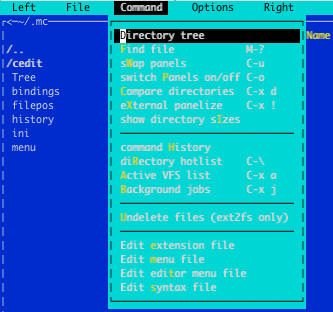

Posted by Alexandra at 1:54 PM

Labels: color scheme , mc , transparency
Oct 15, 2015; 12:13pm [ANN] mc^2
11 posts
05-02-2017, 04:19 AM


 3.2.6 Syntax Highlighting