|
|
Home | Switchboard | Unix Administration | Red Hat | TCP/IP Networks | Neoliberalism | Toxic Managers |
| (slightly skeptical) Educational society promoting "Back to basics" movement against IT overcomplexity and bastardization of classic Unix | |||||||
Content : Foreword : Ch01 : Ch02 : Ch03 : Ch04 : Ch05 : Ch06 : Ch07 : OFM1999 : OFM2004 : OFM2012
| Prev | Contents | Next |
|
|
Direct integration with shell
Python-based OFMs Perl-based OFMs PHP-based OFMs|
|
The field of scripting based OFMs is pretty much in rudimentary stage. Note before are "research in progress" type of things, and do not pretend on anything more then recording the developments that come to author's attention.
Unix suffers from the absence of the standard macrolanguage. That fact makes it inferior to such OSes as Amiga, OS/2 and Windows. Amiga and OS/2 used the same scripting language (REXX) both for external scripting and as a macro language. For example OS/2 used to include an XEDIT style editor that uses REXX as a macro language. PC DOS 7 also has XEDIT style editor with REXX as a scripting language: E Editor. This is a powerful editor with menus, math, and mouse support which uses REXX as a macro language (REXX interpreter was included as a part of PC DOS 7).
Nothing similar currently exists in Unix: macro languages are fragmented, disconnected from shell environment and pretty much not integrated either in OS or applications. Please note that in this respect even Microsoft done better: VBscript can serve as an external scripting language (via Windows scripting host) and also serves as a macro language for important range of applications (MS Office).
Historically the first and the best attempt to overcome this fundamental problem of Unix was made by John Ousterhout who created the TCL scripting language and the Tk toolkit. Here how he describes the events:
I got the idea for TCL while on sabbatical leave at DEC's Western Research Laboratory in the fall of 1987. I started actually implementing it when I got back to Berkeley in the spring of 1988; by summer of that year it was in use in some internal applications of ours, but there was no Tk. The first external releases of TCL were in 1989, I believe. I started implementing Tk in 1989, and the first release of Tk was in 1991.
TCL has a very simple structure. Each line starts with a command, such as dotask and a number of arguments. Each command
is implemented as a C function. This function is responsible for handling all the arguments. It was really brilliant in its simplicity
design. In several aspects it was a more interesting development than Perl as it was the first open sourced embeddable language. IMHO
Perl is a kind of mainframe (anti-Unix) style language that very much reminds me PL/1 ("all things for all people" kind of approach;
there is always several ways to accomplish anything, etc. -- bonanza for consultants and book writers ;-), while TCL is a more Unix-style
language. It does well one thing well: it's a really decent command language for various tools including OFMs. Actually
in addition to TCL John Ousterhout developed a TK toolkit that also became very popular (and independent of TCL) continues the life
of its own and actually became more popular than TCL itself. It is now ported to all major programming languages. Now when we are talking
about TCL we often mean TCL/Tk, but still we need to distinguish:
Sun was the first and the only company which realized the potential TCL in Unix environment and John Ousterhout joined SunLabs as a Distinguished Engineer in 1993. But TCL was not sexy enough and after Sun started its Java marketing blitzkrieg, TCL became an red-haired orphan in the corporation. And without major corporate sponsor TCL never was able to realize its full potential in Unix, where it could became a universal application-level macro language. That's really sad. John Ousterhout left Sun and in 1998 founded Scriptic Corp. (see Tcl's inventor leaves Sun to form startup - SunWorld - February 1998). The life of a startup is a difficult one. In late 2000 it changed it name to Ajuba Solutions and then disappeared after the acquisition by Interwoven. Later he founded Electric Cloud, Inc.
From the Orthodox File Manager perspective TCL was the first scripting language in which people tried to implement key ideas of the interface. But as TCL never become prominent in Solaris or in Linux environments this development suffered setbacks. BTW that definitely attests Linux as a neo-conservative movement as TCL has tremendous potential to lift Unix-style OS to a different level by integrating applications on a new level as well as providing a common internal language to a million of obscure Unix utilities some of which outlived their usefulness. One needs to understand that despite their non-othogonality and obscurity (I would like to see a person who really understands all the differences between find and grep in interpreting regular expressions ;-) the current set of Unix utilities still represents quite an innovative, semantically rich set of commands for the operating system.
Actually there was one attempt in this direction -- here I would like to mention tksh -- a very interesting development that also failed to get a proper attention of the Unix/Linux community. Due to ability to use Tcl as tool macro language there are a lot of Tcl-based applications (see Top Applications), much more than in any other language (even Rexx) -- and that makes an important difference between TCL and other scripting languages. John Ousterhout views on scripting were best formulated in his famous paper Scripting: Higher Level Programming for the 21st Century.
Like Tcl itself TK is a simple and elegant toolkit that proved to be useful not only for TCL programmers but in other scripting languages including Python and Perl. The major benefit of TK is its conciseness. The classic minimal Tk application is indeed tiny:
pack [button .mybutton -text Bye-bye -command exit]
Compare this with Java and you will understand that newer is not always better. This is a small but complete program in Tcl/Tk that puts a button on the screen and exits when the button is pushed, with proper behavior for iconifying, clicking, and other modern GUI conventions. And TK is definitly adequte for creating OFM interface
While there are multiple TCL based OFMs historically important are probably only two: FileRunner and TkDesk.
After TCL fall into sunset the only other scripting language in which several OFMs were written was Python.
Direct integration with shell is the best, the most optimal way of implementing OFM, which in essence is nothing more that an attempt to create a graphical shell. The problem here is the most shells are moving target and as they develop the codebase needs to be resynchronize with each new version. Which in most cases dooms the project. So the only way such a project can be successful is when it is integrated with the development of shell itself. Some shells, such as ksh93 are pretty stable and development is almost stopped. For them such a project is more viable. Also for shells that undeservingly are sidelined, such as zsh, this may be a chance to get into mainstream, as zsh integrated with OFM leaves "pure" bash in the dust.
I know about just one such an attempt: Bash commander by Sergey Vaculentko (who is also an author of deco -- one of the oldest and the most compact OFMs for Unix, initially created for FreeBSD).
'Bash Commander' is a version of the GNU Bourne Again shell extended with two-panel file manager. Visit http://groups.google.com/group/bashc for project news, FAQ, discussions etc.
So one way to create a simple but useful OFM is to write it as a set of macro in some programmable editor, preferably one that has standard scripting language as a macro language.
An obvious candidate here are orthodox editors such as XEDIT, THE, Kedit. Actually on VM/CMS built-in file browser was based on XEDIT and due to this has had some OFM-like features.
VIM is another obvious candidate and there is a file manager for vim that can be modified to fit to OFM paradigm (see vifm). It has set of ideas that really can enrich OFM concepts. Look not only at attempts to create OFM inside vim in a macrolanguage, but also on attempts to emulate vim concepts in OFM. There are two very interesting projects related to creating vi-style OFMs ( ranger and vifm ). Linking OFMs with vi concepts and vi culture proved to be a treasure trove of new ideas.
Emacs is powerful enough editor with build-in dialect of Lisp as macrolanguage, so it is suitable for implementation of some very simple OFM as a plug-in. Several implementation of this idea exist:
Sunrise Commander which was implemented on top of Emacs in elisp. Here is long quote from the website:
Hello, Emacs Community!I�ve been working lately on a new OFM for GNU Emacs. (For those who may not know, OFM stands for �Orthodox File Manager� [1] - it�s the kind of interface made popular by the Norton and Midnight Commanders.)
�Another one?� you may say.
Well, yes. As a long time user of the Midnight Commander on Linux (and, long before that, of Norton Commander and Norton Navigator on DOS), one of the first things I tried after moving to Emacs was running MC in term-mode. It was no joy, so after that I tried using nc.el and mc.el, but both scripts were far away from what I was looking for.
I realized early the power of Dired (learned quite fast several nifty tricks on it), and I think the decision made by the authors of mc.el of basing their file manager on Dired was a wise one. But it lacked support for so many of the usage patterns MC got me accustomed to through all these years� it was a real pity.
So, faithful to the tradition established by mc.el and ec.el, I decided to write the Sunrise Commander.
After several months of growing it up (good programs seem to grow by themselves) I�ve managed to put together most of the functionality I wanted that was not there before:
- It is implemented as an independent major mode derived from Dired, what allows to have a rich feature set (key bindings, colors, functions, killing automatically unused buffers, etc.) without interfering with normal Dired stuff.
- Transparent navigation inside compressed files/archives: zip, tar, tgz, rar, jar, war, ear, sar, � (using AVFS)
- Virtual directories with the results of �locate�, �find�, �grep� commands (or whatever other command that produces a list of files/directories) that can be used as regular panes with copying, removing, renaming, following�
- List of most recently visited files, also fully functional as a virtual directory. (using recentf)
- An independent history ring for each of the panes that can be navigated forwards and backwards and also displayed in its own pane as a virtual directory.
- Sorting directory contents by file names either alphabetically or numerically (e.g. file9.txt placed before file10.txt) or by date, size, extension; all in ascending and descending order.
- Comparing directories by file names, sizes and thoroughly (using MD5 sums).
- Comparing files using diff (for fast checking) or ediff (for more details and merging).
- Synchronized navigation for comparing and merging whole directory trees.
- Terminal integration: integrates well with any external shell that works in term-mode or with the emacs shell (eshell).
- Terminal navigation: allows to use the active pane from the terminal window without actually switching to it.
- Command line macro expansion: replaces automatically e.g. �%f� with the currently selected file, �%m� with all marked files, etc. without leaving the command line (while in line mode).
- More �natural� functions for copying and renaming recursively files and directories. The default dired functions for these operations are somewhat �weird� compared to the ones one finds usually on OFMs.
- Remembering the current locations of the panes, so I can switch contexts for a while, do some other stuff and later come back to the place I was before.
- Making a backup copy of selected or marked files with just one keystroke.
- Many other small functions (swap panes, go to parent dir, follow file, show/hide hidden fields, change display of data, file coloring based on extension etc.) found usually on more mature OFMs.
It is quite portable. I�ve tested it on Linux and Windows 2000 using GNU Emacs versions 22 and 23 (I have also received feedback from a user reporting it works fine on GNU Emacs 22.2 on Mac OS X Leopard), though there�s some homework left one has to do in order to have everything working fine: on Linux you have to install AVFS if you want to navigate inside compressed files (who doesn�t?) and on Windows there is some work configuring ls-lisp and you must also install some diff port if you want to be able to use ediff. Unfortunately I haven�t heard of anything like AVFS for MS Windows, so you�ll have to use archive-mode, tar mode, etc. for your compressed files.
Here�s a screenshot (click to enlarge):
You can get a copy of the Sunrise Commander at:
- Lisp:sunrise-commander.el
- The ELPA repository at http://joseito.republika.pl/sunrise-commander/
- http://joseito.republika.pl/sunrise-commander.el.gz
- git://github.com/escherdragon/sunrise-commander.git (includes all extensions)
Enjoy ;-)
The Buttons Extension: making Sunrise a bit more like MC
I have written a small extension that may be of help to new users who want to get acquainted fast with the most frequent functions found in the Sunrise Commander and their keybindings. Once installed, it displays a panel with mouse clickable buttons that show some of the most useful actions performed by Sunrise and their respective bindings in the bottom window every time the main panels are invoked.
Have a look, here is a screenshot (click to enlarge):
You can execute any of the functions by clicking the appropriate button, but the extension was conceived more as a simple cheat sheet (a very, very limited one, as you can easily learn by pressing the last button, labeled �More��) than as a real interface to Sunrise and Dired functions. Eventually, if you like this kind of interaction with the program you can add your own commands to the list and let this extension manage the creation and layout of the buttons for you.
To get a copy of the Sunrise Commander Buttons Extension (including installation instructions) go here:
- Lisp:sunrise-x-buttons.el
- The ELPA repository at http://joseito.republika.pl/sunrise-commander/
- http://joseito.republika.pl/sunrise-x-buttons.el.gz
The Mirror Extension: full read/write access to compressed archives
Unfortunately the access to compressed archives offered by AVFS is limited to read-only operations, so I have written an extension to the Sunrise Commander that provides seamless and effective manipulation of compressed archives in a virtual file system. It is called the Sunrise Mirror Extension and you can get a copy of it here:
- Lisp:sunrise-x-mirror.el
- The ELPA repository at http://joseito.republika.pl/sunrise-commander/
- http://joseito.republika.pl/sunrise-x-mirror.el.gz
For this extension to work you must have:
- FUSE + AVFS support in your Sunrise Commander. If you can navigate (read-only) inside compressed archives you already have this.
- One of funionfs or unionfs-fuse. Debian lenny (stable distribution) provides packages for both.
- Programs required for compressing � at least zip and tar.
- Your AVFS mount point (and the value of variable sr-avfs-root) must be in a directory where you have writing access.
All this means is that most probably this extension will work out-of-the-box on Linux (or MacOS?, or other unices), but you�ll have a hard time to make it work on Windows. It was written on GNU Emacs 23 on Linux and tested on GNU Emacs 22 and 23 for Linux.
The Loop Extension: copying and renaming files in the background
Not long ago I read in some discussion board a quite nice comment regarding the Sunrise Commander, something on the lines of �beautiful stuff, but it will never be a real file manager as long as emacs remains single-threaded�. The answer any seasoned emacs user would give in such situation would be something like �you may have as many processes as you need - have you ever heard of openwith?� and, in the case of Sunrise, it is mostly right, but there was one small exception that already had had the chance to bug me a lot since I started using Sunrise as my default FM: copying and renaming files bigger than several hundred megabytes is a painful operation that can freeze your emacs for a looong time and toss you out of your flow without a good reason.
Then somewhere else I read about this emacs user that launches as many instances of emacs as needed, because memory is cheap these days, and who cares. But that didn�t look to me like something I could seriously suggest to an annoyed user.
So I wrote a new extension to the Sunrise Commander that allows to execute asynchronously this kind of tasks. Actually it does launch a separate elisp interpreter (with a limited set of functions loaded) and delegates to it the dirty work, but it also manages automatically the life cycle of this new instance and all the communication between the main and the background ones. In order to perform your copy or rename operation in the background, the only thing you have to do is add an empty prefix to the usual keystroke (e.g. C will perform a regular copy in the foreground and C-u C will do it in the background).
You can get a copy of the Sunrise Loop extension here:
As VIM also has macrolanguage it is possible to write a simple OFMs in it. At least one implementation exists
This is an adaptation of opsplorer (vimscript #362), intended to be more like the Total Commander (http://www.ghisler.com) file explorer.
This opens two panels of file explorers on the top half of the vim screen.
Targets for moving and copying defaults to the other panel, like totalcmd. TAB switches between panels.
Vimcommander keys are mostly totalcommander's:
F3 - view
F4 - edit
F5 - copy
F6 - move
F7 - create dir
F8 - del
Others: C-U, C-Left/C-Right, C-R, BS, DEL, C-H, etc.
Selection of files/dirs also works: INS, +, -. Then copy/move/del selected files.
Suggested binding is
noremap <silent> <F11> :cal VimCommanderToggle()<CR>
Tested on Linux. I have reports that it doesn't work on Windows. If you want to contribute, note that vimcommander is hosted at github: http://github.com/lpenz/vimcommander/.install details
Drop vimcommander.vim in ~/.vim/plugin
Put in you .vimrc a map to VimCommanderToggle():
noremap <silent> <F11> :cal VimCommanderToggle()<CR>
Python fared the best among scripting languages as for attracting OFM developers. Still results are very modest. I have found three projects in different stages of maturity with one currently active (Ranger). The most interesting thing is ranger is availability of command set (which is side effect of its vi influence). In this sense it is more Orthodox, then most OFMs ;-)
Last File Manager is a simple but powerful file manager for the UNIX console. Written by I�igo Serna - inigoserna at terra.es. It has been developed with the ol' good Midnight Commander as model. Python 2.5 or later is required now. Some of the features you can find in lfm:
The last version is LFM 2.3 dated May 2011. Codebase is below 10K lines... The size is 116 KB
May 21, 2011
Lfm is a curses-based file manager for the Unix console written in Python
Python 2.5 or later is required now. PowerCLI was added, an advanced command line interface with completion, persistent history, variable substitution, and many other useful features.
Persistent history in all forms was added. Lots of improvements were made and bugs were fixed
From version 0.6 and up lfm package also contains pyview, a text / hex file viewer to be used with or without lfm. Read README.pyview for more info about it.
Lfm and Pyview are written in Python and require curses module. It needs Python v2.3 or higher, it won't work with older versions.
Since version 0.90, lfm needs ncurses >= v5.x to handle terminal resizing.
All modern UNIX flavours (Linux, *BSD, Solaris, etc) should run it without problems. If they appear please notify me.
Note that python curses module should be linked against ncursesw library (instead of ncurses) to get wide characters support. This is the usual case in later versions of Linux distributions, but maybe not the case in older Linux or other UNIX platforms. Thus, expect problems when using multibyte file names (f.e. UTF-8 or latin-1 encoded) if your curses module isn't compiled against ncursesw. Anyway, I hope this issue will disappear with new releases of those platforms, eventually.
Also, take a look at TODO file to see bugs and not-implemented-yet (tm) features.
... ... ...Back when most of my work was done at a DOS prompt, I was a big fan of Norton Commander. A simple full screen interface made it easy to tag and move groups of files. Often using wildcards would be faster, but sometimes wildcards just wouldn't do. With Norton Commander, you had both at your fingertips. On my Linux system, I have Midnight Commander, a Norton Commander clone. I like it, but even simpler still is I�igo Serna's lfm.Written in about 100k of well-documented python, the Last File Manager, lfm, is a console application. Serna uses the curses library to create this Midnight Commander-like file manager. The command keys are identical to MC so if you are an old hand at Norton or MC, you can use this application right away. lfm does not have a command prompt at the bottom of the screen the way Norton and MC do. Nor are all of its commands implemented yet. If like me you think using Python tools is fun, you won't let that stop you.
Ranger is a console file manager that support Midnight Commander bindings and vi key bindings. Default is vi bindings. It is developed by Roman Zimbelmann. It does not implemn command line and shell terminal window so in a way it is a different animal, but some ideas behind Ranger is more modern and more advanced then in many alternative implementations. Mong them:
 s   Silent mode.  Output will be discarded.
 d   Detach the process.  (Run in background)
 p   Redirect output to the pager
 w   Wait for an Enter-press when the process is done
 c   Run the current file only, instead of the selection
 r   Run application with root privilege (requires sudo)
 t   Run application in a new terminal window
By default, all the flags are off unless specified otherwise in the apps.py configuration file. You can specify as many flags as you want. An uppercase flag negates the effect: "ddcccDs" is equivalent to "cs".
The "t" flag looks for the environment variable TERMCMD, and uses it as the terminal command, if it's not set it'll use xterm.
Examples: :open_with p will pipe the output of that process into the pager. :shell -w df will run "df"
and wait for you to press Enter before switching back to ranger.
Also implementation language is Python. It was referenced among top five in Linux Links article 5 Top Console Linux File Managers
It already attreacted some user base (OpenSource - Google+ - 5 Top Console Linux File Managers)
Mart�n Cigorraga, Oct 8, 2012
While MC is an all-time classic I actually find myself using Ranger a lot.
Igor EtteOct 11, 2012
awe! Orthodox File Managers
Last version posted on Web site is 1.55. dated Aug 10, 2012.
Because the reference model is vi with its distinct command language layer in some ways this is more orthodox manager that classic OFMs ;-). There is a distinct set of command and those commands can be used as scripts. Here is a fragment of the man page:
OPTIONS
- -d, --debug
- Activate the debug mode: Whenever an error occurs, ranger will exit and print a full traceback. The default behavior is to merely print the name of the exception in the statusbar/log and try to keep running.
- -c, --clean
- Activate the clean mode: ranger will not access or create any configuration files nor will it leave any traces on your system. This is useful when your configuration is broken, when you want to avoid clutter, etc.
- --choosefile=targetfile
- Allows you to pick a file with ranger. This changes the behavior so that when you open a file, ranger will exit and write the absolute path of that file into targetfile.
- --choosefiles=targetfile
- Allows you to pick multiple files with ranger. This changes the behavior so that when you open a file, ranger will exit and write the absolute paths of all selected files into targetfile, adding one newline after each filename.
- --choosedir=targetfile
- Allows you to pick a directory with ranger. When you exit ranger, it will write the last visited directory into targetfile.
- --selectfile=targetfile
- Open ranger with targetfile selected.
- --copy-config=file
- Create copies of the default configuration files in your local configuration directory. Existing ones will not be overwritten. Possible values: all, rc, apps, commands, options, scope.
- --list-unused-keys
- List common keys which are not bound to any action in the "browser" context. This list is not complete, you can bind any key that is supported by curses: use the key code returned by
getch().- --list-tagged-files=tag
- List all files which are tagged with the given tag. Note: Tags are single characters. The default tag is "*"
- --fail-unless-cd
- Return the exit code 1 if ranger is used to run a file instead of used for file browsing. (For example, "ranger --fail-unless-cd test.txt" returns 1.)
- -m n, --mode=n
- When a filename is supplied, run it in mode n. This has no effect unless the execution of this file type is explicitly handled in the configuration.
- -f flags, --flags=flags
- When a filename is supplied, run it with the given flags to modify behavior. The execution of this file type is explicitly handled in the configuration.
- --cmd=command
- Execute the command after the configuration has been read. Use this option multiple times to run multiple commands.
- --version
- Print the version and exit.
- -h, --help
- Print a list of options and exit.
CONCEPTS
TAGS
Tags are single characters which are displayed left of a filename. You can use tags however you want. Press "t" to toggle tags and "T" to remove any tags of the selection. The default tag is an Asterisk ("*"), but you can use any tag by typing "<tagname>.
PREVIEWS
By default, only text files are previewed, but you can enable external preview scripts by setting the option
use_preview_scriptandpreview_filesto True.This default script is ~/.config/ranger/scope.sh. It contains more documentation and calls to the programs lynx and elinks for html, highlight for text/code, img2txt for images, atool for archives, pdftotext for PDFs and mediainfo for video and audio files.
Install these programs (just the ones you need) and scope.sh will automatically use them.
SELECTION
The selection is defined as "All marked files IF THERE ARE ANY, otherwise the current file." Be aware of this when using the :delete command, which deletes all files in the selection.
You can mark files by pressing <Space>, v, etc. A yellow Mrk symbol at the bottom right indicates that there are marked files in this directory.
MACROS
Macros can be used in commands to abbreviate things.
 %f   the highlighted file
 %d   the path of the current directory
 %s   the selected files in the current directory.
 %t   all tagged files in the current directory
 %c   the full paths of the currently copied/cut files
The macros %f, %d and %s also have upper case variants, %F, %D and %S, which refer to the next tab. To refer to specific tabs, add a number in between. (%7s = selection of the seventh tab.)
%c is the only macro which ranges out of the current directory. So you may "abuse" the copying function for other purposes, like diffing two files which are in different directories:
 Yank the file A (type yy), move to the file B, then type
 @diff %c %f
Macros for file paths are generally shell-escaped so they can be used in the :shell command.
BOOKMARKS
Type m<key> to bookmark the current directory. You can re-enter this directory by typing `<key>. <key> can be any letter or digit. Unlike vim, both lowercase and uppercase bookmarks are persistent.
Each time you jump to a bookmark, the special bookmark at key ` will be set to the last directory. So typing "``" gets you back to where you were before.
Bookmarks are selectable when tabbing in the :cd command.
Note: The bookmarks ' (Apostrophe) and ` (Backtick) are the same.
FLAGS
Flags give you a way to modify the behavior of the spawned process. They are used in the commands :open_with (key "r") and :shell (key "!").
 s   Silent mode.  Output will be discarded.
 d   Detach the process.  (Run in background)
 p   Redirect output to the pager
 w   Wait for an Enter-press when the process is done
 c   Run the current file only, instead of the selection
 r   Run application with root privilege (requires sudo)
 t   Run application in a new terminal window
By default, all the flags are off unless specified otherwise in the apps.py configuration file. You can specify as many flags as you want. An uppercase flag negates the effect: "ddcccDs" is equivalent to "cs".
The "t" flag looks for the environment variable TERMCMD, and uses it as the terminal command, if it's not set it'll use xterm.
Examples:
:open_with pwill pipe the output of that process into the pager.:shell -w dfwill run "df" and wait for you to press Enter before switching back to ranger.MODES
By specifying a mode (a positive integer), you can tell ranger what to do with a file when running it. You can specify which mode to use by typing <mode>l or <mode><Enter> or :open_with <mode>. The default mode is 0.
Examples:
l(mode zero) to list the contents of an archive,1l(mode one) to extract an archive. See the apps.py configuration file for all programs and modes.
KEY BINDINGS
Key bindings are defined in the file ranger/defaults/rc.conf. Check this file for a list of all key bindings. You can copy it to your local configuration directory with the --copy-config=rc option.
Many key bindings take an additional numeric argument. Type 5j to move down 5 lines, 2l to open a file in mode 2, 10<Space> to mark 10 files.
This list contains the most useful bindings:
MAIN BINDINGS
- h, j, k, l
- Move left, down, up or right
- ^D or J, ^U or K
- Move a half page down, up
- H, L
- Move back and forward in the history
- gg
- Move to the top
- G
- Move to the bottom
- ^R
- Reload everything
- ^L
- Redraw the screen
- S
- Open a shell in the current directory
- ?
- Opens this man page
- yy
- Yank the selection to the "copy" buffer and mark them as to be copied
- dd
- Cut the selection to the "copy" buffer and mark them as to be moved
- pp
- Paste the files from the "copy" buffer here (by moving or copying, depending on how they are marked.) By default, this will not overwrite existing files. To overwrite them, use po.
- mX
- Create a bookmark with the name X
- `X
- Move to the bookmark with the name X
- n, N
- Find the next file. By default, this gets you to the newest file in the directory, but if you search something using the keys /, cm, ct, ..., it will get you to the next found entry.
- N
- Find the previous file.
- oX
- Change the sort method (like in mutt)
- zX
- Change settings. See the settings section for a list of settings and their hotkey.
- f
- Quickly navigate by entering a part of the filename.
- Space
- Mark a file.
- v
- Toggle the mark-status of all files, unmark all files.
- V, uv
- Unmark all files
- /
- Search for files in the current directory.
- :
- Open the console.
- Alt-N
- Open a tab. N has to be a number from 0 to 9. If the tab doesn't exist yet, it will be created.
- gn, ^N
- Create a new tab.
- gt, gT
- Go to the next or previous tab. You can also use TAB and SHIFT+TAB instead.
- gc, ^W
- Close the current tab. The last tab cannot be closed this way.
MIDNIGHT COMMANDER-LIKE BINDINGS
- <F1>
- Display Help.
- <F3>
- Display the file.
- <F4>
- Edit the file.
- <F5>
- Copy the file.
- <F6>
- Cut the file.
- <F7>
- Open the console with ":mkdir ".
- <F8>
- Prompt for deletion of the selected files.
- <F10>
- Exit ranger.
READLINE-LIKE BINDINGS IN THE CONSOLE
- ^B, ^F
- Move left and right (B for back, F for forward)
- ^P, ^N
- Move up and down (P for previous, N for Next)
- ^A, ^E
- Move to the start or to the end
- ^D
- Delete the current character.
- ^H
- Backspace.
MOUSE BUTTONS
- Left Mouse Button
- Click on something and you'll move there. To run a file, "enter" it, like a directory, by clicking on the preview.
- Right Mouse Button
- Enter a directory or run a file.
- Scroll Wheel
- Scrolls up or down. You can point at the column of the parent directory to switch directories.
SETTINGS
This section lists all built-in settings of ranger. The valid types for the value are in [brackets]. The hotkey to toggle the setting is in <brokets>, if a hotkey exists.
Settings can be changed in the file ~/.config/ranger/options.py or on the fly with the command :set option value. Examples: :set column_ratios (1,2,3) :set show_hidden=True
- autosave_bookmarks [bool]
- Save bookmarks (used with mX and `X) instantly? This helps to synchronize bookmarks between multiple ranger instances but leads to *slight* performance loss. When false, bookmarks are saved when ranger is exited.
- collapse_preview [bool] <zc>
- When no preview is visible, should the last column be squeezed to make use of the whitespace?
- colorscheme_overlay [function, None]
- An overlay function for colorschemes. See the default options.py for an explanation and an example.
- colorscheme [string]
- Which colorscheme to use? These colorschemes are available by default: default, default88, texas, jungle, snow. Snow is monochrome, texas and default88 use 88 colors.
- column_ratios [tuple, list]
- How many columns are there, and what are their relative widths? For example, a value of (1, 1, 1) would mean 3 even sized columns. (1, 1, 1, 1, 4) means 5 columns with the preview column being as large as the other columns combined.
- dirname_in_tabs [bool]
- Display the directory name in tabs?
- display_size_in_main_column [bool]
- Display the file size in the main column?
- display_size_in_status_bar [bool]
- Display the file size in the status bar?
- display_tags_in_all_columns [bool]
- Display tags in all columns?
- draw_bookmark_borders [bool]
- Draw borders around the bookmark window?
- draw_borders [bool]
- Draw borders around columns?
- flushinput [bool] <zi>
- Flush the input after each key hit? One advantage is that when scrolling down with "j", ranger stops scrolling instantly when you release the key. One disadvantage is that when you type commands blindly, some keys might get lost.
- hidden_filter [regexp]
- A regular expression pattern for files which should be hidden.
- max_console_history_size [integer, None]
- How many console commands should be kept in history?
- max_history_size [integer, None]
- How many directory changes should be kept in history?
- mouse_enabled [bool] <zm>
- Enable mouse input?
- padding_right [bool]
- When collapse_preview is on and there is no preview, should there remain a little padding on the right? This allows you to click into that space to run the file.
- preview_directories [bool] <zP>
- Preview directories in the preview column?
- preview_files [bool] <zp>
- Preview files in the preview column?
- preview_script [string, None]
- Which script should handle generating previews? If the file doesn't exist, or use_preview_script is off, ranger will handle previews itself by just printing the content.
- save_console_history [bool]
- Should the console history be saved on exit? If disabled, the console history is reset when you restart ranger.
- scroll_offset [integer]
- Try to keep this much space between the top/bottom border when scrolling.
- shorten_title [integer, bool]
- Trim the title of the window if it gets long? The number defines how many directories are displayed at once, False turns off this feature.
- show_cursor [bool]
- Always show the terminal cursor?
- show_hidden_bookmarks [bool]
- Show dotfiles in the bookmark preview window? (Type ')
- show_hidden [bool] <zh>, <^H>
- Show hidden files?
- sort_case_insensitive [bool] <zc>
- Sort case-insensitively? If true, "a" will be listed before "B" even though its ASCII value is higher.
- sort_directories_first [bool] <zd>
- Sort directories first?
- sort_reverse [bool] <or>
- Sort reversed?
- sort [string] <oa>, <ob>, <oc>, <om>, <on>, <ot>, <os>
- Which sorting mechanism should be used? Choose one of atime, basename, ctime, mtime, natural, type, size
Note: You can reverse the order by using an uppercase O in the key combination.
- tilde_in_titlebar [bool]
- Abbreviate $HOME with ~ in the title bar (first line) of ranger?
- unicode_ellipsis [bool]
- Use a unicode "..." character instead of "~" to mark cut-off filenames?
- update_title [bool]
- Set a window title?
- use_preview_script [bool] <zv>
- Use the preview script defined in the setting preview_script?
- xterm_alt_key [bool]
- Enable this if key combinations with the Alt Key don't work for you. (Especially on xterm)
COMMANDS
You can enter the commands in the console which is opened by pressing ":".
There are additional commands which are directly translated to python functions, one for every method in the ranger.core.actions.Actions class. They are not documented here, since they are mostly for key bindings, not to be typed in by a user. Read the source if you are interested in them.
- bulkrename
- This command opens a list of selected files in an external editor. After you edit and save the file, it will generate a shell script which does bulk renaming according to the changes you did in the file.
This shell script is opened in an editor for you to review. After you close it, it will be executed.
- cd [directory]
- The cd command changes the directory. The command
:cd -is equivalent to typing ``.- chain command1[; command2[; command3...]]
- Combines multiple commands into one, separated by columns.
- chmod octal_number
- Sets the permissions of the selection to the octal number.
The octal number is between 000 and 777. The digits specify the permissions for the user, the group and others. A 1 permits execution, a 2 permits writing, a 4 permits reading. Add those numbers to combine them. So a 7 permits everything.
Key bindings in the form of [-+]<who><what> and =<octal> also exist. For example, +ar allows reading for everyone, -ow forbids others to write and =777 allows everything.
See also: man 1 chmod
- cmap key command
- Binds keys for the console. Works like the
mapcommand.- console [-pN] command
- Opens the console with the command already typed in. The cursor is placed at N.
- copycmap key newkey [newkey2 ...]
- See
copymap- copymap key newkey [newkey2 ...]
- Copies the keybinding key to newkey in the "browser" context. This is a deep copy, so if you change the new binding (or parts of it) later, the old one is not modified.
To copy key bindings of the console, taskview, or pager use "copycmap", "copytmap" or "copypmap".
- copypmap key newkey [newkey2 ...]
- See
copymap- copytmap key newkey [newkey2 ...]
- See
copymap- cunmap key command
- Removes key mappings of the console. Works like the
unmapcommand.- delete [confirmation]
- Destroy all files in the selection with a roundhouse kick. ranger will ask for a confirmation if you attempt to delete multiple (marked) files or non-empty directories.
When asking for confirmation, this command will only proceed if the last given word starts with a `y'.
- edit [filename]
- Edit the current file or the file in the argument.
- eval [-q] python_code
- Evaluates the python code. `fm' is a reference to the FM instance. To display text, use the function `p'. The result is displayed on the screen unless you use the "-q" option.
Examples: :eval fm :eval len(fm.env.directories) :eval p("Hello World!")
- filter [string]
- Displays only the files which contain the string in their basename.
- find pattern
- Search files in the current directory that match the given (case-insensitive) regular expression pattern as you type. Once there is an unambiguous result, it will be run immediately. (Or entered, if it's a directory.)
- grep pattern
- Looks for a string in all marked files or directories.
- load_copy_buffer
- Load the copy buffer from ~/.config/ranger/copy_buffer. This can be used to pass the list of copied files to another ranger instance.
- map key command
- Assign the key combination to the given command. Whenever you type the key/keys, the command will be executed. Additionally, if you use a quantifier when typing the key, like 5j, it will be passed to the command as the attribute "self.quantifier".
The keys you bind with this command are accessible in the file browser only, not in the console, task view or pager. To bind keys there, use the commands "cmap", "tmap" or "pmap".
- mark pattern
- Mark all files matching the regular expression pattern.
- mkdir dirname
- Creates a directory with the name dirname.
- open_with [application] [flags] [mode]
- Open the selected files with the given application, unless it is omitted, in which case the default application is used. flags are characters out of "sdpcwSDPCW" and mode is any positive integer. Their meanings are discussed in their own sections.
- pmap key command
- Binds keys for the pager. Works like the
mapcommand.- punmap key command
- Removes key mappings of the pager. Works like the
unmapcommand.- quit
- Like quit!, but closes only this tab if multiple tabs are open.
- quit!
- Quit ranger. The current directory will be bookmarked as ' so you can re-enter it by typing `` or '' the next time you start ranger.
- rename newname
- Rename the current file. If a file with that name already exists, the renaming will fail. Also try the key binding A for appending something to a file name.
- relink newpath
- Change the link destination of the current symlink file to <newpath>. First <tab> will load the original link.
- save_copy_buffer
- Save the copy buffer from ~/.config/ranger/copy_buffer. This can be used to pass the list of copied files to another ranger instance.
- search pattern
- Search files in the current directory that match the given (case insensitive) regular expression pattern.
- search_inc pattern
- Search files in the current directory that match the given (case insensitive) regular expression pattern. This command gets you to matching files as you type.
- set option=value
- Assigns a new value to an option. Valid options are listed in the settings section. Use tab completion to get the current value of an option, though this doesn't work for functions and regular expressions. Valid values are:
None None bool True or False integer 0 or 1 or -1 or 2 etc. list [1, 2, 3] tuple 1, 2, 3 or (1, 2, 3) function lambda <arguments>: <expression> regexp regexp('<pattern>') string Anything- shell [-flags] command
- Run a shell command. flags are discussed in their own section.
- terminal
- Spawns the x-terminal-emulator starting in the current directory.
- touch filename
- Creates an empty file with the name filename, unless it already exists.
- tmap key command
- Binds keys for the taskview. Works like the
mapcommand.- tunmap key command
- Removes key mappings of the taskview. Works like the
unmapcommand.- unmap [keys ...]
- Removes the given key mappings in the "browser" context. To unmap key bindings in the console, taskview, or pager use "cunmap", "tunmap" or "punmap".
- unmark pattern
- Unmark all files matching a regular expression pattern.
FILES
ranger reads several configuration files which are located in $HOME/.config/ranger or $XDG_CONFIG_HOME/ranger if $XDG_CONFIG_HOME is defined. The configuration is done mostly in python. When removing a configuration file, remove its compiled version too. (Python automatically compiles modules. Since python3 they are saved in the __pycache__ directory, earlier versions store them with the .pyc extension in the same directory.)
Use the --copy-config option to obtain the default configuration files. They include further documentation and it's too much to put here.
You don't need to copy the whole file though, most configuration files are overlaid on top of the defaults (options.py, command.py, rc.conf) or can be sub-classed (apps.py, colorschemes).
When starting ranger with the --clean
CONFIGURATION
- apps.py
- Controls which applications are used to open files.
- commands.py
- Defines commands which can be used by typing ":".
- rc.conf
- Contains a list of commands which are executed on startup. Mostly key bindings are defined here.
- options.py
- Sets a handful of basic options.
- scope.sh
- This is a script that handles file previews. When the options use_preview_script and preview_files or, respectively, preview_directories are set, the program specified in the option preview_script
- colorschemes/
- Colorschemes can be placed here.
STORAGE
- bookmarks
- This file contains a list of bookmarks. The syntax is /^(.):(.*)$/. The first character is the bookmark key and the rest after the colon is the path to the file. In ranger, bookmarks can be set by typing m<key>, accessed by typing '<key> and deleted by typing um<key>.
- copy_buffer
- When running the command :save_copy_buffer, the paths of all currently copied files are saved in this file. You can later run :load_copy_buffer to copy the same files again, pass them to another ranger instance or process them in a script.
- history
- Contains a list of commands that have been previously typed in.
- tagged
- Contains a list of tagged files. The syntax is /^(.:)?(.*)$/ where the first letter is the optional name of the tag and the rest after the optional colon is the path to the file. In ranger, tags can be set by pressing t and removed with T. To assign a named tag, type "<tagname>.
ENVIRONMENT
These environment variables have an effect on ranger:
- RANGER_LEVEL
- Ranger sets this environment variable to "1" or increments it if it already exists. External programs can determine whether they were spawned from ranger by checking for this variable.
- EDITOR
- Defines the editor to be used for the "E" key. Defaults to the first installed program out of "vim", "emacs" and "nano".
- SHELL
- Defines the shell that ranger is going to use with the :shell command and the "S" key. Defaults to "bash".
- TERMCMD
- Defines the terminal emulator command that ranger is going to use with the :terminal command and the "t" run flag. Defaults to "x-terminal-emulator" or "xterm"
- XDG_CONFIG_HOME
- Specifies the directory for configuration files. Defaults to $HOME/.config
- PYTHONOPTIMIZE
- This variable determines the optimize level of python..
Using PYTHONOPTIMIZE=1 (like python -O) will make python discard assertion statements. You will gain efficiency at the cost of losing some debug info.
EXAMPLES
BASH: Display that the shell spawned from ranger:
By putting this in ~/..bashrc, "(in ranger) " will be displayed next to your prompt to notify you that the shell spawned from ranger.
Bash: cd to last path after exit
This is a bash function (for ~/.bashrc) to change the directory to the last visited one after ranger quits. You can always type
cd -to go back to the original one.function ranger-cd { tempfile='/tmp/chosendir' /usr/bin/ranger --choosedir="$tempfile" "${@:-$(pwd)}" test -f "$tempfile" && if [ "$(cat -- "$tempfile")" != "$(echo -n `pwd`)" ]; then cd -- "$(cat "$tempfile")" fi rm -f -- "$tempfile" }# This binds Ctrl-O to ranger-cd: bind '"\C-o":"ranger-cd\C-m"'LICENSE
GNU General Public License 3 or (at your option) any later version.
Zemljanka Commander
SourceForge.net Zemljanka Commander by Pavel Machek (leader), Johanka Dolezalova, Dan Koukola, Mirek 'Qiq' Spousta, Tomas 'Tobbi' Bouda
Zemljanka Commander is a file manager for GTK2. It is both
asynchronous (VFS) and extensible (Python). It has a text interface and a
GUI, which function identically.License: GNU General Public License (GPL)
ZC 1.0 released 2003-12-28 Version 1.0.1 is out 2004-01-14
Sunflower is a small and highly customizable twin-panel file manager for Linux with support for plugins. It is intended to be an easy-to-use and powerful file manager that seamlessly integrates into the GNOME desktop environment.
Perl never attracted much interest as a programming language for OFMs.
Skilled Unix users know the importance of the shell or command line interface (CLI). (Old-time Unix users didn't even have a choice about it). While having more of a learning curve than a graphical user interface (GUI), it permits powerful, creative, complex operations to be specified quickly and reliably. For anyone but the superficial user, learning a CLI is an investment that pays off rewardingly. Command line environments are still readily usable over low-bandwidth network connections and restricted displays. Neal Stephenson explains the history and values of computer interfaces exceedingly well in "In the Beginning was the Command Line" <http://www.cryptonomicon.com/beginning.html>. One can even build a strong case that a CLI is best for a learning new computer user, as described in "The Command Line - The Best Newbie Interface?" <http://osnews.com/story.php?news_id=6282>.
However, when one is concerned about file manipulation and management (which is a very good thing to be concerned about as the basis of your interface, as most GUIs would rather lead you to forget), a CLI can be a frustratingly terse interface to the filesystem. Too many tedious ls(1) and cd(1) commands are needed to keep watch on what's there. A GUI file manager can address this problem, but then you're in mouseland and have lost the advantages of the CLI.
Enter the visual shells. Not a new idea, visual shells can operate within an entire terminal or console screen. File listings are displayed for your constant reference. Common commands and operations can typically be performed in fewer keystrokes in a visual interface. As the vi(1) visual editor evolved from the ed(1) and ex(1) command line editors, visual shells have attempted to evolve from command line shells. Some visual shells have promoted themselves as simpler menu-oriented interfaces suitable for novices, while others emphasize more expert functionality.
Nonetheless, visual shells have never really caught on, except some in certain circles such as Emacs' "dired" mode and the Midnight Commander program. I believe this is because they have been designed as largely self-contained applications with limited configurability. Using a visual shell has required a significant jump into a new base interface tool, and few are so compelling or standard to make that worthwhile.
Hence the design of vshnu, the New Visual Shell. In the Unix tradition, it works with things already there and fills a empty niche. When incorporating it into your Unix environment, you keep your command line shell, your editor, your pager, and access to all your tools, tricks and know-how. Vshnu can operate as an optional supplemental visual mode to your command line shell. You switch between command line and visual mode easily as you wish. Your interface bandwidth and power for Unix operations is on a higher plane and life gets sweeter. In addition, being written in Perl, it ports to any Unix system without compilation, gives you the advantages of a Perl interpreter running readily at hand, and permits visual command customizability limited only by your creativity, yet doesn't require knowledge of Perl for normal usage. Vshnu is a tool that's worthwhile even if only used occasionally as an interactive, pageable, color ls(1), yet still pays back, with interest, whatever more you put into using it.
Vshnu was inspired by and initially patterned after the program vsh, the Visual Shell <http://www.cs.indiana.edu/~kinzler/vshnu/vsh.txt> <http://www.cs.indiana.edu/~kinzler/vshnu/vsh-4.2k.tar.gz>. Vsh was written in the early 1980's and is pretty much obsolete bit rot now. After failing to be included in a BSD distribution, it faded into obscurity. A SunOS port hasn't compiled since the pre-Solaris days, and an attempted Linux port is still horrendously buggy. But, it started with some right ideas. I used vsh almost my entire Unix career before finally writing vshnu to replace, extend and modernize it.
The "nu" in "vshnu" implies "new", of course, as well as invokes the Hindu god Vishnu, the preserver of the universe and restorer of dharma (moral order). Hmmm, how appropriate.
You need Perl 5.002 or greater with the Term::Screen and Term::ANSIColor modules -- all available at <http://www.cpan.org>. Term::Screen and Term::ANSIColor module files are also included here in the libperl/Term directory. If you wish to install these, just add a ".pm" extension to the filenames and copy them into a directory in your Perl's @INC or into $HOME/perl/Term, $HOME/lib/Term or $HOME/lib/perl/Term.
Term::Screen uses Term::Cap, so you'll need a termcap file containing your terminals' capabilities definitions.
Most systems already have one, but in case yours doesn't, a very complete termcap file is available at
<http://www.tuxedo.org/~esr/terminfo/termtypes.tc.gz>.
A much briefer one containing only some common terminals is at
<http://www.cs.indiana.edu/~kinzler/home.html#etc/termcap>.
The termcap file may be installed as $TERMCAP, $HOME/.termcap,
/etc/termcap or /usr/share/misc/termcap.
Or on Debian systems, you can just run `apt-get termcap-compat`.
The Term::ReadLine::Gnu, or at least the Term::ReadLine::Perl, module is recommended to provide line editing, history, filename completion, and insertions (with M-v) within vshnu <http://www.cpan.org>. Other modules that Perl can use, if installed, for particular features are Data::Dumper, Filesys::DiskFree, MIME::Types and Mail::Cap.
If available, vshnu can make good use of color in a terminal or console with ANSI color support, and this is highly recommended. For X Windows, the latest versions of xterm(1) have proper color support <http://www.clark.net/pub/dickey/xterm/>. Make sure your termcap information is properly defined for your color terminal. You'll then also want the GNU fileutils software <ftp://alpha.gnu.org/gnu/fetish/> which includes the dircolors(1) tool for setting your LS_COLORS environment variable. This variable is referenced by GNU ls(1) and vshnu to determine how files should be colored by type and name. As an example, the file color specification file I use is available at <http://www.cs.indiana.edu/~kinzler/home.html#etc/colorrc-ansi> .
The xcb(1) utility will be required for the interfaces to the
X11 cut buffer to work <http://www.goof.com/pcg/marc/xcb.html>.
Vshnu may be installed either as a regular Perl module or manually in any desired locations, including your home directory.
The usual routine
perl Makefile.PL
make install clean
should properly install the "vshnu" file in your Perl scripts
directory and the "vshnucfg.pl" file in your Perl library directory.
You can edit the first line of the "vshnu" script here to contain the proper path to your perl executable, then copy it into any directory in your PATH. Make sure the copy's made executable.
Then the "vshnucfg.pl" file can be copied where you wish.
If it's not installed as $HOME/.vshnucfg or as
vshnucfg.pl somewhere in your Perl's @INC
or in $HOME/perl, $HOME/lib
or $HOME/lib/perl, then you'll have to set the VSHNUCFG environment variable
to its location, or edit the installed "vshnu" script near the top to set
$default_vshnucfg.
Optionally, your regular shell environment can be enhanced to interact with vshnu as a sort of supplemental visual mode, communicating any environment changes to vshnu and directory changes between the two shells.
See the subdirectory here for your command line shell for further direction. Contributions of other shell
integrations are very welcome.
The installation procedure described above installs the main vshnu "engine" script and the supplied required configuration file. An entirely new configuration file could be written and substituted for the supplied one for a vshnu with a very different key command structure and operation (modeless perhaps). Contributions of additions or improvements to the vshnucfg file are welcome.
Usually, though, you'll just want to add on some personal extras or tweak a few things in the supplied configuration. This can be done with a "vshnurc" Perl file. It's loaded after the "vshnucfg" Perl file (installed above) and so can modify or supplement the effects of anything in it. Both of these files are just Perl code that define operating structures for vshnu's environment. The location of the vshnurc file is assumed to be $HOME/.vshnurc (or vshnurc.pl in Perl's @INC or in $HOME/perl, $HOME/lib or $HOME/lib/perl) unless the VSHNURC environment variable is set (or the $default_vshnurc variable is set in the vshnucfg file). My personal vshnurc file is included here as "vshnurc.pl" as an example to start your own. Some familiarity with Perl will probably be required to do any significant work within these files.
If the Mail::Cap, and perhaps MIME::Types, modules are available, vshnu's supplied configuration will use any mailcap(4) files it finds (in $MAILCAPS or $HOME/.mailcap, /etc/mailcap, /usr/etc/mailcap and /usr/local/etc/mailcap) for offered file actions for any file types it doesn't otherwise cover. Also, it will recognize a vshnu-specific mailcap file (in $VSHNUCAP or $HOME/.vshnucap or the $default_vshnucap variable set in the vshnucfg file) for file actions to supersede its usual configuration. For example, if you prefer xv(1) over display(1) for viewing image files, you may find adding this line to your vshnucap file simpler than changing your vshnurc file:
image/*; xv %s; dontneedterminal
This is the minimum you'll want to know to make some good use of vshnu with the supplied configuration:
Upon starting vshnu, you should see a listing of the files in your current directory. You can enter a subdirectory by typing the letter that labels it. Typing the label letter of a file will load that file into your editor. You can go up to the parent directory with <Return> or back to the previous directory with '\'. With '.' you can enter a file or directory to go to. <Tab> and <Backspace> (or <Delete>) will slide the labels (aka the "bag") around to the other files on the screen. <Space> will page to the next screenful of files in the current directory. Typing 'L' repeatedly will display the long listings of the files in the bag's column (<Control-L> will clear the long listings). ':' will let you run a shell command. 'V' will suspend vshnu, dropping you back into the invoking shell. <Control-Q>q (or <Control-Z>q) will exit vshnu.
Of course, there's much, much more possible. Type '%' within each mode of vshnu to see all the key commands available and what they'll do. Type '&' to see what file actions will be performed upon selecting files in the current file action mode. Type <Control-N> followed by a key to see what would happen with that key command.
Here's a summary of the modes in the supplied configuration, with the keys to enter and exit each mode:
| MODE | KEY | KEY COMMAND MODES |
|---|---|---|
| main | The starting mode and most commonly used. | |
| choose | / | Selected files are added to the set of chosen files. Main mode commands are available here, too, though a few change meaning. Additional key commands are available that operate on the chosen file set. |
| opts | O | Sets and unsets various options for sorting and listing the display. Type '%' in opts mode for a complete options list. This mode exits automatically after an option key is selected. |
| MODE | KEY | FILE ACTION MODES |
|---|---|---|
| edit | The starting mode where files are edited and directories are entered. | |
| do | ? | Special action is taken depending on the nature of the file selected, eg, GIF files are viewed, archive files have their contents listed, etc. |
| expand | " | Selected directories are expanded in the file listing, or collapsed if they're already expanded. |
Download Version 1.0211 || Screenshots || Mailing List || Feedback http://www.cs.indiana.edu/~kinzler/vshnu
A web forum and mailing list for discussion, support and announcements regarding vshnu is available at
http://groups.yahoo.com/group/vshnu
An introductory article on using vshnu was published in the November 2005 issue of Linux Magazine (US version) in Jerry Peek's Power Tools column, pages 12-17. It's available online at <http://www.linux-mag.com/content/view/2332/>.
A Japanese review and showcase of vshnu was published in the September 2001 issue of Linux Magazine <http://www.ascii.co.jp/linuxmag/>, pages 124-125.
PFM is a terminal-based file manager written in Perl, based on PFM.COM for MS-DOS (originally by Paul Culley and Henk de Heer). Permission to use the original name was kindly granted by Henk de Heer.
pfm is a terminal-based file manager written in Perl. All pfm commands are one- or two-key commands (case-insensitive). It features colored filenames according to extension or type, a single-file and multiple-file mode, support for executing user-defined commands (including wildcards) with only two keystrokes, and use of the ReadLine library for friendly commandline editing.
For more documentation, see the manual page.
Sourceforge is also where the project summary is located.
- Download the latest version (v1.92.2) from Sourceforge. Please note that you will also need the dependencies (see below).
New in 1.92.2:
- fixed bug in editing config file when PFMRC is set
- fixed bug in More - Kill for invalid input
- fixed bug in siZe command in multiple mode (marked file info is now updated)
- fixed bug in cursor positioning ('0' as filename no longer ignored)
- fixed bug concerning error reporting in launch
- fixed bugs concerning locale support (a.o. Japanese)
- added launch functionality
- added f-column (diskinfo)
- added functionality to sort by grand total (z-column)
- added 'clockdateformat' and 'clocktimeformat' options
- added clobber mode (switch with ! command)
- changed option 'clobber' to 'defaultclobber'
- updated documentation (use *roff tables)
So, what does it look like?
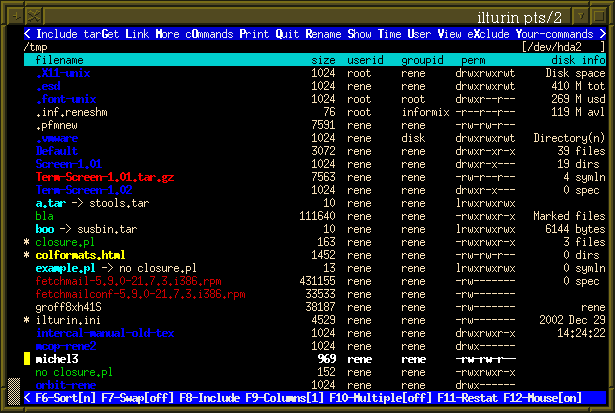
This program has some dependencies.
It makes use of the module Term::ScreenColor, which was based on Term::Screen, , in turn derived from Term::Cap. Term::ScreenColor is available on CPAN.
Furthermore, it uses the Term::ReadLine::Gnu module which adds the readline flexibility to the commmand-line editing.
I said I was porting pfm to Term::ANSIScreen. Well, I did, but I decided to change it back. There are pros and cons to both modules, and since Term::ScreenColor is published on CPAN now, and it gives me slightly cleaner code, I decided to stick with my own module.
This program is free software: you can redistribute it and/or modify it under the terms described by the GNU General Public License version 2.
As it happens, the original MS-DOS version can still be obtained from some FTP sites.
PHP is used almost exclusively for writing WEB applications so those few OFM-style managers that were written are all work as web based applications accessible via browser. That put severe restrictions on the interface that can be implemented.
Webnight Commander is web file manager with interface similar to GNU Midnight Commander. The main difference is that Webnight Commander have only one directory panel. The whole program code is organized in one PHP script. All you need to do is to upload the php script on your server (set the password) and call the php file. Then you have a fully functional File manager. You can copy, move, edit files. Requirements: apache web server with php
FSGuide by trajic is a Web-based OFM written in PHP and Javascript
FSGuide is a Norton Commander clone used by many hosting firms and individuals for advanced file management through the Web. It features user management (password protection, and access control), advanced file selection dialogs, a multiple file uploader (which can also run any application after uploading), a text viewer, a binary file viewer, a source highlighting viewer, an internal text and binary editor, language support, and much more.
While TCL looks like a perfectly suitable language for implementing OFM due to its transparent connection to C and availblity ot TCL/TK toolkit, those advantages were never materialised. Most of entries below are abandonware.
Not A Commander by Sergiy Babkin is yet another OFM manager, but due to usage of TCL it has build-in scripting capabilities. The author noted that "good integration with the command line is the primary goal"
This project's purpose is a file manager for X11 with the user interface inspired by the Norton Commander (tm). Unlike the other NC clones, I try to keep the interaction with the command line unimpeded and transparent. I also try to do things more in the Unix way. The development is going in the Way of Natural Stupidity: first get something working and then add the features and refine the design. The main architectural goal is to keep the architecture flexible and make future changes easy.
The current state of development is "alpha": at least all the basic features are implemented.
My article about the Tk geometry managers written in Tcl is now available online - see below.
Read about how to Make Your X11 Look Like The Text Console
Look at the project from the hight of the first anniversary. (Updated on Oct 11, 2001). Some of the statements in this text are not correct, and people have told me that - I've added comments about that in italic as "2003 notes".
www.usenix.org/publications/login/2001-10/pdfs/babkin.pdf My article about the Tk geometry managers written in Tcl was printed in the October 2001 issue of ;login:, the Usenix association magazine. This article is a direct result of experiences with NAC.
I have submitted my proposals for nested lists as TIP#170. It's interesting to note that as it turns out, extensions for the lindex command, a new lset command have been already adopted in Tcl 8.4 with almost exactly the same syntax. So apparently, the idea is fairly obvious, since at least two people have done it independently in practically the same way. More similar features with slightly different syntax are in Tcl 8.4 as well.
FileRunner is a GUI-based file manager for X (all major flavors are supported) written by Henrik Harmsen. The first version was implemented in 1996 and can be considered probably as the second Tcl/Tk based filemanager for X (after Tkdesk) and the first TCL-based OFM. Latest release is 2.5.1.
It has Amiga flavor with central bar that holds additional buttons. Like MC it is distributed as Open Source under the GNU General Public License. See also small article in LG: A New Filemanager with Amiga Roots
It has built-in FTP support and due to the use of Tcl/Tk is very configurable. The interface is similar to OFM but have a middle command area between panel (the idea that was used in several other GUI-based file managers). I suspect that the idea came from Amiga. FileRunner is implemented in Tcl/Tk and a little C. From the point of software engineering such an approach is a superior to monolithic C coding of MC. Latest release is 2.5.1. It implements:
TkDesk by Christian Bolik is a non-OFM, but very successful graphical desktop and file manager for several types of UNIX (such as Linux) and the X Window System. TkDesk is free software, as defined by the GNU General Public License. It offers a rich set of file operations and services, but generally very weak links with OFM paradigm. It is another demonstration than "MC-way" is not optimal as a design implementation strategy especially in GUI environment. At the same time it is one of the most interesting TCL-based implementation and as such details can be interesting for any OFM developer. Actually it is possible to rewrite TK-desk in OFM style with minimum efforts.
Some solutions probably can be profitably borrowed. Among them:
You can get TkDesk from its homepage at: http://people.mainz.netsurf.de/~bolik/tkdesk/
You can also get it from (no guarantees on the paths given below): ftp://sunsite.unc.edu/pub/Linux/Incoming/ or ftp://sunsite.unc.edu/pub/Linux/X11/desktop/ and all of sunsite's mirrors.
ftp://ftp.neosoft.com/pub/tcl/NEW/ and all of Neosoft's mirrors.
Entries below are all discontinues development projects:
This package (?) contains 2 files :
1) xmc
2) READMEXmc is X Minek Commander - Norton Commander clone running on X. It's written in Tcl/Tk.
I tested it on Linux, Tcl 7.4 and Tk 4.0. This package (?) doesn't contain Tcl or Tk, so you have to install
it yourself. The best place to get it, should be :
1) ftp.sunlabs.com/pub/tcl
2) www.neosoft.com/tcl
3) www.smli.com/~bwelch/bwelch.html
Most of Linux installations have it already installed. Wish, or link to wish, is supposed to be located at /usr/bin, if your wish is elsewhere, please change first line in xmc. Xmc could be located where you want, but I think the best place is /usr/local/bin.It's just a first version, I spend 13 hours on it. Next versions are expected very soon. Menu, execpt a few options, is not working yet, althought generally this program can be usefull. I don't know why, but file attributes are not read correctly by my Tcl, so RWX persmissions are always displayed.
I just started with Tcl/Tk, and this program is just result of my learning. I used some code (just a little bit...) from the book "Practical Programming in Tcl/Tk" written by Brent Welch. This is a very good book, althought I paid for it 50.95 $CAN.
Please let me know, if you have something interesting to say.
[Minek]
[email protected]
www.geocities.com/SoHo/5306
There are also severl non-orthodox TCL file managers
X-Files is a graphical file management program for Unix/X-Window environment. It was inspired by the Amiga program DirWork.This application differs slightly from the main stream file managers in that it has always only one window. On top (or bottom) of the window you have ActionbuttonsTM -area. Other main areas are the two directory listings for file related actions. You can use quick pop-up menu for basic operations. File extensions can be configured to launch any program you desire for that file.
The appearance and functionality can be fully configured according to your taste using the built-in editors.
Tested on: Intel Linux, DEC Alpha, SGI, HP-UX, Solaris
(Should work on any Unix-machine running Tcl/Tk.)X-Files -- The Ultimate File Organizer -- current version 1.21 beta, dated 29.11.1996 X-Files is a graphical file management program for Unix/X-Window environment. For more info see: http://pinhead.tky.hut.fi/~xf_adm/ http://www.hut.fi/~mkivinie/xfindex.html The packages are also available at: java.inf.tu-dresden.de:/pub/unix/x-files IMPORTANT ======================================================================
X-Files is written in Tcl/Tk and offers e.g. the following: * An entirely configurable set of up to 96 Actionbuttons, although basic file operations can be performed even without any buttons! * The actionbuttons can also be configured to launch different applications making X-Files a nice front-end. * Two fast mouse button binded operations can be associated for each file type. These are examples, configure your own combinations: E.g. textfiles: left MB -> your favourite viewer middle MB -> editing with your favourite editor * Easy configuration of the previous items with built-in editors * Editor also for X-Files resources * Transparent access to tar- and zip-packages. Basic file operations are supported both to and from a package. * Easy installation with our own installation script * Moving within the directory hierarchy is flexible, fast and very visual. * A pop-up menu for a quick use of the basic file operations and also for other operations of your own choice * Directory history of the last six directories accessed * Safe delete with one-step undo * A few well thought and tested shortcut keys * Context sensitive pop-up help * Pattern select, cool looks and much more... ====================================================================== What you need to get X-Files working: * Unix/X-Window environment. Developed on Linux, tested on SGI Indy, HP 700, and Digital Alpha. * Tcl/Tk 7.4/4.0 or higher. * 3-button mouse or 2-button mouse with 3-button emulation. For questions mail [email protected] or contact the authors [email protected] and [email protected].
/*
* *Fedot* Copyright 1997 Mike Fedotov, [email protected]
*
* Permission to use, copy, modify, and distribute, this software and its
* documentation for any purpose is hereby granted without fee, provided that
* the above copyright notice appear in all copies and that both that
* copyright notice and this permission notice appear in supporting
* documentation, and that the name of the copyright holders be used in
* advertising or publicity pertaining to distribution of the software with
* specific, written prior permission, and that no fee is charged for further
* distribution of this software, or any modifications thereof. The copyright
* holder make no representations about the suitability of this software for
* any purpose. It is provided "as is" without express or implied warranty.
*
* THE COPYRIGHT HOLDER DISCLAIM ALL WARRANTIES WITH REGARD TO THIS SOFTWARE,
* INCLUDING ALL IMPLIED WARRANTIES OF MERCHANTABILITY AND FITNESS, IN NO
* EVENT SHALL THE COPYRIGHT HOLDERS BE LIABLE FOR ANY SPECIAL, INDIRECT OR
* CONSEQUENTIAL DAMAGES OR ANY DAMAGES WHATSOEVER RESULTING FROM LOSS OF USE,
* DATA, PROFITS, QPA OR GPA, WHETHER IN AN ACTION OF CONTRACT, NEGLIGENCE
* OR OTHER TORTIOUS ACTION, ARISING OUT OF OR IN CONNECTION WITH THE USE OR
* PERFORMANCE OF THIS SOFTWARE.
*/0) What is Fedot ?
Fedot is simple , writed on Tcl/Tk, file manipulation tool. It is similar to GIT ( Gnu Interactive Tool ) or Midnight Commander. It is not so powerful as they, but realize, i hope, all main necessary operations.
Using Fedot you can copy, move, delete file in very simple way.You can run executable file only by pressing <Return> key. You can associate extension of file with some action ( run specific command ).
Why is "Fedot"? Fedot is an old Russain name, which is not often used in our time.1) What do you need to use Fedot.
You need packages Tcl/Tk installed on you machine. You need Tcl/Tk shell like tclshell or wish.
2) Installation
You need the folowing files:
Fedot.tcl - main tcl script
Fedot.help - help information ( very brief )
Fedot.conf - Configuration file
Fedot.menu - Menu file ( You may define commands which can be executed
by choosing menu item )
Fedot.ext - Extension association file.
Fedot.rscr - File used for running scripts from Fedot. ( If scripts opens
terminal and direct output to it, then after ending work of
scripts terminal immediately end work too ( And you can't see
results produced by script). Fedot.rscr file prevents it
( It simply wait for pressing <Return> key).
Before you install Fedot, you should modify some files and you should set some variable:Fedot.conf - Set you favourite editor, terminal, fonts, path to Fedot files, initial directories.
Fedot.tcl - Set path to you Tcl/Tk shell ( tclshell or wish )
( This is the first line of file. Warning: this path
on some system can't be longer that 32 symbols)Variables TIX_LIBRARY ( or TCL_LIBRARY or TK_LIBRARY - it depends on your
Tcl shell ) should be setted to directory with Tcl/Tk libraries. You may try
set all these variables. You also should set FEDOT_PATH variable to
directory, where placed Fedot files. ( This variable is uses to find file
Fedot.conf. If in this file you may define another path to Fedot files.
Fedot will use last definition. )3) As the Tcl/Tk is interpreted language you may run Fedot:
/path_to_wish/wish /path_to_fedot/Fedot.tcl
( in the case if your Tcl/Tk shell is "wish" ) and see how it work.
( I hope - without problem - :) - )4) Additions.
I use Fedot under HP-UX and don't port it to any other platforms,
on which Tcl/Tk package is present, but hope that it will not be
a problem to use Fedot on other platforms.
When you editing Fedot.conf, Fedot.menu and Fedot.ext file
don't forget about following: beetween option, colon and command
empty spaces is not allowed.User Menu: No problems with X11 programs, but if you shall use Menu for
running scripts or terminal-oriented program some difficulties is possible.
The problem is the following - If scripts opens terminal and direct output
to it, then after ending work of scripts terminal immediately end work
too. ( And you can't see results produced by script). Therefore you may use
Fedot.rscr file to prevents ending work terminal. In other word you may
specify:
<Menu Item>:<Terminal_name> -e <Path to Fedot>/Fedot.rscr <Name of script>
( instead simply:<Menu Item>:<Term_name> -e <Name of command or script>).
I write Fedot not as a serious work but as a testing example for studing
Tcl/Tk. Therefore it may seem not so user-friendly or powerful as
other tools. But I think that it is a compromise beetween simplicity and
functionality.May be somtimes you will see Tcl dialog boxes with something like that
"Error in Tcl script". Don't worry, press "Ok". I had not intention to
avoid all possibilities of appearing these messages. But they are NOT an
error. They are not destructive. ( Of course, it is possible to avoid these
messages. But it is a big work which improve only interface but not
functionality ).
Make your life simpler with SFM, a TCL file manager for X11, compatible with TCL 7.5 and Wishx 4.1.Here's some of it's great features:
- Manage files (copy, paste, delete, permissions, properties, link)
- Drag and drop support
- Floppy disk mounting
- Trash
- Choice of colors
- Muitiple file browsers
- Open files and launch applications
- Find files
The only attempt to implement shall-based OFM was the author attempt called KISSOFM, written to explain benefits and main principles of OFM to his students as a teaching project. It was based on the set of scripts and uses screen as a windows managers.
Another non-orthodox file manager is macosxhints - Shell-based file and directory manager
| Prev | Contents | Next |
Society
Groupthink : Two Party System as Polyarchy : Corruption of Regulators : Bureaucracies : Understanding Micromanagers and Control Freaks : Toxic Managers : Harvard Mafia : Diplomatic Communication : Surviving a Bad Performance Review : Insufficient Retirement Funds as Immanent Problem of Neoliberal Regime : PseudoScience : Who Rules America : Neoliberalism : The Iron Law of Oligarchy : Libertarian Philosophy
Quotes
War and Peace : Skeptical Finance : John Kenneth Galbraith :Talleyrand : Oscar Wilde : Otto Von Bismarck : Keynes : George Carlin : Skeptics : Propaganda : SE quotes : Language Design and Programming Quotes : Random IT-related quotes : Somerset Maugham : Marcus Aurelius : Kurt Vonnegut : Eric Hoffer : Winston Churchill : Napoleon Bonaparte : Ambrose Bierce : Bernard Shaw : Mark Twain Quotes
Bulletin:
Vol 25, No.12 (December, 2013) Rational Fools vs. Efficient Crooks The efficient markets hypothesis : Political Skeptic Bulletin, 2013 : Unemployment Bulletin, 2010 : Vol 23, No.10 (October, 2011) An observation about corporate security departments : Slightly Skeptical Euromaydan Chronicles, June 2014 : Greenspan legacy bulletin, 2008 : Vol 25, No.10 (October, 2013) Cryptolocker Trojan (Win32/Crilock.A) : Vol 25, No.08 (August, 2013) Cloud providers as intelligence collection hubs : Financial Humor Bulletin, 2010 : Inequality Bulletin, 2009 : Financial Humor Bulletin, 2008 : Copyleft Problems Bulletin, 2004 : Financial Humor Bulletin, 2011 : Energy Bulletin, 2010 : Malware Protection Bulletin, 2010 : Vol 26, No.1 (January, 2013) Object-Oriented Cult : Political Skeptic Bulletin, 2011 : Vol 23, No.11 (November, 2011) Softpanorama classification of sysadmin horror stories : Vol 25, No.05 (May, 2013) Corporate bullshit as a communication method : Vol 25, No.06 (June, 2013) A Note on the Relationship of Brooks Law and Conway Law
History:
Fifty glorious years (1950-2000): the triumph of the US computer engineering : Donald Knuth : TAoCP and its Influence of Computer Science : Richard Stallman : Linus Torvalds : Larry Wall : John K. Ousterhout : CTSS : Multix OS Unix History : Unix shell history : VI editor : History of pipes concept : Solaris : MS DOS : Programming Languages History : PL/1 : Simula 67 : C : History of GCC development : Scripting Languages : Perl history : OS History : Mail : DNS : SSH : CPU Instruction Sets : SPARC systems 1987-2006 : Norton Commander : Norton Utilities : Norton Ghost : Frontpage history : Malware Defense History : GNU Screen : OSS early history
Classic books:
The Peter Principle : Parkinson Law : 1984 : The Mythical Man-Month : How to Solve It by George Polya : The Art of Computer Programming : The Elements of Programming Style : The Unix Hater�s Handbook : The Jargon file : The True Believer : Programming Pearls : The Good Soldier Svejk : The Power Elite
Most popular humor pages:
Manifest of the Softpanorama IT Slacker Society : Ten Commandments of the IT Slackers Society : Computer Humor Collection : BSD Logo Story : The Cuckoo's Egg : IT Slang : C++ Humor : ARE YOU A BBS ADDICT? : The Perl Purity Test : Object oriented programmers of all nations : Financial Humor : Financial Humor Bulletin, 2008 : Financial Humor Bulletin, 2010 : The Most Comprehensive Collection of Editor-related Humor : Programming Language Humor : Goldman Sachs related humor : Greenspan humor : C Humor : Scripting Humor : Real Programmers Humor : Web Humor : GPL-related Humor : OFM Humor : Politically Incorrect Humor : IDS Humor : "Linux Sucks" Humor : Russian Musical Humor : Best Russian Programmer Humor : Microsoft plans to buy Catholic Church : Richard Stallman Related Humor : Admin Humor : Perl-related Humor : Linus Torvalds Related humor : PseudoScience Related Humor : Networking Humor : Shell Humor : Financial Humor Bulletin, 2011 : Financial Humor Bulletin, 2012 : Financial Humor Bulletin, 2013 : Java Humor : Software Engineering Humor : Sun Solaris Related Humor : Education Humor : IBM Humor : Assembler-related Humor : VIM Humor : Computer Viruses Humor : Bright tomorrow is rescheduled to a day after tomorrow : Classic Computer Humor
The Last but not Least Technology is dominated by two types of people: those who understand what they do not manage and those who manage what they do not understand ~Archibald Putt. Ph.D
Copyright � 1996-2021 by Softpanorama Society. www.softpanorama.org was initially created as a service to the (now defunct) UN Sustainable Development Networking Programme (SDNP) without any remuneration. This document is an industrial compilation designed and created exclusively for educational use and is distributed under the Softpanorama Content License. Original materials copyright belong to respective owners. Quotes are made for educational purposes only in compliance with the fair use doctrine.
FAIR USE NOTICE This site contains copyrighted material the use of which has not always been specifically authorized by the copyright owner. We are making such material available to advance understanding of computer science, IT technology, economic, scientific, and social issues. We believe this constitutes a 'fair use' of any such copyrighted material as provided by section 107 of the US Copyright Law according to which such material can be distributed without profit exclusively for research and educational purposes.
This is a Spartan WHYFF (We Help You For Free) site written by people for whom English is not a native language. Grammar and spelling errors should be expected. The site contain some broken links as it develops like a living tree...
|
|
You can use PayPal to to buy a cup of coffee for authors of this site |
Disclaimer:
The statements, views and opinions presented on this web page are those of the author (or referenced source) and are not endorsed by, nor do they necessarily reflect, the opinions of the Softpanorama society. We do not warrant the correctness of the information provided or its fitness for any purpose. The site uses AdSense so you need to be aware of Google privacy policy. You you do not want to be tracked by Google please disable Javascript for this site. This site is perfectly usable without Javascript.
Last modified: March 12, 2019


