Free and adequate looks enticing
compared with expensive and adequate. Rob Pegoraro Washtech.com
If we can't afford the solution,
then it's not a solution ;-).
SAP marketing slogan
The main selling point for Windows and an important driving force of Windows
development are applications. MS Office is a really impressive set of well
integrated programs with the common macro language (VBA)
It also have very good, flexible GUI and ports of Apple applications on windows (ITunes) have shown that Microsoft managed
to beat Apple in its own game. ITunes sucks so much that any talk about Apple
software superiority is just a joke. Apple is a company with super-talented
marketing, but average (and incase of iTunes below average) software quality and
very restrictive Apple ecosystem enforcing software products. It is essentially
a computer and software ecosystem for dummies, who are ready to trade
flexibility for predictability. When open source enthusiasts criticize
Microsoft I always ask myself did they every worked in Apple software ecosystem.
Contrary to views of many naive open source advocates (Eric Raymond is a good example)
MS Office is a tremendously capable suit of professional software applications disguised as a consumer product. It
is a professional suit of high-quality high-end applications with the real cost
of at least $1K, which Microsoft is selling approximately
for $300 (with home and student edition for around $100, which is a shareware
price per application such as Word and Excel -- $50 each). It's not only de-facto standard and that has capabilities perfectly
suited for enterprise customers. It is more then that. Some components of Microsoft Office
are good (MS Word) but some are masterpiece of software engineering (Excel) in a
sense that few companies are able to debug such a complex product to such level.
Yes there are other architectures that might be equal or better then used in
Excel, more elegant and less complex. But Microsoft is really a king of software
complexity. And level of debugging of those application and first of all Excel
is a testament
of IQ of Microsoft designers and tremendous talent and perseverance of Microsoft managers. It is a very rare case when such
a large company can produce such a slick and reliable applications. Just look at software produced by IBM (which recently screwed Lotus Notes
client beyond recognition with version 8.5, based on Eclipse). Look at
software product that Symantec, Adobe and SAP sells to unsuspecting public.
Comparison is in favor of Microsoft in many parameters. The same actually was
true for FrontPage 2003 which was killed. It was a tremendously powerful
and cheap Web editor, professional tool sold for shareware price.
In a way, as long as Microsoft continued to enhance and further develop this powerful suit of applications it can
lock in most of the PC users. That might be one reason why attempts to unseat Windows domination as diverse as Linux. Apple
and lately Goggle met only limited success. Microsoft proved to be a tremendously competitive company, which despite
its size still can wear down and at then defeat a serious competitor by its relentless upgrade cycle. I think that
a popular joke that any Microsoft product becomes good starting from version six sounds a pretty sinister forecast to many
Microsoft competitors ;-)
Home users can generally benefit from simpler tools, but MS Word/Excel/Publisher trio costs so little in Home and Student
Office editions (around $100) that to compete with Microsoft on the price is
similar to competing with Linux on the price. MS Word was historically sold as a part of Microsoft Works, and was priced below
$50 which made any competition meaningless. With such prices even with the availability of robust and simple tools it just
does not make much sense to settle for less. Just becuse of the size of
Microsoft software ecosystem.
Situation with the alternative to other components of the Office is no better then with MS Word. Excel is a real masterpiece of software
engineering (again, disguised as a consumer product) and despite the fact that the full power of Excel can be appreciated
only by professional user and/or (and may be) sophisticated investor, it does not make sense to settle for less as it is availble as a part of the Office with total pitrce slightly above $100. It is true that relatively small percentage of home
users can benefi from full power of Excel, but it is indispensable in the enterprise environment and using the same tool
at home as in office makes a lot of sense. I noticed that small business often use Excel as a simple database tool, instead
of Access and (now discontinued) FoxPro.
The same might be true for PowerPoint and FrontPage. FrontPage helped bring WYSIWYG publishing to the Web. I personally
use FrontPage (this site is developed using FrontPage and set of custom script that compile webpages) for 15 years and now
use it also as MS Word substitute but that's just an idiosyncrasy as I resent
inability of word to present a 'raw' editable
markup of the document and also I know HTML relatively well and do not have too much needs outside its capabilities.
Actually FrontPage is another really amazing application from Microsoft (although it was initially bought by Microsoft,
but it was fully developed while already a part of Microsoft application stack). Microsoft team led by dramatically enhanced
with each version up to 2003 (the last version of FrontPage) and which provides professional user the ability to increase
his/her productivity ten times or more in comparison with simpler tools. While using it on daily basis for 15 years I still
find new tips and tricks that increase my productivity in FrontPage environment almost monthly
So the short answer to the question what are alternatives to MS Office in the USA is: there is no alternatives. The real
problem with Microsoft Office is that it is rather expensive outside the USA, and it is extremely expensive
in Eastern Europe, if you compare the price with the average monthly salary. Like in SAP/R3 somewhat perverted ( judging
from the cost of SAP software) slogan: "If we can't afford the solution, then it's not a solution" ;-). Therefore
generally MS Office is an extremely good, irreplaceable solution for the US market, but much less
so for Eastern European market,
which needs to find the alternative. Currently the most plausible is Open Office which is free,
but highly deficient substitute (see
The Biggest Failure in Open Source)
But there are other
alternatives such as Microsoft Works
8.0),
older versions of Office (such as Office 2007 and Office 2003) as
well as some licensing tricks available for small businesses (Microsoft partner programs used to be an excellent
opportunity
for small business to get all Microsoft stack of operating systems and applications including Office for just $350 a year.
If the firm contains exactly or less 10 employees that was the deal of the century, as $35 per year per employee is a price
you simply can't beat :-).
The key attractiveness of applications like components of MS Office is openness of the API and the underlying formats.
They all are scriptable and it is more useful feature that openness of code per se (its just too much code to be useful
for 99.99% of the users ;-).
The key advantage of the MS Office -- common macro language for all applications in a suit, is the advantage
that is still unmatched by rivals. Also the level of support of MS Office (books, training materials, add-ons,
etc) is far superior to the alternatives. That mean that MS Office including its crown jewels MS Word and Excel
still makes sense in the open world. But if only if :
You can afford it (not true for many business in Eastern Europe, at least until recently Microsoft pricing
was "out of reach" for them)
Know how to use outlining capabilities (this is a training issue). Paradoxically many users use MS Word
like Word Perfect. In this case Word Perfect is a better alternative.
You can benefit from macro capabilities. Ms Word have very powerful macro capabilities and that makes
it a class of its own. Just look at MS Word viruses ;-). But jokes aside this is one of the most programmable word
processor around and you can make it to do amazing things with macros. See, for example,
MS Word Macros. Again most users and
even organizations do not have enough IQ to benefit from it. If this is case then (outside of the USA) an
attractiveness of MS Office in general and MS Word in particular is more problematic and simpler alternatives might
make some sense. Google tries to exploit this niche but so far its attempts were really "fist steps".
The main problem with the Office is that until Office 2007 both MS Word and Excel documents formats were proprietary
and generally undocumented. But for all earlier versions you still can export documents in Open formats including RTF
and XHTML. The latter needs some post-processing (see, for example
demoroniser), if you want to publish it;
raw Ms Word xhtml contains too many Microsoft styles. The fact that
you don't have access to "internal" representation of MS Word actually is a
very serious deficiency.
Absence of the internal representation accessibility severely limits what you can do in MS Word and
greatly complicate
debugging of complex documents. That's probably the most severe shortcoming of MS Word. and that why I personally often use FrontPage
as an alternative to MS Word despite much weaker spellchecker, weaker and
more convoluted macro capabilities and absence
of many vital for word processing capabilities.
The absence of the internal representation view limits what you can do in MS Word
and complicates debugging of complex documents
Contrary to the opinion of typical Linux zealots, I am convinced that Microsoft Word was and still is a very good
program that was innovative at the time of introduction and positively influenced the field previously dominated by
somewhat backward WordPerfect (which, paradoxically, has an access to the view of the internal representation of the
document). I would agree that from the point of view of supporting open formats like HTML and XML, MS Word still
have room to grow, but I am surprised how Adobe managed to monopolize the field of document viewers despite the fact
that MS Word viewers would be clearly adequate (and somewhat superior due to the quality of MS Word as a tool for creating
them). Weaker products might become dominant if they meet the needs of the most users.
In the past (in the MS DOS environment) MS Word was always underdog to WordPerfect, but despite the second place
that most PC magazines assigned to in in 1987-1994 (or may be due to it :-) it was always more innovative word processor
than WordPerfect:
I remember that the first DOS version of Word that I used (Word 4, 1987?) already had outlining capabilities.
Word5 for DOS(1989?) introduced the use of style sheets in a way very similar to CCS, so to a certain extent
it was 10 year ahead of its time. People were able to produce pretty
complex books using Ms Word as poor man publishing system.
BTW it is funny that generally more conservative WordPerfect has "show the source" concept of showing raw source
format similar to HTML editors of today and MS Word never had it. Because in other areas MS Word was definitely more
innovative work processor. If you remember the days of character-based WordPerfect, you will remember the "reveal
codes" feature, which shows an editable view of the current file with the internal formatting codes visible. This gave
the user more control of the underlying text-processing than MS Word. That why lawyers always prefer WordPerfect and
that's why many advanced users (including myself) for simple documents are now using FrontPage instead of MS Word (FrontPage
is now part of Office Professional).
Inability of MS Word transparently show its internal format
always was one of the biggest shortcomings of this very powerful program
In addition to being rather expensive outside of North America, today's versions of Microsoft Office are huge
and try to implement everything possible under the sun. The best original ideas are buried under the bloat of
"me too" features. For example how many people use MS Word outlining capabilities, the really innovative feature of
MS Word. My guestimate is that less then 1%. If you do not need all the capabilities you can probably use cheaper
substitutes. What are the alternatives?
Microsoft
Work Suit 2006 Paradoxically the best alternative for the MS Word are earlier versions of MS Word.
;-). For example Microsoft Works Suit 2006 is a cheap ($32 shrinkwrapped,
$10 open box on Amazon as of April 2013) bungle of six pretty powerful programs including MS Word 2002.
This collection of software is amazing for the price at which it is being offered.
For $32 you should accept no substitutes :-).
The price on Amazon is really shareware price. Again the package contains full version of MS Word 2002:
Word 2002 Use the same premier word processor
featured in Microsoft Office XP. Word 2002 features—such as smart tags and task panes, and improved technology
for formatting—make it easy to create professional-looking documents. Enhanced reliability ensures that you
spend your time working, not re-creating the work you've completed.
Read more about Word 2002.
It also contains:
Picture It!Photo Premium 9.0
Use photos from digital cameras, scanners, photo CDs, and e-mail attachments. Organize your photos, correct
common photo problems, create great photo projects, and share your photos online.
Read more about Picture
It! Photo Premium 9.0.
Encarta® Encyclopedia Standard
Access more than 38,000 up-to-date articles, plus photos, illustrations, hundreds of videos,
animations, and audio files. Encarta is the ideal multimedia encyclopedia for everyday use.
Read more about Encarta
Encyclopedia Standard 2004.
Money Standard Organize and manage your personal
finances quickly and easily. If you're new to personal finance management software, Money Standard is a great
way to get started. Read more about Money
2004 Standard.
Streets & Trips Find maps, points of
interest, routes, and driving directions without waiting for an Internet connection. Create and download maps
to your Pocket PC.
After struggling with Microsoft Word 2007, I immediately ordered Microsoft Works 9.0 simply because it is
easy to handle and I love some of the updates that has been added. I love the way it saves your letters and
documents. It has a lot of other great features as well. You can make your own personal stationary, all occasion
cards, budgets, and personal business forms etc. I especially love the history tab which helps me to find all
of my letter/documents or anything else that I might have saved. It is easy to change letter size, and style
or to print letters in different color ink.
When I bought a new computer it came with microsoft office word 2007. It was too complicated when you just want
a simply letter or want to add headers and footers to your letter. I will have to take a class or take some
time to learn microsoft word 2007.
That is what I love about Microsoft Works 9.0 it is very easy to manuver without a lot of reading and studying.
For me, it is self explanatory. Although, almost every company and most of my teachers wants me to use microsoft
office word 2007, I generally get permission to use Microsoft Works 9.0 because Microsoft Word 2007 is too time
consuming if you don't know how to use it or you don't have the time to learn it -- it becomes a waste of time.
Most people need MS Word which is a de facto standard in document processing, but an average user seldom needs Powerpoint
or Excel. At home one can benefit from such useful programs as Money, Street Finder, and Picture It. The last
is Microsoft's publishing photo program and it alone usually costs around $60. This makes MS Works suit a real bargain
and the best alternative for MS Office, especially for family use or student use.
Google Docs. Currently it's less capable product that costs more ($50 per user per year for corporations
which means $250 in five years). Retail price of Office 2010 Home and Business (which includes Word, Excel, PowerPoint,
OneNote and Outlook) is $279.95, which is more functionality for approximately the same price (it will last 5-7 years
for sure).
Corel's WordPerfect Office. It is the workhorse of legal departments all over the world. The recent version
of
WordPerfect Office X4 can work with PDF documents. It can import, edit, archive and export PDF documents with built-in
PDF features—no Adobe® Acrobat® required!
WordPerfect is a
proprietaryword processing application,
now owned by Corel.
Bruce Bastian, a
Brigham Young
University (BYU) graduate student, and BYU computer science professor
Dr. Alan Ashton
joined forces to design a word processing system for the city of
Orem's
Data General Corp. minicomputer
system in 1979. Bastian and Ashton kept the rights to the WordPerfect software they designed for Orem, deciding
to market it through their own company. Ashton and Bastian started Satellite Systems International (SSI) to
sell WordPerfect in 1980. WordPerfect 1.0 represented a significant departure from the previous
Wang
standard for word processing. At the height of its popularity in the late 1980s and early 1990s, it was the
de facto standard word processor,
but has long since been eclipsed in sales by
Microsoft Word.
Although the MS-DOS and
Microsoft Windows versions
are best known[citation
needed], its popularity was based in part on the fact that it was available for a wide variety
of computers and operating systems, including Mac
OS, Linux, the
Apple IIe, a separate version for the
Apple IIgs, most popular versions of
Unix,
VMS,
Data General,
System/370,
AmigaOS,
Atari ST,
OS/2, and
NeXTSTEP.
The common file name extension
of WordPerfect document files is .wpd. Older versions of WordPerfect also used file extensions
.wp, .wp7, .wp6, .wp5, .wp4, and originally, no extension at all.[1]
Since its acquisition by Corel, WordPerfect for
Windows has officially been known as Corel WordPerfect.
Historically, Quattro Pro used keyboard command similar to
Lotus 1-2-3. It is commonly said
to have been the first program to use the "tabbed notebook" metaphor. However, this is not true, as Boeing
Calc had already used tabbed pages[1][2].
It currently runs under the Windows operating system. Quattro Pro avoided the 65,536 row by 256 column spreadsheet
limitations inherent to pre-2007 versions of Microsoft Excel by allowing a maximum worksheet size of one
million rows by 18,276 columns. Since about 1996 Quattro Pro has run a distant second to Excel's market
domination.
When version 1.0 was in development, it was codenamed "Buddha" since it was meant to "assume the
Lotus position", #1 in
the market. When the product was launched in 1988, its original name was Quattro (the
Italian word for "four",
a play on being one step ahead of "1-2-3"). Borland changed the name to Quattro Pro for its 1990 release.
The common file extension of Quattro Pro spreadsheet file is .qpw. Older versions of Quattro Pro used
also following file extensions: wb3, wb2, wb1, wq2, wq1.[3]
Lotus SmartSuite. IBM bought
and then eventually killed this fine suit of applications which at one point were competitors for Microsoft. Its strongest
feature is 1-2-3 spreadsheet, which for a long time was the standard spreadsheet for financial people.
But the last version (9.8) works on Windows XP and you can create kind of
text processing appliances on an old computer with XP using it. You can
buy
Lotus Smart Suite Millenium Edition 9.8 SoftwareOutlet it for ~$20.
It features the following applications:
Oracle Office/OpenOffice. A marginal player emerged in May 1999 -- StarOffice is now free for individual
users on all platforms. It's written in Java and it does suffers from Java shortcomings as a system programming
language. It is also underpowered although less so then Google Docs. Applications are rather primitive in comparison
with MS Office and interface is raw. StarOffice is a set of office applications that includes:
WRITER -- a decent but far from
perfect MS Word alternative. Can integrate images and charts in documents, create everything from business letters
to complete books with professional layouts, as well as create and publish Web content. You can publish your work
in Portable Document Format (.pdf). MS Word compatibility is also good, but sometimes I
get documents from Sun that are not readable...
WRITER has everything you would expect from a modern, fully equipped word processor or desktop publisher.
It's simple enough for a quick memo, powerful enough to create complete books with contents, diagrams, indexes,
etc. You're free to concentrate on your message - while WRITER makes it look great.
The Wizards
takes all the hassle out of producing standard documents such as letters, faxes, agendas, minutes, or carrying
out more complex tasks such as mail merges. You are of course free to create your own templates, or
download templates from our
Extensions repository.
Styles and Formatting puts the power of style sheets into the hands of every user.
Trap typing mistakes on the fly with the AutoCorrect dictionary, which can check your spelling as
you type. If you need to use different languages in your document - WRITER can handle that too.
Reduce typing effort with AutoComplete, which suggests common words and phrases to complete what
you are typing.
Text frames and linking give you the power to tackle desktop publishing tasks for newsletters,
flyers, etc. laid out exactly the way you want them to be.
Increase the usefulness of your long, complex documents by generating a table
of contents or indexing terms, bibliographical references, illustrations, tables, and other objects.
WRITER can also display multiple pages while you edit - ideal for complex documents, or if you have a large
monitor (or multiple monitors).
The advanced notes feature displays notes on the side of the document. This makes notes a lot easier to read.
In addition, notes from different users are displayed in different colours together with the editing date and
time.
Make your documents freely available with WRITER's HTML export to the web, or export in MediaWiki format
for publishing to wikis. Publish in Portable Document Format (.pdf) to guarantee that what you write is what
your reader sees. The PDF export feature in OpenOffice.org provides a huge set of formatting and security options;
so that PDF files can be customized for many different scenarios, including ISO standard PDF/A files.
Save your documents in OpenDocument format, the new international standard for office documents.
This XML based format means you're not tied in to WRITER. You can
access your documents from any OpenDocument compliant software.
WRITER can of course read all your old Microsoft Word documents, or save your work in Microsoft Word format
for sending to people who are still locked into Microsoft products. From version 3.0 WRITER can also open .docx
files created with Microsoft Office 2007 or Microsoft Office 2008 for Mac OS X.
CALC -- a spreadsheet.
contains some advanced spreadsheet functions and decision-making tools to perform sophisticated data analysis. Use
built-in charting tools to generate impressive 2D and 3D charts. Still inferior to Excel.
IMPRESS -- multimedia presentations
tool. Supports special effects, animation and has drawing tools.
DRAW will produce everything from
simple diagrams to dynamic 3D illustrations and special effects.
The Database User Tools give you
all the tools you need for day to day database work in a simple spreadsheet-like form. They support dBASE databases
for simple applications, or any ODBC or JDBC compliant database for industrial strength database work.
The main attraction of Open Office is that it is free. Oracle office is $50. Also support of open formats is better
that in MS Office. Open Office is a just a renamed Star Office that Sun bought and re-licensed. Star Office was from
the beginning designed as a cheap MS Office emulator. Before Sun acquired Star Division GmbH in 2000, the original vendor,
StarOffice used to have 30% of the German market and it was even rated superior to Microsoft Office among users surveyed
by Germany's largest computer magazine, ComputerBild. In October 2000, Sun change the license to dual with GPL as a
second license, renamed the product to Open Office and organized a special site for the coordination of development
OpenOffice.org.
Due to financial problems, currently many municipal governments play with the idea of saving money moving to Open
Office and it does make sense as a regular municipal worker usually does not need any macro capabilities.
There is somewhat better version from Sun called
StarOffice 7 (for ~$80), but it
is overpriced in comparison with the MS Works Suit
which contains MS Word 2002 (street
price of MS Works suit 2004 is ~$25). Therefore it mainly makes sense if you are limited to Solaris and Linux.
In late June 2001, the U.S. Defense Information Systems Agency (DISA) chose to implement 25,000 units of Sun’s StarOffice
software. This sounds like a significant gain until you discover that StarOffice was replacing Applix on Unix workstations
as well as Windows based software. DISA’s requirement was for “an open office productivity suite to work on multiple
platforms, including Linux, Solaris and Windows."
By May 2001 Sun was reporting that five million copies had been downloaded and that more than 20 million copies of
the software were distributed worldwide with the major users in the education community, government, and small-to-medium-sized
businesses. In 2002 Sun promised to release version 6, which will support XML. StarOffice has good compatibility with
Microsoft Office formats. It already has language support for Danish, Dutch, English, French, German, Italian, Polish,
Russian, Portuguese, Spanish and Swedish, but version 6 will add Chinese, Japanese and Korean to the mix.
Five million downloads does not prove any specific number of users and the only way of guessing it right is the impact
of OpenOffice on MS Office revenues. the fact that MS Office is ridiculously expensive in poor countries (Eastern Europe,
India, China, South America...) can also help.
LyX and other TeX-based tools are very good (and free for commercial use). They're
mainly attractive for power users and researchers who need a precise control of formatting (scientific articles
and dissertation are two primary examples). You operate with the internal representation of the document using any suitable
editor and them create the "preview" document via TeX. The great advantage of TeX is its stability and simplicity.
It's a tool written by a one of the greatest programmers of all times, Professor
Donald Knuth.
Frontpage and other HTML editors. For modest requirements
FrontPage instead of MS Word. Frontpage solves
the fundamental deficiency of MS Word -- absence of an editable view of the
internalrepresentation.
There is a free version of some derivative of FrontPage 2003
called
Microsoft
SharePoint Designer 2007. This is the best free HTML editor available
for Windows. It's somewhat buggy, even with SP3 applied but it is free and
powerful. No other free editor even comes close.
Here is some info from Wikipedia:
Microsoft SharePoint Designer (formerly known as Microsoft
Office SharePoint Designer) is a specialized
HTML editor and
web designfreeware for creating
or modifying
Microsoft
SharePoint sites and web pages. It is a part of Microsoft SharePoint
family of products.[2] It was
formerly a part of
Microsoft
Office 2007 families of products, but was not included in any of
the Microsoft Office suites.
SharePoint Designer and its sister product,
Microsoft
Expression Web are successors of
Microsoft
FrontPage. While Expression Web serves as the full-featured successor
to FrontPage, SharePoint Designer features focuses on designing and
customizing Microsoft SharePoint websites. For instance, it only includes
SharePoint-specific site templates. It retains more FrontPage features
than Expression Web, such as web components, database, marquee, hit
counter, navigation bars, map insert, etc. Although SharePoint Designer
2007 (this first version of this product) could be used as a generic
HTML editor, SharePoint Designer 2010 (the subsequent version) may no
longer operate in absence of
Microsoft SharePoint Server or
Microsoft SharePoint Foundation.[3]
Theoretically XML-based tools looks more viable than TeX, and OpenOffice seems to be a leader in this category.
I just do not like XML and consider XHTML quite adequate for most purposes.
20210314 : Augmented Reality Gets Pandemic Boost - WSJ by the pandemic found immediate uses for the distanced expertise AR technology can provide Mercedes-Benz USA trained more than 1,200 automotive technicians at all 383 dealerships last summer on how to use AR HoloLens 2 headsets for remote assistance. PHOTO: MERCEDES-BENZ USA By Sara Castellanos Jan. 28, 2021 3:46 pm ET
Before starting, you will need to install some dependencies required to build the Asterisk server. You can install all of them
using the following command:
Once all the packages are installed, you will need to install DAHDI to communicate Asterisk with analog and digital telephones.
First, download the latest version of DAHDI to the /opt directory:
cd /opt
git clone -b next git://git.asterisk.org/dahdi/linux dahdi-linux
Next, change the directory to the downloaded directory and compile it using the following command:
cd dahdi-linux
make
make install
Next, download the DAHDI tools with the following command:
cd /opt
git clone -b next git://git.asterisk.org/dahdi/tools dahdi-tools
Once the download is completed, configure and install it with the following command:
cd dahdi-tools
autoreconf -i
./configure
make install
make install-config
dahdi_genconf modules
Next, download the LibPRI to communicate Asterisk with ISDN connections.
git clone https://gerrit.asterisk.org/libpri libpri
cd libpri
Next, install it using the following command:
make
make install
Once all the necessary tools are installed, you can proceed to install Asterisk.
Install Asterisk
By default, the Asterisk package is not included in the Ubuntu 20.04 default repository. So you will need to download and compile
it from the source. You can download it from the Git Hub using the following command:
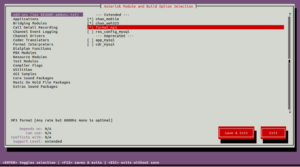
Next, you will need to select the modules that you want to install with Asterisk. You can select it using the following command:
make menuselect
You can use the Arrow key to navigate and Enter key to select the modules.
Select and enables the Addons as shown below:
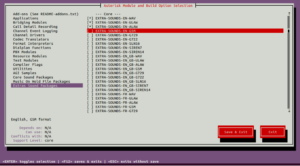
Next, enable the Core sound modules:
Next,
enable the additional MOH packages:
Next,
enable the Extra Sound Packages:
Now, click on the Save and Exit button.
Next, build the Asterisk using the following command:
make -j2
Next, Asterisk and its modules using the following command:
make install
You should get the following output:
 +---- Asterisk Installation Complete -------+
 +                                           +
 +    YOU MUST READ THE SECURITY DOCUMENT    +
 +                                           +
 + Asterisk has successfully been installed. +
 + If you would like to install the sample   +
 + configuration files (overwriting any      +
 + existing config files), run:              +
 +                                           +
 + For generic reference documentation:      +
 +    make samples                           +
 +                                           +
 + For a sample basic PBX:                   +
 +    make basic-pbx                         +
 +                                           +
 +                                           +
 +-----------------  or ---------------------+
 +                                           +
 + You can go ahead and install the asterisk +
 + program documentation now or later run:   +
 +                                           +
 +               make progdocs               +
 +                                           +
 + **Note** This requires that you have      +
 + doxygen installed on your local system    +
 +-------------------------------------------+
You can also install the documentation and basic PBX config files with the following command:
make samples
make basic-pbx
Next, install the Asterisk init script with the following command:
make config
Next, update the shared libraries using the following command:
ldconfig
Create Asterisk User
It is always recommended to run Asterisk as a standalone user for security reasons.
First, create a new Asterisk user with the following command:
At this point, Asterisk is installed and configured. Now, you can start the Asterisk service using the following command:
systemctl start asterisk
You can also enable the Asterisk service to start at system reboot with the following command:
systemctl enable asterisk
To check the status of the Asterisk service, run the following command:
systemctl status asterisk
You should get the following output:
â --  asterisk.service - LSB: Asterisk PBX
     Loaded: loaded (/etc/init.d/asterisk; generated)
     Active: active (running) since Sun 2021-05-16 12:24:29 UTC; 13s ago
       Docs: man:systemd-sysv-generator(8)
    Process: 60668 ExecStart=/etc/init.d/asterisk start (code=exited, status=0/SUCCESS)
      Tasks: 46 (limit: 4691)
     Memory: 34.7M
     CGroup: /system.slice/asterisk.service
             â""â"€60685 /usr/sbin/asterisk -U asterisk -G asterisk

May 16 12:24:29 ubuntu2004 systemd[1]: Starting LSB: Asterisk PBX...
May 16 12:24:29 ubuntu2004 asterisk[60668]:  * Starting Asterisk PBX: asterisk
May 16 12:24:29 ubuntu2004 asterisk[60668]:    ...done.
May 16 12:24:29 ubuntu2004 systemd[1]: Started LSB: Asterisk PBX.
Now, connect to the Asterisk command line utility with the following command:
asterisk -vvvr
Once connected, you should get the following output:
Asterisk GIT-18-78d7862463, Copyright (C) 1999 - 2021, Sangoma Technologies Corporation and others.
Created by Mark Spencer
Asterisk comes with ABSOLUTELY NO WARRANTY; type 'core show warranty' for details.
This is free software, with components licensed under the GNU General Public
License version 2 and other licenses; you are welcome to redistribute it under
certain conditions. Type 'core show license' for details.
=========================================================================
Connected to Asterisk GIT-18-78d7862463 currently running on ubuntu2004 (pid = 60685)
ubuntu2004*CLI>
Congratulations! You have successfully installed and configured Asterisk server on Ubuntu 20.04 VPS.
Of course, you don't have to install and set up Asterisk if you use one of our
Managed VPS Hosting services, in which case you can
simply ask our expert Linux admins to install Asterisk on Ubuntu 20.04, for you. They are available 24Ã -- 7 and will take care of
your request immediately. If you're looking to find something else, such as
how to install Magento
or Elasticsearch on
Ubuntu 20.04, check out our blog.
If you liked this post on how to install Asterisk on Ubuntu 20.04, please share it with your friends on the social networks using
the buttons on the left or simply leave a reply below. Thanks.
Posted by msmash on Monday May 17, 2021 @12:02PM from the how-about-that dept. Microsoft
is launching the personal version of Microsoft Teams today. After previewing the service nearly
a year ago, Microsoft Teams is now
available for free personal use amongst friends and families . From a report:
The service itself is almost identical to the Microsoft Teams that businesses use, and
it will allow people to chat, video call, and share calendars, locations, and files easily.
Microsoft is also continuing to offer everyone free 24-hour video calls that it introduced in
the preview version in November.
You'll be able to meet up with up to 300 people in video calls that can last for 24
hours. Microsoft will eventually enforce limits of 60 minutes for group calls of up to 100
people after the pandemic, but keep 24 hours for 1:1 calls.
While the preview initially launched on iOS and Android, Microsoft Teams for personal
use now works across the web, mobile, and desktop apps. Microsoft is also allowing Teams
personal users to enable its Together mode -- a feature that uses AI to segment your face and
shoulders and place you together with other people in a virtual space. Skype got this same
feature back in December.
[Mar 14, 2021] Augmented Reality Gets Pandemic Boost - WSJ by the pandemic found immediate uses for the distanced expertise AR technology can provide Mercedes-Benz USA trained more than 1,200 automotive technicians at all 383 dealerships last summer on how to use AR HoloLens 2 headsets for remote assistance. PHOTO: MERCEDES-BENZ USA By Sara Castellanos Jan. 28, 2021 3:46 pm ET
The Morning Download delivers daily insights and news on business technology from the CIO
Journal team.
PREVIEW
SUBSCRIBE
Last summer, L'Oréal also began using
Microsoft
Corp.'s
HoloLens
2 headset to help employees install and troubleshoot manufacturing equipment with assistance from experts in
different parts of the world.
While wearing the HoloLens 2 headset, users can see data, instructions and 3-D visual images in their
real-world view. They can manipulate digital objects by using their fingers to grab the corners of the object
and drag it over to one side, among other gestures. With remote-assistance software, a user wearing a headset
can share their real-time view with others who are using a desktop or mobile device.
The world-wide total market value for augmented reality is expected to grow to $140 billion by 2025, up from
about $10 billion last year, according to a report this month from tech market advisory firm Allied Business
Intelligence Inc. Those figures include hardware, software and content, AR advertising, platforms and
licensing, connectivity and much more.
The hardware includes headsets such as Microsoft's HoloLens, and Glass, made by
Alphabet
Inc.'s
Google.
For smart glasses alone, ABI said world-wide shipments last year totalled around 1.8 million units; it
forecasts that will rise to 27 million in 2025.
The expected growth is attributed partly to the lasting impacts of the pandemic over the next few years, said
Eric Abbruzzese, a research director at ABI Research.
https://tpc.googlesyndication.com/safeframe/1-0-37/html/container.html
MORE FROM CIO JOURNAL
The jolt higher would also be due to new products and advances in the technology over the next few years, he
said.
Increased demand for augmented reality in some sectors is also part of a wider digital transformation in
businesses, along with investments in cloud-computing and videoconferencing, triggered by the pandemic.
"We don't see it slowing down," said Paul Travers, chief executive of Vuzix Corp., which makes
augmented-reality glasses. In the fourth quarter of last year, Vuzix's sales doubled to over $4 million
compared with the same period in 2019, he said.
Mr. Travers said customers will continue to use the products even after the pandemic. "This is the beginnings
of an inflection point for this industry," he said. "There's no doubt about it."
Microsoft saw a 44-fold rise in remote-assistance usage of HoloLens 2 between January and December of last
year, largely because of social-distancing and lockdown requirements amid the pandemic, the company said.
It's not going to be a uniform rocket to the moon, but in some areas we're seeing extremely fast growth.
-- Charlie Han, Microsoft HoloLens
Demand has increased in industries such as auto and semiconductor manufacturing, where it is being used for
remote guidance on complex assembly tasks and new installations, said Charlie Han, principal program manager of
Microsoft HoloLens.
"It's not going to be a uniform rocket to the moon, but in some areas we're seeing extremely fast growth," he
said.
Mercedes-Benz USA, a subsidiary of Daimler AG, trained more than 1,200 automotive technicians at all 383 U.S.
dealerships last summer on how to use HoloLens 2 headsets for remote assistance.
In the past, a technician might have to wait days for a field service engineer to travel to the dealership to
help with a complex problem, such as fixing a car's transmission or software, said Christian Treiber, vice
president of customer services at Mercedes-Benz USA.
Now, 60% of complex problems can be solved within 24 hours with the HoloLens 2 headset, Mr. Treiber said. A
technician with a headset at any dealership can connect right away with one of several specialists around the
country. Through remote-assist software, the specialist can see on a desktop or tablet what the technician is
seeing using the headset.
"It's a guided repair, which helps the dealership technician be more efficient and effective," said Mr.
Treiber.
The plan to distribute HoloLens 2 headsets to dealerships had been in effect since 2019, but the technology
became more valuable during the pandemic, he said. Still, he said it would be around three years for AR
headsets to become as widely used as other tools.
"The HoloLens is not yet accepted as a tool like maybe a wrench or screwdriver or diagnostic laptop," Mr.
Treiber said. "We're not there yet."
Announced at the Microsoft Ignite 2021 conference, the initiative is part of an effort to
extend the reach of Power Fx that is already employed within Office 365 to other offerings such
as Microsoft Dataverse, Microsoft Power Automate, and Microsoft Power Virtual Agents.
Power Fx traces its lineage back to a pair of Tangram and Siena projects that ultimately
gave birth to a programming language that was first widely employed by users of Microsoft Excel
spreadsheets.
Microsoft to cut perpetual Office support by 50%, raise price by 10%The move is
more evidence, as if it's needed, that Microsoft remains eager to push, pull, and prod
commercial customers into service-like subscriptions.
By the way, if you want to download a Twitter video, you can use this online tool: Twitter Video Downloader
All it does is break out the video into its own tab in the browser, and you can
right-click and save the video. Facebook video is the same, using this online tool: Facebook Video
Downloader
And there are other tools of course, and there always will be. Information wants to be
free, and it will be.
Storage is so cheap that it makes sense to download everything to watch at leisure and to
keep for review.
~~
What made the social media platforms so successful is that people love to communicate and
share. And the platforms behaved like jealous gods, grabbing images and videos into their own
caches, not caring about copyright or royalties, not caring about destroying the quality of
the original, just grabbing it all and then creating walled gardens - so that Pinterest, for
example, can't save an image from Facebook - an image that was uploaded from a private
individual - but to hell with ownership rights or credits, for these gods.
First they gave it all away free to get a lot of people using their platform, then they
monetized it with ads or subscriptions. We're dealing with merchants here, greedheads - petty
tyrants, not real tyrants. Fuck 'em. Let them kill themselves from their own gluttony.
We'll just move on. And yes, there are places to go. There is still more of this world and
this human experience to explore and inhabit.
Leave these losers to their own hell. And that goes for the politicians, spooks, fixers,
players, grifters, bankers and secret societies as well. They will all destroy
themselves.
In this tutorial we work with xlsx files. The xlsx is a file extension for an open XML spreadsheet file format used by
Microsoft Excel. The xlsm files support macros. The xls format is a proprietary binary format while xlsx is based on Office
Open XML format.
$ sudo pip3 install openpyxl
We install
openpyxl
with the
pip3
tool.
Openpyxl create new file
In the first example, we create a new xlsx file with
openpyxl
.
write_xlsx.py
#!/usr/bin/env python

from openpyxl import Workbook
import time

book = Workbook()
sheet = book.active

sheet['A1'] = 56
sheet['A2'] = 43

now = time.strftime("%x")
sheet['A3'] = now

book.save("sample.xlsx")
In the example, we create a new xlsx file. We write data into three cells.
from openpyxl import Workbook
From the
openpyxl
module, we import the
Workbook
class.
A workbook is the container for all other parts of the document.
book = Workbook()
We create a new workbook. A workbook is always created with at least one worksheet.
sheet = book.active
We get the reference to the active sheet.
sheet['A1'] = 56
sheet['A2'] = 43
We write numerical data to cells A1 and A2.
now = time.strftime("%x")
sheet['A3'] = now
We write current date to the cell A3.
book.save("sample.xlsx")
We write the contents to the
sample.xlsx
file with the
save
method.
Figure:
New file
Openpyxl write to a cell
There are two basic ways to write to a cell: using a key of a worksheet such as A1 or D3, or using a row and column
notation with the
cell
method.
write2cell.py
#!/usr/bin/env python

from openpyxl import Workbook

book = Workbook()
sheet = book.active

sheet['A1'] = 1
sheet.cell(row=2, column=2).value = 2

book.save('write2cell.xlsx')
In the example, we write two values to two cells.
sheet['A1'] = 1
Here, we assing a numerical value to the A1 cell.
sheet.cell(row=2, column=2).value = 2
In this line, we write to cell B2 with the row and column notation.
Openpyxl append values
With the
append
method, we can append a group of values at the bottom of the
current sheet.
appending_values.py
#!/usr/bin/env python

from openpyxl import Workbook

book = Workbook()
sheet = book.active

rows = (
    (88, 46, 57),
    (89, 38, 12),
    (23, 59, 78),
    (56, 21, 98),
    (24, 18, 43),
    (34, 15, 67)
)

for row in rows:
    sheet.append(row)

book.save('appending.xlsx')
In the example, we append three columns of data into the current sheet.
For the next example, we need to create a xlsx file containing numbers. For instance, we have created 25 rows of numbers in
10 columns with the
RANDBETWEEN()
function.
mystats.py
#!/usr/bin/env python
import openpyxl
import statistics as stats
book = openpyxl.load_workbook('numbers.xlsx', data_only=True)
sheet = book.active
rows = sheet.rows
values = []
for row in rows:
for cell in row:
values.append(cell.value)
print("Number of values: {0}".format(len(values)))
print("Sum of values: {0}".format(sum(values)))
print("Minimum value: {0}".format(min(values)))
print("Maximum value: {0}".format(max(values)))
print("Mean: {0}".format(stats.mean(values)))
print("Median: {0}".format(stats.median(values)))
print("Standard deviation: {0}".format(stats.stdev(values)))
print("Variance: {0}".format(stats.variance(values)))
In the example, we read all values from the sheet and compute some basic statistics.
import statistics as stats
The
statistics
module is imported to provide some statistical functions, such as
median and variance.
book = openpyxl.load_workbook('numbers.xlsx', data_only=True)
Using the
data_only
option, we get the values from the cells, not the formula.
rows = sheet.rows
We get all the rows of cells that are not empty.
for row in rows:
for cell in row:
values.append(cell.value)
In two for loops, we form a list of integer values from the cells.
We compute and print mathematical statistics about the values. Some of the functions are built-in, others are imported with
the
statistics
module.
$ ./mystats.py
Number of values: 312
Sum of values: 15877
Minimum value: 0
Maximum value: 100
Mean: 50.88782051282051
Median: 54.0
Standard deviation: 28.459203819700967
Variance: 809.9262820512821
This is a sample output.
Openpyxl filter & sort data
A sheet has an
auto_filter
attribute, which allows to set filtering and sorting
conditions.
Note that Openpyxl sets the conditions but we must apply them inside the Spreadsheet application.
filter_sort.py
#!/usr/bin/env python
from openpyxl import Workbook
wb = Workbook()
sheet = wb.active
data = [
['Item', 'Colour'],
['pen', 'brown'],
['book', 'black'],
['plate', 'white'],
['chair', 'brown'],
['coin', 'gold'],
['bed', 'brown'],
['notebook', 'white'],
]
for r in data:
sheet.append(r)
sheet.auto_filter.ref = 'A1:B8'
sheet.auto_filter.add_filter_column(1, ['brown', 'white'])
sheet.auto_filter.add_sort_condition('B2:B8')
wb.save('filtered.xlsx')
In the example, we create a sheet with items and their colours. We set a filter and a sort condition.
Openpyxl dimensions
To get those cells that actually contain data, we can use dimensions.
dimensions.py
#!/usr/bin/env python
from openpyxl import Workbook
book = Workbook()
sheet = book.active
sheet['A3'] = 39
sheet['B3'] = 19
rows = [
(88, 46),
(89, 38),
(23, 59),
(56, 21),
(24, 18),
(34, 15)
]
for row in rows:
    sheet.append(row)
print(sheet.dimensions)
print("Minimum row: {0}".format(sheet.min_row))
print("Maximum row: {0}".format(sheet.max_row))
print("Minimum column: {0}".format(sheet.min_column))
print("Maximum column: {0}".format(sheet.max_column))
for c1, c2 in sheet[sheet.dimensions]:
    print(c1.value, c2.value)
book.save('dimensions.xlsx')
The example calculates the dimensions of two columns of data.
The example modifies the background colour of the sheet titled "March".
sheet.sheet_properties.tabColor = "0072BA"
We change the
tabColor
property to a new colour.
Figure:
Background colour of a worksheet
The background colour of the third worksheet has been changed to some
blue colour.
Merging cells
Cells can be merged with the
merge_cells
method and unmerged with the
unmerge_cells
method.
When we merge cells, all cells but the top-left one are removed from the worksheet.
merging_cells.py
#!/usr/bin/env python

from openpyxl import Workbook
from openpyxl.styles import Alignment

book = Workbook()
sheet = book.active

sheet.merge_cells('A1:B2')

cell = sheet.cell(row=1, column=1)
cell.value = 'Sunny day'
cell.alignment = Alignment(horizontal='center', vertical='center')

book.save('merging.xlsx')
In the example, we merge four cells: A1, B1, A2, and B2. The text in the final cell is centered.
from openpyxl.styles import Alignment
In order to center a text in the final cell, we use the
Alignment
class from
the
openpyxl.styles
module.
We get the cell where we show the result of the calculation.
cell.value = "=SUM(A1:B6)"
We write a formula into the cell.
cell.font = cell.font.copy(bold=True)
We change the font style.
Figure:
Calculating the sum of values
Openpyxl images
In the following example, we show how to insert an image into a sheet.
write_image.py
#!/usr/bin/env python

from openpyxl import Workbook
from openpyxl.drawing.image import Image

book = Workbook()
sheet = book.active

img = Image("icesid.png")
sheet['A1'] = 'This is Sid'

sheet.add_image(img, 'B2')

book.save("sheet_image.xlsx")
In the example, we write an image into a sheet.
from openpyxl.drawing.image import Image
We work with the
Image
class from the
openpyxl.drawing.image
module.
img = Image("icesid.png")
A new
Image
class is created. The
icesid.png
image
is located in the current working directory.
sheet.add_image(img, 'B2')
We add a new image with the
add_image
method.
Openpyxl Charts
The
openpyxl
library supports creation of various charts, including bar charts,
line charts, area charts, bubble charts, scatter charts, and pie charts.
According to the documentation,
openpyxl
supports chart creation within a
worksheet only. Charts in existing workbooks will be lost.
We create a category axis. A category axis is an axis with the data treated as a sequence of non-numerical text labels. In
our case, we have text labels representing names of countries.
Understanding why
you may want to use a named range
You don't have to include named ranges in a financial model, and some of the best financial
models don't use them at all. Those who haven't used them before sometimes struggle to see the
benefits of including them in financial models. Most of the time, named ranges aren't really
necessary, but there are a few reasons why you should consider using them in a financial
model:
Named ranges can make your formulas easier to follow. A formula containing lots of
cell references can be confusing to look at and difficult to edit. But if the cell references
are replaced by a range name, it becomes much easier to understand. For example, the formula
=SUM(B3:B24)-SUM(F3:F13) could be expressed as =SUM(Revenue)-SUM(Expenses) to calculate
profit.
Named ranges don't need absolute referencing. By default, a named range is an
absolute reference, so you don't need to add any in.
Using named ranges is ideal when you're linking to external files. When the cell
reference in the source file changes (such as when someone inserts a row), the formula
linking to it will automatically update, even if the file is closed when the update is
made.
If you decide to use macros in your model, you should use named ranges when referring
to cell references in the Visual Basic code. As with external links, this practice is
more robust than using cell references.
The University of California, Santa Barbara's David Tadres and Matthieu Louis designed a
virtual reality (VR) system for presenting environments to small, freely moving animals like
flies and fish larvae during optogenetic experiments.
The customizable Raspberry Pi VR system (PiVR) combines a behavioral environment, a camera,
a Raspberry Pi microcomputer, a light-emitting diode (LED) controller, and a touchscreen
display.
The researchers employed the system to explore sensory navigation in response to gradients
of chemicals and light in various animals.
Said Tadres and Louis, "
Our goal has been to make virtual reality paradigms accessible to
everyone, from professional scientists to high-school students. PiVR should help democratize
cutting-edge technology to study behavior and brain functions." Full
Article
Leanpub is a powerful platform for serious authors. This platform is the combination of two
things: a publishing workflow and a storefront . Oh, and we pay 80% royalties .
Leanpub is more than the sum of its parts, however – by combining a simple, elegant
writing and publishing workflow with a store focused on selling in-progress ebooks , it's
something different. Leanpub is a magical typewriter for authors : just write in plain text ,
and to publish your ebook, just click a button . (You can click a Preview button first if you
want!) Once you've clicked the Publish button, anyone in the world can instantly buy your ebook
from Leanpub, and read it on their computer, tablet, phone or ebook reader. Whenever you want
to distribute an update to all your readers, just click the Publish button again. It really is
that easy.
Authors can sign up for our Free plan to create 100 books or courses for FREE! Authors can
also get more features and unlimited previews and publishes by signing up for a Standard or Pro
plan.
How to configure an Asterisk dialplan for intra-office calling
Learn how to configure Asterisk to let two softphones call each other.
Posted January 21, 2020
|
by
Anthony Critelli
Image
"Telephone - Amalgamated Wireless of Australasia, 300 CBT, circa 1940"
is licensed under
CC
BY 4.0
In the
previous article
, you learned how to
configure the PJSIP channel driver to connect a simple softphone client with your Asterisk
installation. However, your phones still can't call each other, and you haven't given them numerical
"extensions" yet. Connecting channels together in Asterisk is the work of the dialplan. In this
article, you'll learn the basics of the dialplan: What it is, how it's configured, and how to use it
to connect phones together.
As a reminder, this is the setup we're configuring:
The Asterisk
dialplan
is responsible for routing calls, so it is often referred to as the
heart of an Asterisk system. The dialplan is written in a special scripting language, and it is
extremely powerful. You might think of phone systems as simply accepting and connecting calls, but
Asterisk is capable of much more. With the dialplan, you can design rich, voice-driven applications.
For example, you could create the following call flow for a small business:
An external call comes into Asterisk from a standard telephone number.
An
Interactive Voice Response (IVR)
system might ask the user to enter basic
information, such as their account number.
Asterisk accepts the user's input. The IVR looks up their account and presents them with
information (e.g., information about outstanding invoices).
Optionally, the user can be routed to a
queue
of available customer service
representatives. When the employee receives the customer's call, the system provides them with all
of the customer's details and saves the caller some time.
While there are other programming interfaces for interacting with Asterisk, the dialplan is the
most basic, and understanding it is fundamental to understanding how Asterisk handles calls. According
to
Asterisk the
Definitive Guide
, there are four fundamental components to the Asterisk dialplan:
Contexts:
A
context
is a logical section in the dialplan. Contexts
contain one or more
extensions
.
Extensions:
An
extension
is simply a grouping of steps used to handle
a particular call. Unlike many traditional phone systems, extensions don't have to be numerical and
they aren't tied to a single device. You could have an extension called "mainIVR" if you wanted.
Priorities:
A
priority
is a step in an extension. Priorities handle
ordering, and they can also have labels attached to them so that a call can jump between priorities
as needed.
Applications:
Applications are a lot like functions in traditional programming
languages. They tell Asterisk
what
to do with a call. For example, you might have an
internal extension of *86. When *86 is dialed, you might have Asterisk play a message of the day
using the
Playback application
.
If you're new to Asterisk, this breakdown probably sounds complicated. While Asterisk dialplans
certainly can be complex, a simple phone system only requires a simple dialplan. Let's take a look at
the dialplan needed to support your intra-office calling scenario. The dialplan is configured in
/etc/asterisk/extensions.conf
:
The snippet above is all that is necessary to allow your two phones to call each other. Let's step
through each part of this dialplan:
office-phones
is the context. This context contains two extensions.
1001
and
1002
are the extensions. Notice how this setup decouples the
numbers from the phones themselves. While these numbers are currently hardcoded to dial Alice's and
Bob's phones, they could just as easily be used for more complex routing (e.g., automatically roll
over to an overnight line during certain hours).
The
1
after the extension is the priority. Remember, a priority is just a step in
extension handling. The first priority is always
1
. In this example, each extension
only has a single priority.
Dial
is the application. The
Dial
application
is used to ring a remote device. Dialing occurs via SIP or other signaling
protocols (if you need a refresher on VoIP protocols, head over to our [first article]).
[Note: Don't forget to add the link.]
To recap:
When a call comes into the
office-phones
context, Asterisk
tries matching that call to an extension. When extension 1001 is dialed, the first step (priority)
tells Asterisk to dial the PJSIP endpoint for Alice's phone. When extension 1002 is dialed, the same
thing happens for Bob's phone.
This is great so far, but how exactly does a call make its way
into
the dialplan? The
answer lies in the PJSIP endpoint configuration from the previous article:
Notice that the context for each phone is set to
office-phones
. This setting tells
Asterisk that any calls coming from the
alice-softphone
or
bob-softphone
endpoints should enter the dialplan in the
office-phones
context. When Bob dials a number
(say, 9000) from his softphone, Asterisk looks in the
office-phones
context for the
matching extension 9000. In the sample dialplan above, this call will fail because there is no
matching extension.
You don't have to configure all of your phones to enter the dialplan in the same context. In fact,
you'll likely find good reasons to specifically put phones in other contexts. Consider a business that
wants to only allow certain people to make international calls, while everyone else is restricted to
local calls. You might have two extensions: One to allow unrestricted calling, and one that only
allows calls to numbers that start with the local area code. Those with international calling
privileges would be placed in the
international
context, while everyone else would be
placed in the
local-only
context.
That was a lot of theory. Let's get back to the command line and test out the changes that we made
to the dialplan. First, you must non-disruptively
reload
the dialplan to enact the
changes you made in the config file:
Next, you can inspect the dialplan directly from the Asterisk CLI to ensure that your changes are
present:
asterisk-1*CLI> dialplan show office-phones
[ Context 'office-phones' created by 'pbx_config' ]
'1001' => 1. Dial(PJSIP/alice-softphone) [extensions.conf:3]
'1002' => 1. Dial(PJSIP/bob-softphone) [extensions.conf:5]
-= 2 extensions (2 priorities) in 1 context. =-
Notice that Asterisk includes the exact file name and line number where an extension and its
priority can be found. This information is useful when troubleshooting behavior in your phone system.
With the dialplan reloaded and your changes clearly in place, you should be able to place a test
call from Linphone (or whatever SIP endpoint you're using). First, launch the Asterisk CLI with extra
verbosity using
asterisk -rvvv
:
[root@asterisk-1 asterisk]# asterisk -rvvv
Asterisk 16.6.1, Copyright (C) 1999 - 2018, Digium, Inc. and others.
Created by Mark Spencer <[email protected]>
Asterisk comes with ABSOLUTELY NO WARRANTY; type 'core show warranty' for details.
This is free software, with components licensed under the GNU General Public
License version 2 and other licenses; you are welcome to redistribute it under
certain conditions. Type 'core show license' for details.
=========================================================================
Connected to Asterisk 16.6.1 currently running on asterisk-1 (pid = 4138)
Next, place a call from Alice's phone to extension 1002. Assuming that you registered an additional
softphone (or physical phone) for Bob, the extension should show as
ringing
:
Image
The Asterisk CLI also prints informational messages about the call's progression since it was set
to verbose mode. You can see the inbound call being handled by the dialplan and handed off to the
PJSIP channel driver to dial Bob's softphone. Eventually, once Bob answers, Asterisk bridges the audio
for the call together so that both parties can hear each other:
== Setting global variable 'SIPDOMAIN' to 'asterisk-1.acritelli.com'
-- Executing [1002@office-phones:1] Dial("PJSIP/alice-softphone-00000008", "PJSIP/bob-softphone") in new stack
-- Called PJSIP/bob-softphone
-- PJSIP/bob-softphone-00000009 is ringing
-- PJSIP/bob-softphone-00000009 is ringing
-- PJSIP/bob-softphone-00000009 answered PJSIP/alice-softphone-00000008
-- Channel PJSIP/bob-softphone-00000009 joined 'simple_bridge' basic-bridge <edd9402c-6df0-4fff-a81e-57826dadc652>
-- Channel PJSIP/alice-softphone-00000008 joined 'simple_bridge' basic-bridge <edd9402c-6df0-4fff-a81e-57826dadc652>
-- Channel PJSIP/bob-softphone-00000009 left 'native_rtp' basic-bridge <edd9402c-6df0-4fff-a81e-57826dadc652>
-- Channel PJSIP/alice-softphone-00000008 left 'native_rtp' basic-bridge <edd9402c-6df0-4fff-a81e-57826dadc652>
== Spawn extension (office-phones, 1002, 1) exited non-zero on 'PJSIP/alice-softphone-00000008'
asterisk-1*CLI>
You have now created enough Asterisk configuration to allow both of your phones to call each other.
Congratulations!
Adding another extension
You've now seen basic dialplan configuration that allows two phones to call each other. I also
mentioned a few times that Asterisk decouples the concept of a physical phone from an extension
because an extension is simply a set of instructions in the dialplan. Let's add another simple
extension to the dialplan to see exactly what I mean:
[office-phones]

exten => 1001,1,Dial(PJSIP/alice-softphone)

exten => 1002,1,Dial(PJSIP/bob-softphone)
exten => 9000,1,Answer()
same => n,Playback(hello-world)
same => n,Hangup()
The above configuration adds an additional extension (9000) to the dialplan. When this extension is
dialed, Asterisk:
Answers the call.
Plays a
hello-world
file. This is a sound file included with Asterisk. By default,
Asterisk searches for sounds in
/usr/lib/asterisk/sounds/
.
Hangs up the call.
Notice the use of the
same => n
syntax. This is a common and helpful bit of syntactic
sugar in the dialplan. Remember that each extension has one or more
priorities
, or steps,
associated with it. The
same => n
syntax saves you some typing and tells Asterisk that
this step is just the next priority for the same extension. The above configuration could also be
written as:
With your new configuration in place, reload the dialplan and try dialing extension 9000 to see
what happens. Again, the key concept to understand is that you have created an extension that has no
physical device associated with it. Asterisk fully decouples the concept of devices and extensions.
Wrapping up
In this article, you learned about the Asterisk dialplan and wrote enough dialplan configuration to
enable two phones to call each other. The Asterisk dialplan is extremely powerful, allowing you to
build rich communications applications. I strongly recommend that you check out the official
Asterisk dialplan
documentation
and the fifth edition of
Asterisk: The Definitive Guide
to help you better
understand everything that the dialplan has to offer.
In the [next article], you'll work on connecting your phone system to an external provider to
enable inbound and outbound calling.
[Note: Don't forget to add the link.]
Topics:
Networking
VOIP
Anthony Critelli
Anthony Critelli is a Linux systems engineer with interests in automation, containerization,
tracing, and performance. He started his professional career as a network engineer and
eventually made the switch to the Linux systems side of IT. He holds a B.S. and an M.S.
More about me
a
p
d
v
EoA
b
QCFY
y
YNDC
U
P
dtacP
a
aDju
e
UuZ
s
mhNd
s
IC
l
w
e
cAOm
r
x
ss
A
rfap
G
NkAPl
Which tools are used for monitoring the
network traffic and issue in an enterprise network?
You can use any
number of
tools to monitor
your company's network. Some of
these tools specialize in just one thing. Wireshark, for example,
records and analyzes data traffic.
Co...
(Continue Reading)
You dismissed this ad.
The feedback you provide will help us show you more relevant content in the future.
Undo
Answer Wiki
6 Answers
Terry Lambert
,
Did kernel and Bluetooth stack work on the iPhone, cell
modems on Chromebooks
Answered Mar 28, 2019
·
Author has
11.7k
answers and
33.3m
answer views
Yes.
A landline
is an analog telephony line, and is usually called a POTS (
Plain
Old Telephone Service
) line.
You can put
an analog telephony card into a PC that has slots for cards.
This is
pretty much how you build your own PBX using
Asterisk
.
You can also
use digital telephony cards to provide connectivity for VOIP
handsets within your office.
Typically
these handsets are what are known as "IP Phones".
If you want
to do this with a laptop, you can do it with a USB dongle.
You can
still find USB interfaces "voice modems", such as the US
Robotics USR5637 56K USB Controller Dial-Up External Fax Mo...
A
landline is an analog telephony line, and is usually called
a POTS (
Plain Old Telephone Service
) line.
You can
put an analog telephony card into a PC that has slots for
cards.
This is
pretty much how you build your own PBX using
Asterisk
.
You can
also use digital telephony cards to provide connectivity for
VOIP handsets within your office.
Typically
these handsets are what are known as "IP Phones".
If you
want to do this with a laptop, you can do it with a USB
dongle.
You can
still find USB interfaces "voice modems", such as the US
Robotics USR5637 56K USB Controller Dial-Up External Fax
Modem with Voice available for sale at various locations.
There are
also cheaper versions, but they are a crap shoot as to
whether they're going to work very well or not. The Conexant
ones, which are used in the Imported520 products are about
1/6th the price of the US Robotics, and tend to have good
reviews. I've never personally use one.
4.9k views
·
View 4 Upvoters
·
View Sharers
·
Answer requested by
Alberto Bucciante
Related Questions
More
Answers Below
Dean Rubine
Former Faculty at Carnegie
Mellon School Of Computer
Science
1991-1994
Studied at Carnegie Mellon
University
Graduated
1991
Lives in New Hampshire
4.5m content views
224.9k
this month
Top
Writer
2018
Active in
4 Spaces
Dean Rubine
Former Faculty at Carnegie
Mellon School Of Computer
Science
1991-1994
Studied at Carnegie Mellon
University
Graduated
1991
Lives in New Hampshire
4.5m content views
224.9k
this month
Top
Writer
2018
Active
in 4 Spaces
Dean Rubine
,
former Faculty at Carnegie Mellon School Of Computer Science
(1991-1994)
Answered Mar 27, 2019
·
Author has
4k
answers
and
4.5m
answer views
You
certainly used to be able to back in the nineties. Back then
computers usually came with RJ11 jacks to plug them into the
phone network so you could access dialup services, even dialup
internet. Some of the modems evolved into general phone
devices, supporting two way voice audio as well as data.
I actually
won a computer in 1993; it was an ASUS with Windows 3.11 if I
recall, which was subtitled "Windows for Multimedia" or some
such. It had a telephone app (we called them programs back
then) that let you use the computer as a speakerphone and
answering machine. I think it used the then n...
You
certainly used to be able to back in the nineties. Back then
computers usually came with RJ11 jacks to plug them into the
phone network so you could access dialup services, even
dialup internet. Some of the modems evolved into general
phone devices, supporting two way voice audio as well as
data.
I
actually won a computer in 1993; it was an ASUS with Windows
3.11 if I recall, which was subtitled "Windows for
Multimedia" or some such. It had a telephone app (we called
them programs back then) that let you use the computer as a
speakerphone and answering machine. I think it used the then
new TAPI API to control it.
The prize
computer has this very goofy feature where it would actually
boot up when the phone rang, presumably to fire up the
answering machine and take a message. But it took a good
fraction of a minute to boot; any caller had long hung up.
These
days if you want to use your computer as a phone it's
generally a VOIP thing like Skype, going out over the
internet to some server which can access the regular phone
network. But some offices have VOIP with a local PBX
connected to shared local POTS (Plain Old Telephone Service)
lines right in the office.
You need
to find the right device to let you do it these days. You
can probably find a TAPI modem with USB on one end and RJ11
on the other and some software to make it work. I haven't
tried it for 25 years so I won't try to be more specific.
2.6k views
You've
described what a Reverse ATA is and does, approximately. I've
seen this question here on Quora before. Such devices used to
exist. You could put together a solution that does this today,
at a little cost and some effort.
You're
better off ditching your landline and using Skype or a VoIP
service.
If it's for
an elderly person or someone with hearing loss ot a disability,
get a seniors phone or a seniors video phone.
1.2k views
·
Answer requested by
Alberto Bucciante
Chris Summers
,
Worked in cellphone sales and service for 5 years, computer
also for 15 years.
Answered May 24, 2019
·
Author has
7.9k
answers
and
5m
answer views
PCs use to
come with a 56k modem that did just that. You could still do
that either by getting a card for a tower or by a USB adapter.
There are several programs out there that will also work with
this set to use the line as your telephone and you could use a
headset with a mic to use the computer as your telephone too.
You would need to look on a site like Newegg or tigerdirect for
the cards or adapters.
1.3k views
·
Answer requested by
Alberto Bucciante
Studied at Universidad De León
Lives in Bristol, UK
Alberto Bucciante
Related Questions
More
Answers Below
It used to
be called CTI (Computer Telephony Integration) and you could do
things like get your PC to dial numbers from a database, or
automatically recognise incoming calls and display the contact
record for the caller.
There was a
software standard called TAPI (Telephony Application
Programmers Interface) that standardised the software/hardware
interaction, although it suffered from quite bad fragmentation
in different manufacturers.
This kind of
technology has largely been replaced or superseded by VOIP, so
it may be tricky to find hardware or software that still talks
...
It used
to be called CTI (Computer Telephony Integration) and you
could do things like get your PC to dial numbers from a
database, or automatically recognise incoming calls and
display the contact record for the caller.
There was
a software standard called TAPI (Telephony Application
Programmers Interface) that standardised the
software/hardware interaction, although it suffered from
quite bad fragmentation in different manufacturers.
This kind
of technology has largely been replaced or superseded by
VOIP, so it may be tricky to find hardware or software that
still talks to good old fashioned landlines now.
However, if
you're open to suggestions, I'd recommend small landline
extension devices that connect directly to phone. They come
with a simple but functional headset with mic. You just need to
connect t...
However,
if you're open to suggestions, I'd recommend small landline
extension devices that connect directly to phone. They come
with a simple but functional headset with mic. You just need
to connect the small dialpad unit to the handset slot of
your phone, plug the headset into the dialpad unit and
you're done. This setup is not prone to software crashes,
incompatibilities or performance issues yet they allow you
to make and answer phone calls easily while leaving your
hands free.
Been more
than 20 years since I've used one so I'm not sure about the
availability.
Learn how to set up Asterisk so your softphones can receive incoming calls from outside and make outgoing
calls outside your organization as well.
Posted January 23, 2020
|
by
Anthony Critelli
Image
"Telephone Pole"
by
Fried
Dough
is licensed under
CC
PDM 1.0
In two previous articles, you learned how to configure
two SIP phones
and the
Asterisk dialplan
to enable the phones to
call each other. Having two phones that can call each other is great, but most organizations want to
connect their phone system to the
public switched
telephone network (PSTN)
to allow for inbound and outbound calling to others outside of the
organization. In this article, you will learn some background about how to connect to the PSTN and you
will see the Asterisk configuration needed for this connectivity.
Note:
I've mentioned
it several times throughout this series, but it is especially important for this article to understand
how to secure your phone system. Connecting to a telephony provider can open you up to all sorts of
issues, such as toll fraud, if you aren't careful about controlling who can connect to your phone system
(e.g., via firewall rules). Be sure to read the
README-SERIOUSLY.bestpractices.md
documentation that comes with the Asterisk source code and understand every piece of configuration that
you add to Asterisk.
Connecting to the PSTN
Obtaining a telephone number and connecting your phone system to the PSTN might sound like a difficult
task, but it's actually pretty easy. Larger organizations may choose to use a local telecommunications
provider or their local Internet company, but there are also a variety of online providers available
(e.g.,
Twilio
and
VoIP.ms
, among many others). I will be using VoIP.ms for
the phone numbers in this article.
No matter who you choose, the process is fairly straightforward. You will buy a phone number (often
called a direct inward dial, or DID), and you'll configure your phone system to connect with the
provider's phone system via SIP. This setup is often referred to as a
SIP trunk
. The process of
configuring your phone system to work with your chosen provider can vary, so it's always best to consult
the provider's documentation or work with their voice engineers if you run into trouble.
Let's take a look at the general best practices for configuring your phone service. These are not
comprehensive, but they should provide a base of sound advice when working with your provider:
Obtain the provider's endpoint IP (or IPs) and heavily restrict SIP and RTP communication to only
those IP addresses. Some providers also support only allowing your account to connect from a specified
list of IPs.
Ensure that your SIP connection minimally uses a username and password for security. If your
provider supports mutual TLS authentication, investigate that option as well.
Don't sign up for features that you do not need. If you won't be placing international calls, then
don't sign up for international calling. Doing this lessens your attack surface if your phone system
is ever breached. Toll fraud can be costly. You can avoid the risk of expensive international calls by
opting out of international calling.
Investigate the fraud detection and prevention options that your provider has available. Some
providers can immediately alert you if they detect any suspicious phone calls being placed from your
account.
PJSIP configuration
The first step in configuring PSTN connectivity is to define the SIP configuration necessary for
Asterisk to communicate with the IP telephony provider. This information will vary a bit by provider, but
many of them provide information about the parameters that you need (VoIP.ms actually provides
Asterisk-specific instructions
):
Image
In my case, the configuration in
/etc/asterisk/pjsip.conf
looks like this:
Most of this configuration probably
looks
familiar
, but this configuration does introduce two new PJSIP section types: a
registration
and an
identify
. The
registration
section tells Asterisk to explicitly register
with the upstream voice provider's server. The
identify
section tells Asterisk that SIP
traffic coming from
newyork1.voip.ms
should match the
voipms
endpoint.
After reloading PJSIP, I can see that my local Asterisk server successfully registered with the
provider's SIP infrastructure. Note that issues during this stage of the process are fairly common, and
you may need to work with your provider to understand what "they see" so that you can effectively
troubleshoot:
Next, Asterisk has to be told what to do with incoming and outgoing calls. Incoming and outgoing calls
in Asterisk aren't fancy, they are just extensions in the dialplan like any other extension. I will
discuss incoming calls first. Like any programming language, it's important to understand what your goals
are before you start writing code. In my case, I wanted a dialplan that would:
Answer an inbound call from the DID that I purchased from my provider.
Allow the user to enter an extension (one for Alice, two for Bob).
Call the appropriate user once the extension was dialed.
Notice that in the above PJSIP configuration, I am using the
inbound-calls
context for
calls from my SIP provider. Here's what that context looks like in
/etc/asterisk/extensions.conf
:
[inbound-calls]
exten => 1234567890,1,Answer()
same => n,Playback(hello)
same => n,WaitExten(30)
same => n,Hangup()
exten => 1,1,Answer()
same => n,Dial(PJSIP/alice-softphone)
exten => 2,1,Answer()
same => n,Dial(PJSIP/bob-softphone)
Notice that I replaced my real DID with the fake 1234567890 for privacy reasons. You will want to use
your real DID if you are following along. Also, notice that my phone number follows a United States
numbering convention (a three-digit area code followed by a seven-digit number).
Let's step through this contents of this configuration together:
When my DID is called, Asterisk matches the 1234567890 extension. It answers the call.
Asterisk then plays a built-in "hello" message. In a real environment, you might want to record
your own prompts for Asterisk to use.
Asterisk then calls the
WaitExten
application
with a value of 30. This value tells Asterisk to wait up to 30 seconds for the user to
enter an extension.
Assuming the user enters an extension of "1" or "2", the dialplan will jump to that extension.
Notice that the "1" extension will call Alice's softphone, and the "2" extension will call Bob's
softphone.
Once the above configuration is in place, you can reload the dialplan and place a test call to your
PSTN phone number. You should hear Asterisk say "hello," and you should be able to dial one of the
extensions and have the phone on the other end ring.
Outbound dialplan configuration
Being able to place inbound calls is great, but most businesses expect outbound calling functionality
as well. Luckily, this is fairly easy to configure.
First, recall from the previous article about intra-office calling that outbound calls for Alice and
Bob's phones enter the dialplan in the
office-phones
context. Therefore, we need a way to
match all outbound calls in this context and send them to the upstream provider.
Until now, you've seen extensions configured as exact matches. Extension 1001 matches and dials Alice,
extension 1002 matches and dials Bob, and the extension for your inbound DID matches and allows the
caller to input a selection. It would obviously be impractical to match every single possible outbound
number that a user might dial. Thankfully, Asterisk provides a way to perform
pattern matching.
To provide outbound calling for American numbers -- e.g., (123) 456-7890 -- my
office-phones
context looks like this:
[office-phones]

exten => 1001,1,Dial(PJSIP/alice-softphone)

exten => 1002,1,Dial(PJSIP/bob-softphone)

exten => 9000,1,Answer()
same => n,Playback(hello-world)
same => n,Hangup()
exten => _XXXXXXXXXX,1,Set(CALLERID(all)="Anthony Critelli <1234567890>")
same => n,Dial(PJSIP/${EXTEN}@voipms)
If you already took a look at the Asterisk wiki's linked pattern matching documentation, this syntax
will look familiar. The outbound extension matches
_XXXXXXXXXX
, which is a fancy way of
saying: "Match a sequence of 10 digits." The underscore indicates that this character is the beginning of
a pattern match, similar to the use of the forward-slash (/) in many programming languages to indicate
the use of a regular expression. Therefore, this extension will match any 10-digit extension that I send
to it, such as standard 10-digit US phone numbers. A more complete example would also account for country
codes, local calling, and other considerations. That is an exercise left up to the reader.
The first priority in this extension sets the
CALLERID
to a string of my choosing. You
should replace the name and number with your own name and DID. This practice also introduces another
concept in the Asterisk dialplan: The use of variables. In the configuration above, both
CALLERID
and
EXTEN
are variables that you have available to manipulate.
The second, and final, priority in the extension simply sends the call to the upstream provider via
the PJSIP channel driver. This syntax is pretty straightforward, and it looks a lot like the dialplan
that you already wrote to allow two phones to call each other.
With this configuration in place, you can reload your dialplan and try placing a test outbound call
from Alice or Bob's phone. Assuming that everything went well, your call should succeed.
Wrapping up
If you've stuck with me from
the
beginning
, then you have successfully implemented a basic phone system using the open source Asterisk
PBX. You've come a long way. From understanding VoIP and Asterisk basics to installing and configuring
Asterisk from scratch, you should now have an idea of how to configure a simple phone system. Minimally,
I hope this series has sparked your interest in learning more about telephony and Asterisk.
If you want to continue your VoIP and Asterisk journey, then I recommend that you check out these
resources:
Videos from
AstriCon
, the Asterisk Users Conference, may help to spark some ideas about telephony projects.
The
Wireshark
packet analysis tool has a
trove of utilities
for analyzing
phone calls. These include call ladders, traffic analysis, and even media playback.
Finally, if you are interested in understanding the fundamental protocols that support VoIP
networks, you should review the
IETF RFCs
for a
technical deep-dive. There are tons of VoIP-related RFCs, but the SIP, SDP, and RTP/RTCP RFCs are good
starting points.
The improvements will allow users to take better advantage of the phone's voice
recording functionality, as it will be able to turn the recordings into text even when
there's no internet connectivity. This presents a new competitor to others in voice
transcriptions that are leveraging similar AI advances, like Otter.ai, Reason8, Trint and
others, for example.
As Google explained, all the recorder functionality happens directly on the device --
meaning you can use the phone while in airplane mode and still have accurate
recordings.
"This means you can transcribe meetings, lectures, interviews, or anything you want to
save," said Sabrina Ellis, VP of Product Management at Google.
The Recorder app was demonstrated onstage during the event, live, and was offering --
from what was shown -- an error-free transcription.
Writing is not an easy task, and therefore any assistance provided by a
useful app can be very much appreciated, and even totally relied upon. The apps included here
needed to satisfy only three criteria to make it to this list: they had to be compatible for
Linux , they had
to be a writing tool but not a word processing
app , and they had to be great.
Plume Creator Coming from the repositories of Ubuntu 16.04 ,
and easily installable, Plume Creator is a novel writing app which envisions your piece of work
as a tree within which there are scenes and chapters containing text and interactions between
characters in certain locations. Its target audience is creative writers who want to keep easy
track of all of the elements of their novel through the delivery of organizational tools.
One aspect of Plume Creator which is particularly appreciated is the fullscreen mode which
allows you to maintain a simple view of what you are writing without all of the other elements
that it allows you to keep track of being shown around the edges - these can become a little
busy and at times distract from the task at hand, so this fullscreen mode is definitely a handy
option to have. Aside from these elements, a synopsis can be easily added at any time, and you
can attach notes wherever required to again help you maintain consistency and link as
required. bibisco bibisco is an immensely popular novel writing app and it's first big plus point
is that it is easy to install - simply download it from the website and follow the simple
instructions. Then there are just a couple of quick settings questions, and you're away.
bibisco helps you to craft a novel or screenplay by producing scenes - it provides a scene
editor which is complemented by a dual view with information regarding your structure, other
scenes (comprising your larger chapters) and then all your character and location details for
easy reference.
One of the unique features of bibisco is that is assigns a status to scenes which are
categorized as 'to-do', 'not yet complete' an 'completed'. That means in one easy view you are
able to ascertain how much still needs to be completed, so novel timeframes can become a lot
closer. Quite simply this is a really easy-to-use and well-structured too for novel
writing. Writer's Café Writer's Café proves popular for the simple reason that it
is the most reminiscent of the hugely successful PC and Mac compatible app Scrivener. The
layout is similar in that the essential storylines tool, where in essence your storyline is
plotted, looks akin to the Scrivener corkboard – you enter text on cards which can then
be arranged into their most logical places within the main storyline.
It's all here in one place - everything you need to put together your story. The downside is
that it costs as it not open source. It also takes a little bit of fiddling to get the app up
and running too, which may put some off. When you are set up, however, it's a great tool. oStorybook oStorybook is not dissimilar to Plume Creator in many ways, although it's
hard to believe that the interface can actually become even more hectic that the extremely busy
Plume version. Having said that, as you would imagine with so much going on, it allows you to
organize perhaps better than any other app, but it does take a while to get the hang of it.
When you do, you won't be disappointed. Tomboy This great-named app allows you the ability to note take to your heart's desire.
It's a pretty simple but hugely effective app which can really ramp up your efficiency when it
comes to putting together your novel, screenplay, school or college assignment, or whatever it
may be that you are (electronically) penning. The tools provided allow formatting, making lists
and even creating links to other notes that you have previously saved in order to jump quickly
between what you have put together. Form an organizational perspective you can then distribute
into different notebooks, and there is also the possibly to make to-do lists for further
convenience.
Do pink slippers go with pink hats? I heard a rumor that Huffington Post laid off all its
opinion writers. Looks like its true:
https://www.huffingtonpost....
""These giant platforms, they broke our industry. This is an existential challenge for
every single publisher." HuffPost Editor-in-Chief Lydia Polgreen on platforms such as Google
and Facebook""
I wonder what took her so long in figuring out the obvious.
I am planning to learn Lua for my desktop scripting needs. I want to know if there is any documentation available and also if
there are all the things needed in the Standard Lib.
Thanks uroc for your quick response. If possible, please let me know of any beginner tutorial or atleast some sample code for
using COM programming via Lua. :) – Animesh
Oct 14 '09 at 12:26
More complex code example for lua working with excel:
require "luacom"

excel = luacom.CreateObject("Excel.Application")

local book  = excel.Workbooks:Add()
local sheet = book.Worksheets(1)

excel.Visible = true

for row=1, 30 do
  for col=1, 30 do
    sheet.Cells(row, col).Value2 = math.floor(math.random() * 100)
  end
end


local range = sheet:Range("A1")

for row=1, 30 do
  for col=1, 30 do
    local v = sheet.Cells(row, col).Value2

    if v > 50 then
        local cell = range:Offset(row-1, col-1)

        cell:Select()
        excel.Selection.Interior.Color = 65535
    end
  end
end

excel.DisplayAlerts = false
excel:Quit()
excel = nil
Another example, could add a graph chart.
require "luacom"

excel = luacom.CreateObject("Excel.Application")

local book  = excel.Workbooks:Add()
local sheet = book.Worksheets(1)

excel.Visible = true

for row=1, 30 do
  sheet.Cells(row, 1).Value2 = math.floor(math.random() * 100)
end

local chart = excel.Charts:Add()
chart.ChartType = 4  --  xlLine

local range = sheet:Range("A1:A30")
chart:SetSourceData(range)
A quick suggestion: fragments of code will look better if you format them as code (use the little "101 010" button). –
Incredulous Monk
Oct 19 '09 at 4:17
Convert Screenshots of Equations into LaTeX Instantly With This Nifty Tool | It's FOSS
LaTeX editors
are
excellent when it comes to
writing
academic and scientific documentation.
There is a steep learning curved involved of course. And this
learning curve becomes
steeper
if you have to write complex mathematical equations.
Mathpix
is a nifty little tool
that helps you in this regard.
Suppose you are reading a document that has mathematical equations. If you want to use those equations in your
LaTeX document
, you need
to use your ninja LaTeX skills and plenty of time.
But Mathpix solves this problem for you. With Mathpix, you take the screenshot of the mathematical equations, and
it will instantly give you the LaTeX code. You can then use this code in your
favorite LaTeX editor
.
Pandoc is a command-line tool for converting files from one markup language to another. In my
introduction to
Pandoc , I explained how to convert text written in Markdown into a website, a slideshow,
and a PDF.
In this follow-up article, I'll dive deeper into Pandoc , showing how to produce a website and an ePub book from the
same Markdown source file. I'll use my upcoming e-book, GRASP Principles for the Object-Oriented Mind
, which I created using this process, as an example.
First I will explain the file structure used for the book, then how to use Pandoc to
generate a website and deploy it in GitHub. Finally, I demonstrate how to generate its
companion ePub book.
I do all of my writing in Markdown syntax. You can also use HTML, but the more HTML you
introduce the highest risk that problems arise when Pandoc converts Markdown to an ePub
document. My books follow the one-chapter-per-file pattern. Declare chapters using the Markdown
heading H1 ( # ). You can put more than one chapter in each file, but putting them in separate
files makes it easier to find content and do updates later.
The meta-information follows a similar pattern: each output format has its own
meta-information file. Meta-information files define information about your documents, such as
text to add to your HTML or the license of your ePub. I store all of my Markdown documents in a
folder named parts (this is important for the Makefile that generates the website and
ePub). As an example, let's take the table of contents, the preface, and the about chapters
(divided into the files toc.md, preface.md, and about.md) and, for clarity, we will leave out
the remaining chapters.
My about file might begin like:
# About this book {-}
## Who should read this book {-}
Before creating a complex software system one needs to create a solid foundation.
General Responsibility Assignment Software Principles (GRASP) are guidelines to assign
responsibilities to software classes in object-oriented programming.
Once the chapters are finished, the next step is to add meta-information to setup the format
for the website and the ePub.
Generating the websiteCreate the HTML
meta-information file
The meta-information file (web-metadata.yaml) for my website is a simple YAML file that
contains information about the author, title, rights, content for the <head> tag, and
content for the beginning and end of the HTML file.
I recommend (at minimum) including the following fields in the web-metadata.yaml
file:
---
title: <a href="/grasp-principles/toc/">GRASP principles for the Object-oriented
mind</a>
author: Kiko Fernandez-Reyes
rights: 2017 Kiko Fernandez-Reyes, CC-BY-NC-SA 4.0 International
header-includes:
- |
```{=html}
<link href="https://fonts.googleapis.com/css?family=Inconsolata" rel="stylesheet">
<link href="https://fonts.googleapis.com/css?family=Gentium+Basic|Inconsolata"
rel="stylesheet">
```
include-before:
- |
```{=html}
<p>If you like this book, please consider
spreading the word or
<a href="https://www.buymeacoffee.com/programming">
buying me a coffee
</a>
</p>
```
include-after:
- |
```{=html}
<div class="footnotes">
<hr>
<div class="container">
<nav class="pagination" role="pagination">
<ul>
<p>
<span class="page-number">Designed with</span> ❤️ <span
class="page-number"> from Uppsala, Sweden</span>
</p>
<p>
<a rel="license" href="http://creativecommons.org/licenses/by-nc-sa/4.0/"><img
alt="Creative Commons License" style="border-width:0"
src="https://i.creativecommons.org/l/by-nc-sa/4.0/88x31.png" /></a>
</p>
</ul>
</nav>
</div>
</div>
```
---
Some variables to note:
The header-includes variable contains HTML that will be embedded inside the <head>
tag.
The line after calling a variable must be - | . The next line must begin with triple
backquotes that are aligned with the | or Pandoc will reject it. {=html} tells Pandoc that
this is raw text and should not be processed as Markdown. (For this to work, you need to
check that the raw_attribute extension in Pandoc is enabled. To check, type pandoc
--list-extensions | grep raw and make sure the returned list contains an item named +raw_html
; the plus sign indicates it is enabled.)
The variable include-before adds some HTML at the beginning of your website, and I ask
readers to consider spreading the word or buying me a coffee.
The include-after variable appends raw HTML at the end of the website and shows my book's
license.
These are only some of the fields available; take a look at the template variables in HTML
(my article introduction to Pandoc covered this for
LaTeX but the process is the same for HTML) to learn about others.
Split the website into
chapters
The website can be generated as a whole, resulting in a long page with all the content, or
split into chapters, which I think is easier to read. I'll explain how to divide the website
into chapters so the reader doesn't get intimidated by a long website.
To make the website easy to deploy on GitHub Pages, we need to create a root folder called
docs (which is the root folder that GitHub Pages uses by default to render a website).
Then we need to create folders for each chapter under docs , place the HTML chapters
in their own folders, and the file content in a file named index.html.
For example, the about.md file is converted to a file named index.html that is placed in a
folder named about (about/index.html). This way, when users type
http://<your-website.com>/about/ , the index.html file from the folder about
will be displayed in their browser.
# Creation and copy of stylesheet and images into
# the assets folder. This is important to deploy the
# website to Github Pages.
setup:
@mkdir -p $(DOCS)
@cp -r assets $(DOCS)
# Creation of folder and index.html file on a
# per-chapter basis
The option -c /assets/pandoc.css declares which CSS stylesheet to use; it will be fetched
from /assets/pandoc.css . In other words, inside the <head> HTML tag, Pandoc adds the
following line:
<link rel="stylesheet" href="/assets/pandoc.css">
To generate the website, type:
make
The root folder should contain now the following structure and files:
To deploy the website on GitHub, follow these steps:
Create a new repository
Push your content to the repository
Go to the GitHub Pages section in the repository's Settings and select the option for
GitHub to use the content from the Master branch
You can get more details on the GitHub
Pages site.
Check out my book's website , generated
using this process, to see the result.
Generating the ePub bookCreate the ePub
meta-information file
The ePub meta-information file, epub-meta.yaml, is similar to the HTML meta-information
file. The main difference is that ePub offers other template variables, such as publisher and
cover-image . Your ePub book's stylesheet will probably differ from your website's; mine uses
one named epub.css.
---
title : 'GRASP principles for the Object-oriented Mind'
publisher : 'Programming Language Fight Club'
author : Kiko Fernandez-Reyes
rights : 2017 Kiko Fernandez-Reyes, CC-BY-NC-SA 4.0 International
cover-image : assets/cover.png
stylesheet : assets/epub.css
... Update the Makefile and deploy the ePub
Add the following content to the previous Makefile:
The command for the ePub target takes all the dependencies from the HTML version (your
chapter names), appends to them the Markdown extension, and prepends them with the path to the
folder chapters' so Pandoc knows how to process them. For example, if $(DEPENDENCIES) was only
preface about , then the Makefile would call:
Pandoc would take these two chapters, combine them, generate an ePub, and place the book
under the Assets folder.
Here's an example
of an ePub created using this process.
Summarizing the process
The process to create a website and an ePub from a Markdown file isn't difficult, but there
are a lot of details. The following outline may make it easier for you to follow.
Englishpage.com has conducted an extensive text analysis of over 2,000 novels and resources
and we have found 680 irregular verbs so far including prefixed verbs ( misunderstand
, reread ) as well as rare and antiquated forms ( colorbreed ,
bethink ).
According to Englishpage.com's text analysis of over 2,000 novels and resources, the most
common irregular verbs in English are: be , have , say , do
, know , get , see , think , go and take
.
In plain English, Pandoc allows you to
convert a bunch of files from one markup language into another one. Typical examples include
converting a Markdown file into a presentation, LaTeX, PDF, or even ePub.
This article will explain how to produce documentation in multiple formats from a single
markup language (in this case Markdown) using Pandoc. It will guide you through Pandoc
installation, show how to create several types of documents, and offer tips on how to write
documentation that is easy to port to other formats. It will also explain the value of using
meta-information files to create a separation between the content and the meta-information
(e.g., author name, template used, bibliographic style, etc.) of your
documentation.
Installation and requirements
Pandoc is installed by default in most Linux distributions. This tutorial uses
pandoc-2.2.3.2 and pandoc-citeproc-0.14.3. If you don't intend to generate PDFs, those two
packages are enough. However, I recommend installing texlive as well, so you have the option to
generate PDFs.
To install these programs on Linux, type the following on the command line:
I highly recommend installing pandoc-crossref , a "filter for
numbering figures, equations, tables, and cross-references to them." The easiest option is to
download a prebuilt executable ,
but you can install it from Haskell's package manager, cabal, by typing:
cabal update
cabal install pandoc-crossref
Consult pandoc-crossref's GitHub repository if you need additional Haskell installation
information .
Some examples
I'll demonstrate how Pandoc works by explaining how to produce three types of documents:
A website from a LaTeX file containing math formulas
A Reveal.js slideshow from a Markdown file
A contract agreement document that mixes Markdown and LaTeX
Create a website with math formulas
One of the ways Pandoc excels is displaying math formulas in different output file formats.
For instance, let's generate a website from a LaTeX document (named math.tex) containing some
math symbols (written in LaTeX).
The math.tex document looks like:
% Pandoc math demos
$a^2 + b^2 = c^2$
$v(t) = v_0 + \frac{1}{2}at^2$
$\gamma = \frac{1}{\sqrt{1 - v^2/c^2}}$
$\exists x \forall y (Rxy \equiv Ryx)$
$p \wedge q \models p$
$\Box\diamond p\equiv\diamond p$
$\int_{0}^{1} x dx = \left[ \frac{1}{2}x^2 \right]_{0}^{1} = \frac{1}{2}$
Convert the LaTeX document into a website named mathMathML.html by entering the following
command:
pandoc math.tex -s --mathml -o mathMathML.html
The flag -s tells Pandoc to generate a standalone website (instead of a fragment, so it will
include the head and body HTML tags), and the –mathml flag forces Pandoc to convert the
math in LaTeX to MathML, which can be rendered by modern browsers.
Take a look at the website
result and the code ; the code
repository contains a Makefile to make things even simpler.
Make a Reveal.js
slideshow
It's easy to generate simple presentations from a Markdown file using Pandoc. The slides
contain top-level slides and nested slides underneath. The presentation can be controlled from
the keyboard, and you can jump from one top-level slide to the next top-level slide or show the
nested slides on a per-top-level basis. This structure is typical in HTML-based presentation
frameworks.
Let's create a slide document named SLIDES (see the code repository ).
First, add the slides' meta-information (e.g., title, author, and date) prepended by the %
symbol:
% Case Study
% Kiko Fernandez Reyes
% Sept 27, 2017
This meta-information also creates the first slide. To add more slides, declare top-level
slides using Markdown heading H1 (line 5 in the example below, heading 1 in Markdown ,
designated by # ).
For example, if we want to create a presentation with the title Case Study that
starts with a top-level slide titled Wine Management System , write:
% Case
Study
% Kiko Fernandez Reyes
% Sept 27, 2017
# Wine Management System
To put content (such as slides that explain a new management system and its implementation)
inside this top-level section, use a Markdown header H2. Let's add two more slides (lines 7 and
14 below, heading 2 in Markdown ,
designated by ## ):
The first second-level slide has the title Idea and shows an image of the Swiss
flag
The second second-level slide has the title Implementation
% Case Study
% Kiko Fernandez Reyes
% Sept 27, 2017
# Wine Management System
## <img src="img/SwissFlag.png" style="vertical-align:middle"/> Idea
## Implementation
We now have a top-level slide ( # Wine Management System ) that contains two slides ( ##
Idea and ## Implementation ).
Let's put some content in these two slides using incremental bulleted lists by creating a
Markdown list prepended by the symbol > . Continuing from above, add two items in the first
slide (lines 9–10 below) and five items in the second slide (lines 16–20):
%
Case Study
% Kiko Fernandez Reyes
% Sept 27, 2017
# Wine Management System
## <img src="img/SwissFlag.png" style="vertical-align:middle"/> Idea
>- Swiss love their **wine** and cheese
>- Create a *simple* wine tracker system

## Implementation
>- Bottles have a RFID tag
>- RFID reader (emits and read signal)
>- **Raspberry Pi**
>- **Server (online shop)**
>- Mobile app
We added an image of the Matterhorn mountain. Your slides can be improved by using plain
Markdown or adding plain HTML.
To generate the slides, Pandoc needs to point to the Reveal.js library, so it must be in the
same folder as the SLIDES file. The command to generate the slides is:
Let's say you are preparing a document and (as things are nowadays) some people want it in
Microsoft Word format, others use free software and would like an ODT, and others need a PDF.
You do not have to use OpenOffice nor LibreOffice to generate the DOCX or PDF file. You can
create your document in Markdown (with some bits of LaTeX if you need advanced formatting) and
generate any of these file types.
As before, begin by declaring the document's meta-information (title, author, and
date):
% Contract Agreement for Software X
% Kiko Fernandez-Reyes
% August 28th, 2018
Then write the document in Markdown (and add LaTeX if you require advanced formatting). For
example, create a table that needs fixed separation space (declared in LaTeX with \hspace{3cm}
) and a line where a client and a contractor should sign (declared in LaTeX with \hrulefill ).
After that, add a table written in Markdown.
Lines 4–7 contain the commands to generate the different outputs.
If you have several Markdown files and want to merge them into one document, issue a command
with the files in the order you want them to appear. For example, when writing this article, I
created three documents: an introduction document, three examples, and some advanced uses. The
following tells Pandoc to merge these files together in the specified order and produce a PDF
named document.pdf.
Writing a complex document is no easy task. You need to stick to a set of rules that are
independent from your content, such as using a specific template, writing an abstract,
embedding specific fonts, and maybe even declaring keywords. All of this has nothing to do with
your content: simply put, it is meta-information.
Pandoc uses templates to generate different output formats. There is a template for LaTeX,
another for ePub, etc. These templates have unfulfilled variables that are set with the
meta-information given to Pandoc. To find out what meta-information is available in a Pandoc
template, type:
As you can see, there are title , thanks , author , subtitle , and institute template
variables (and many others are available). These are easily set using YAML metablocks. In lines
1–5 of the example below, we declare a YAML metablock and set some of those variables
(using the contract agreement example above):
---
title: Contract Agreement for Software X
author: Kiko Fernandez-Reyes
date: August 28th, 2018
---
(continue writing document as in the previous example)
This works like a charm and is equivalent to the previous code:
% Contract Agreement for
Software X
% Kiko Fernandez-Reyes
% August 28th, 2018
However, this ties the meta-information to the content; i.e., Pandoc will always use this
information to output files in the new format. If you know you need to produce multiple file
formats, you better be careful. For example, what if you need to produce the contract in ePub
and in HTML, and the ePub and HTML need specific and different styling rules?
Let's consider the cases:
If you simply try to embed the YAML variable css: style-epub.css , you would be excluding
the one from the HTML version. This does not work .
Duplicating the document is obviously not a good solution either, as changes in
one version would not be in sync with the other copy.
You can add variables to the Pandoc command line as follows:
My opinion is that it is easy to overlook these variables from the command line, especially
when you need to set tens of these (which can happen in complex documents). Now, if you put
them all together under the same roof (a meta.yaml file), you only need to update or create a
new meta-information file to produce the desired output. You would then write:
This is a much cleaner version, and you can update all the meta-information from a single
file without ever having to update the content of your document.
Wrapping up
With these basic examples, I have shown how Pandoc can do a really good job at converting
Markdown documents into other formats.
"... Although FrontPage was not evaluated, Andre Da Costa found that core programs of Office such as Word, Excel, PowerPoint, Access and Publisher back through Office 2000 work just fine on Windows 10. ..."
They changed the title of my original post so
I thought I'd try it again: I Know that my web sites will work on windows 10
but:
I run a website I started in 1996, 385 pages and built with old
school html and (when it came out) MS Front Page. I've modified many pages
of these old pages to be w3c compliant using good old html. It is super hot
in the search engines and works excellent in all browsers and on all mobile
devices. Front Page 2003 is like putting on a comfortable pair of shoes.
Yes, I've tried Dream Weaver and all the other "options" but it doesn't do a
very good job with the original code, in fact some of the modifications and
programs I have tried have been a disaster. SO I'm currently running windows
7 with the xp package to support Microsoft Front Page Version 2003. My
server guys have no issues with the MS Front Page Extensions and it is very
fast and stable. What do you think the chances are of running MS Front Page
2003 on Windows 10? Any help would be greatly appreciated.
Though MS does indeed say that FP is not compatible (MS says that versions of Office older
that Office 2007 are incompatible with Win10.) , that does not mean that it will not install
and run. You might be happily surprised. In my experience MS tends to discourage the use of
older programs even if they will run.
Although FrontPage was not evaluated, Andre Da Costa found that core programs of Office such
as Word, Excel, PowerPoint, Access and Publisher back through Office 2000 work just fine on
Windows 10.
With that said if you are dependent upon FPSE then you might start looking for an
alternative to FP. MS quit support of the server extensions many years ago and the number of
web hosts that offer them are becoming few and far between.
Eventually you should plan on them
not being available and should start looking to migrate your sites to another program. Better
now before it is too late.
Most software created for previous versions of Windows run well in Windows
10, but you might have some older apps that don't work well or even at all with
the new operating system. You can try to fix any issues you have running these
older desktop programs in Windows 10 by changing their compatibility mode settings.
Windows has a built-in tool called Program Compatibility Troubleshooter that
could automatically fix any compatibility problems for you. If the troubleshooter
can't fix the problem, you can manually make an app run in compatibility mode,
which will run the app using the settings from an earlier version of Windows.
You can have the troubleshooter automatically search for apps that could have
issues in Windows 10 or manually run the troubleshooter on a specific app. Here's
how to do both.
How to Use Windows' Program Compatibility Troubleshooter
1. In the taskbar search box, enter "run programs", then click "Run programs
made for previous versions of Windows."
2. Click Next and the troubleshooter will try to detect potential issues
with your apps.
3. Select the app that's having issues in the next window and click Next.
4. Select a troubleshooting option: use the recommended compatibility setting
or choose compatibility settings yourself.
If you choose to use the recommended settings, the troubleshooter will test
the app using a previous version of Windows so you can see if that resolves
the issue.
If you choose the choose to troubleshoot the app, the troubleshooter will
ask you which problems you're experiencing. Depending on your selection, the
troubleshooter will offer tests and suggestions to resolve the problem, such
as testing the display settings for the app.
5. Click the Test the program button and then click Next.
You can then either choose to save the settings for the app, try different
settings, or report the problem to Microsoft and view help articles online.
You'll have to run the troubleshooter for each app you're having compatibility
problems with.
Alternatively, you can go into a app's properties to change its compatibility
mode settings. With compatibility mode, you can force an app to use settings
from an earlier version of Windows -- helpful if you know the app ran well in,
say, Windows 7 or Vista. You can also change the display and color settings
for the app.
1. Right-click on an app and select Properties. You can do this from the
app's shortcut or by navigating in File Browser to the EXE file.
2. Select the Compatibility tab, then check the box next to "Run this program
in compatibility mode for:"
3. S elect the version of Windows to use for your app's settings in the dropdown
box.
4. Hit Apply , then run your app and see if this fixed your issues.
"... I have MS Expressions Web 4 which is now free as MS is discontinuing it, and it's running on a Windows 10 PC. I used FP, but this upgrade is now free. ..."
I have been a happy user of FrontPage. Bought 2007 Expression Web and it worked fine with
my Windows XP Professional.
I have not used it all since 2008 and want your recommendations what to do as I want to
start using Expression Web again making changes to my different Web Pages.
I want to use my new laptop today with windows 8.1, that I will upgrade to Windows 10 in
the near future.
I read about all the problems Windows 8,1 has occurred and I want to be free from that
that's why I would be very pleased to get your professional recommendations what to do.
Will the free Expression Web (4) work on windows 10?
Can I then work with my webpages from 2008?
If not, what program can be used to work with my web pages?
Or, do I have to start up my old XP machine again?
Thankful for your advise
Hans Trim Wednesday
0
Sign in to vote Yes. Yes. You won't need one. No. Wednesday, July 29, 2015 8:06 PM
0
Sign in to vote Assuming you were able to install MS-FrontPage 2003 onto your Windows
10 machine, properly, you may notice that right clicking a .htm or .html file, then
clicking "Open with," shows one or two "Microsoft Frontpage Server Administrator"
associated programs. Neither of these worked for me, claiming that two DLL files are
missing (I installed them, but that didn't help). Fortunately, there are two ways to access
FrontPage for an HTML file:
1) Open FrontPage. Open the desired file from there.
2) Right-click the desired HTML file. Then click "Edit". On my machine, it automatically
loads FrontPage with that HTML file.
I did nothing special for either method to get them to work as stated.
Good luck! Saturday, December 17, 2016 7:36 PM Reply | Quote
0
Sign in to voteI have MS Expressions Web 4 which is now free as MS is
discontinuing it, and it's running on a Windows 10 PC. I used FP, but this upgrade is now
free. I use Site Publisher that goes for dirt cheap to upload the HD files to my web
server, as most sites are not allowing FP extensions. This FTP program also has an
Exclusion function to not send the hidden vit_cnf and \vti_cnf files on the hard drive that
FP and Expressions uses to locate files when searching and moving files/folders then fixing
the links.
So you can keep FP, but I would suggest the free Expressions Web 4. Just install and
point it to your HD's web folder. Using this specific FTP program also has a Cache ability.
Once you upload your site, you can turn on the Cache and it will remember the web site
files and folders. After the initial upload and after making changes, it checks the WS then
the HD, then only copies those files that have changed on your HD. I have a 53K file site
and Expressions Web 4 and this program has been working for many, many years without any
problem. Sunday, April 01, 2018 6:10 PM Reply | Quote
EW has built-in FTP publishing. It won't publish files that you don't tell it to
publish, and it does not publish _vti files. There is no need to recommend a different FTP
program. There is also no need to answer old threads that already have an answer, as this
one does.
"... The File tab ribbon provides commands to open, close, save/save as/save all, epub export, PDF export, print options and access properties for the file. The Options and Customize buttons display settings panels. ..."
SoftMaker's FreeOffice 2018
Linux office suite is a high-end product that provides performance and compatibility with
Microsoft Office and other office suites.
FreeOffice 2018, released this spring, is a free version that is nearly identical to the
features and user interface of Softmaker's commercial flagship office suite, SoftMaker Office
2018. I recently reviewed the beta commercial version . The
FreeOffice line is distributed under the Mozilla Public License.
The Germany-based software developer offers an impressive and very usable line of open
source and commercial products. The FreeOffice 2018/SoftMaker Office 2018 products are
Windows/Linux cross-platform applications with integrated modules for word processing
(TextMaker), spreadsheets (PlanMaker) and presentations (Presentations).
If you are thinking, "Gee, why not keep the Maker moniker consistent by calling it
'SlideMaker'?" I totally agree.
Office suite compatibility is one of the major selling/rejecting points when consumers and
enterprises consider migrating to the Linux OS. The Linux OS has its share of free lightweight
word processors and a few worthy standalone spreadsheet apps. Generally, Linux office suites
lack a really solid slide presentation creation tool, however.
Many of the Linux word processing packages are little more than glorified text editors.
Graphics compatibility in page design are often their fail point. That trend has been changing
for the better with applications such as SoftMaker's FreeOffice, The Document Foundation's
LibreOffice and Ascensio System
SIA's recently released free office suite upgrade OnlyOffice Desktop Editors, which I recently
reviewed .
The FreeOffice 2018 suite has much to offer. It is a capable alternative to its commercial
upgrade. It poses little trouble reading and writing to other document formats such as .docx,
pptx, xlsx and provides very accurate page rendering when importing/exporting file formats.
Except for the ability to save as earlier MS Office document formats, all that is missing from
the SoftMaker commercial edition are a few dictionary-based and related tools.
The File tab ribbon provides commands to open, close, save/save as/save all, epub
export, PDF export, print options and access properties for the file. The Options and Customize
buttons display settings panels.
EPUB e-book files can be converted to a Kindle-compatible format using a desktop converter app or
online conversion site. Since the Kindle doesn't natively support EPUB files, conversion is the only way to enjoy your EPUB books
on your Kindle without a separate purchase from the Kindle store.
.... ... ...
Calibre Converter
Calibre Converter
is an
open-source e-book management program that works not only as a converter, but also as a reader. Calibre is free and can handle
many file formats, including EPUB and Kindle formats.
The libraries feature in Windows 7 provides a central place to manage files that are located
in multiple locations throughout your computer. Instead of clicking through a bunch of
directories to find the files you need, including them in a library makes for quicker
access.
These easy-to-use open source apps can help you sharpen your writing skills, research more efficiently, and stay organized.
If you've read my article about how I switched
to Linux , then you know that I'm a superuser. I also stated that I'm not an "expert" on anything. That's still fair to say.
But I have learned many helpful things over the last several years, and I'd like to pass these tips along to other new Linux users.
Today, I'm going to discuss the tools I use when I write. I based my choices on three criteria:
My main writing tool must be compatible for any publisher when I submit stories or articles.
The software must be quick and simple to use.
Free is good.
There are some wonderful all-in-one free solutions, such as:
However, I tend to get lost and lose my train of thought when I'm trying to find information, so I opted to go with multiple applications
that suit my needs. Also, I don't want to be reliant on the internet in case service goes down. I set these programs up on my monitor
so I can see them all at once.
Consider the following tools suggestions -- everyone works differently, and you might find some other app that better fits the
way you work. These tools are current to this writing:
Word processor
LibreOffice 6.0.1 . Until recently, I used
WPS , but font-rendering problems (Times New Roman was always in bold format)
nixed it. The newest version of LibreOffice adapts to Microsoft Office very nicely, and the fact that it's open source ticks the
box for me.
Artha gives you synonyms, antonyms, derivatives, and more.
It's clean-looking and fast. Type the word "fast," for example, and you'll get the dictionary definition as well as the
other options listed above. Artha is a huge gift to the open source community, and more people should try it as it seems to be one
of those obscure little programs. If you're using Linux, install this application now. You won't regret it. Note-taking
Zim touts itself as a desktop wiki, but it's also the easiest multi-level note-taking
app you'll find anywhere. There are other, prettier note-taking programs available, but Zim is exactly what I need to manage my characters,
locations, plots, and sub-plots.
Submission tracking
I once used a proprietary piece of software called FileMaker Pro , and
it spoiled me. There are plenty of database applications out there, but in my opinion the easiest one to use is
Glom . It suits my needs graphically, letting me enter information in a form
rather than a table. In Glom, you create the form you need so you can see relevant information instantly (for me, digging through
a spreadsheet table to find information is like dragging my eyeballs over shards of glass). Although Glom no longer appears to be
in development, it remains relevant.
Research
I've begun using StartPage.com as my default search engine. Sure,
Google can be one of your best friends when you're writing. But I don't like
how Google tracks me every time I want to learn about a specific person/place/thing. So I use StartPage.com instead; it's fast and
does not track your searches. I also use DuckDuckGo.com as an alternative to
Google.
As you might have noticed, my taste in apps tends to merge the best of Windows, MacOS, and the open source Linux alternatives
mentioned here. I hope these suggestions help you discover helpful new ways to compose (thank you, Artha!) and track your written
works.
There is a Linux command line application called youtube-dl, which stands for Youtube downloader.
This can be used to
download youtube
videos .
It may be the case that you want to download just the audio from the video file to be played on
your portable music devices such as an MP3 player or smartphone.
This article will show you how to download just the audio from a Youtube video.
Copyright should be adhered to when downloading and extracting the audio from videos but that
doesn't make the practice illegal.
For instance, there are lots of how-to guides that are created in video format and certain video
bloggers create content that is just as accessible in pure audio format. An example would be something
like the Linux
Action Show podcast although they do actually provide an MP3 download link from their site.
The best tool for converting Youtube videos to MP3 is youtube-dl.
How To Install The Youtube Downloader
You can download and install youtube-dl using the following commands:
Debian, Ubuntu, Linux Mint, Zorin and Other Derivatives
There are other ways to download and convert videos from Youtube to MP3.
For instance, there are a number of
Chrome plugins
which can be used. The upside to using an add-on is that it is generally a one-click process
with no command line knowledge required.
One such add-on is called Youtube To MP3. This will place a little icon in the address bar when
you can convert a video to MP3.
Simply find the video you wish to convert and then press the icon. This takes you to
http://www.theyoump3.com/ which performs
the conversion. When the conversion has completed you can download the MP3 file.
Personally, I think the youtube-dl tool is the cleanest solution. Not all of the add-ons in the
Chrome store and within Firefox are safe and many of the add-ons are supported by adverts.
If you like the youtube-dl command, here are another
15 Linux terminal commands that will rock your world . Learn how to run commands in the background,
run commands at a certain time and how to download files from the web from the command line.
Procrastination is like a sore throat; it's a symptom with many possible causes. Unless you
know the cause, the treatment for the symptom might things worse. This column contains the five
most common causes of procrastination and how to overcome them.
1. The size of a task
seems overwhelming.
Explanation: Every time you think about the task it seems like a huge mountain of work that
you'll never be able to complete. You therefore avoid starting.
Solution: Break the task into small steps and then start working on them. This builds
momentum and makes the task far less daunting.
Example: You've decided to write a book. Rather than sitting down and trying to write the
book (which will probably cause you to stare at the blank screen), spend one hour on each of
the following sub-tasks:
Assign those materials to sections of your outline.
Write the first three paragraphs of a sample chapter.
Create a schedule to write 2 pages a day.
2. The number of tasks seems
overwhelming.
Explanation: Your to-do list has so many tasks in it that you feel as if you'll never be
able to finish them all, so why bother getting started?
Solution: Combine the tasks into a conceptual activity and then set a time limit for how
long you'll pursue that activity.
Example: Your email account is being peppered by so many requests and demands that you feel
as if you can't possibly get them done. Rather than fret about the pieces and parts, set aside
a couple of hours to "do email." Schedule a similar session tomorrow or later that day.
Thinking of the work as an activity rather than a bunch of action items makes them seem less
burdensome.
3. A set of tasks seem repetitive and boring.
Explanation: You're a creative person with an active mind so you naturally put off any
activity that doesn't personally interest you.
Solution: Set a time limit for completing a single task in the set and then compete against
yourself to see if you can beat that time limit. Reward yourself each time you beat the
clock.
Example: You're a newly-hired salesperson who must write personalized emails to two dozen
customers. The work involves quickly researching their account, addressing any issues they've
had with the previous salesperson, and then introducing yourself.
Rather than just slogging through the work, estimate the maximum amount of time it should
take to write one letter (let's say 5 minutes). It should thus take you 120 minutes (2 hours)
to write all of them.
Start the stopwatch, write the first email. If you have time left over, do something else
(like read the news). When the stopwatch buzzes, reset, write the second email, etc.
4.
The task seems so important that it's daunting.
Explanation: You realize that if you screw this task up, it might mean losing your job or
missing a huge opportunity. You avoid it because you don't want to risk failure.
Solution: Contact somebody you trust and ask if they'll review your work (if the task is
written) or act as a sounding board (if the task is verbal). Doing the task for your reviewer
is low-risk and thus the task is easier to start. The reviewer's perspective and approval
provides you extra confidence when you actually execute the task.
Example: You need to write an email demanding payment from a customer who's in arrears.
Because you don't want to damage the relationship and yet need to be paid, it's a difficult
balancing act--so difficult that you avoid writing the email.
To break the mental log-jam, ask a colleague or friend if they'll review your email before
you send it to see if it hits the right tone. Writing the email then becomes easier because
you're writing it for your friend to read rather than for the customer.
Problem: You just
don't feel like working.
Explanation: You're feeling burned out and generally unmotivated, so you're finding it very
hard to get down to work.
Solution: You have two choices: 1) reschedule the activity for a time when you'll be more
motivated or 2) motivate yourself in the short-term by setting a reward.
Example: You need to write a trip report but you're tired after a long day of travel. While
you know that the report will be more accurate if you write it now, you decide to write it
tomorrow morning after breakfast and coffee--a time when you're typically more motivated.
Alternatively, you motivate yourself short-term promising yourself that you'll buy and
download a book that you've been wanting to read... but only if you write the report tonight.
Calibre 3.4 is here only one week after the release of the 3.3 update, which means that it's
not a major version and it only adds a few user interface improvements, along with the usual
bug fixes. The most important thing introduced in Calibre 3.4 is the a new method of exporting
books to your computer. In the Edit Book component, there's now an option called "Export
selected files" if you right-click on the File browser, and it makes it a lot easier to export
all selected books to your computer. In addition, there's now a configurable shortcut to move
the focus from the Quickview component to the book list.
The comparison comes 20 years late.
In the 90's, MS Word was unsuitable for academic and scientific writing, period. Even for short documents
like a conference or term paper. It was geared entirely to corporate users. In addition it was riddled
with bugs and layout "quirks".
In reality, you also have to fiddle with Latex, and in the 90's
embedding images was big PITA.
What I did not see in the comparison is price. I suppose one would need to compare legally-owned
copies of one product vs. the other.
It is not just a matter of the author being able to afford Word and the equipment and other software
to use it productively. E.g. how do you prepare your graphs and images? Also business partners accepting
or returning the documents will have to buy into the "ecosystem".
Academia is a highly collaborative venture, and one has to consider overall cost and productivity.
Today there is PDF as a pretty established (readonly) document format, back in the day the standard
in academia was Postscript.
>In the 90's, MS Word was unsuitable for academic and scientific writing, period... It
is not just a matter of the author being able to afford Word and the equipment and other
software to use it productively. E.g. how do you prepare your graphs and images?
I used Word when writing my thesis in '94-95 - each chapter a separate doc, figures inserted
by creating artwork separately and then using a high-end copy machine to integrate text and
figures. It was an ugly process.
> Also business partners accepting or returning the documents will have to buy into the
"ecosystem".
That's what led my employer to switch from WordPerfect to MS Word and from Lotus 1-2-3 to
Excel in the late '90s. Our customer, the US Govt, imposed a requirement that all reports and
supplementary material, e.g., presentations and spreadsheets, be submitted in MS Office formats.
> What I did not see in the comparison is price. I suppose one would need to compare legally-owned
copies of one product vs. the other.
Figure the business owns legal copies. Purchase price is one consideration, another is the
cost to maintain the software and keep staff trained in how to use it.
The inertia - the tendency to stick with what you've got - can be huge when taking the latter
factors into account. In an academic research group not only is there a mentality that you
want to use the best available tool for the job but there's constant turnover, which supports
rapid adaptation and evolution. Inertia is low. In contrast, turnover in (non-startup) business
environments is comparatively slow.
Those businesses make cost-benefit assessments of adopting new software. The tendency is
to stick with what you've got until it's absolutely positively unsustainable to do so.
Every product is made for a market/audience. When TeX/LaTeX
were created, the itch to be scratched was technical and
scientific publications with content and formatting
requirements that most commercial tools targeted at corporate
users were simply unsuitable for, regardless of price level.
Aside from affordability by organizations and individuals
largely in the non-commercial sector.
So academia
standardized, and contributed to, the most promising "free"
and "working" alternative.
If you don't have an appreciation for that, it's probably
because you never had the need. Like with everything else.
Most people are not interested in arcane medical implements
and materials, or even mundane home furnishings, until they
need them.
When the first paper volume of Donald Knuth's The Art of
Computer Programming was published in 1968, it was typeset
using hot metal typesetting set by a Monotype Corporation
typecaster. This method, dating back to the 19th century,
produced a "good classic style" appreciated by Knuth. When
the second edition of the second volume was published, in
1976, the whole book had to be typeset again because the
Monotype technology had been largely replaced by
phototypesetting, and the original fonts were no longer
available. When Knuth received the galley proofs of the new
book on 30 March 1977, he found them awful. Around that time,
Knuth saw for the first time the output of a high-quality
digital typesetting system, and became interested in digital
typography. The disappointing galley proofs gave him the
final motivation to solve the problem at hand once and for
all by designing his own typesetting system. On 13 May 1977,
he wrote a memo to himself describing the basic features of
TeX. ...
The first version of TeX was written in the SAIL
programming language to run on a PDP-10 under Stanford's
WAITS operating system. For later versions of TeX, Knuth
invented the concept of literate programming, a way of
producing compilable source code and cross-linked
documentation typeset in TeX from the same original file. The
language used is called WEB and produces programs in DEC
PDP-10 Pascal. ...(Wikipedia)
(And so, Tex begat LaTex.
Much as UNIX begat Linux, etc.)
"... It is not just a matter of the author being able to afford Word and the equipment and other software to use it productively. E.g. how do you prepare your graphs and images? Also business partners accepting or returning the documents will have to buy into the "ecosystem". ..."
"... Academia is a highly collaborative venture, and one has to consider overall cost and productivity. ..."
"... Today there is PDF as a pretty established (readonly) document format, back in the day the standard in academia was Postscript. ..."
"... I used Word when writing my thesis in '94-95 - each chapter a separate doc, figures inserted by creating artwork separately and then using a high-end copy machine to integrate text and figures. It was an ugly process. ..."
The comparison comes 20 years late. In the 90's, MS Word was unsuitable for academic and scientific
writing, period. Even for short documents like a conference or term paper. It was geared entirely
to corporate users. In addition it was riddled with bugs and layout "quirks".
In reality, you also have to fiddle with Latex, and in the 90's embedding images was big PITA.
What I did not see in the comparison is price. I suppose one would need to compare legally-owned
copies of one product vs. the other.
It is not just a matter of the author being able to afford Word and the equipment and other
software to use it productively. E.g. how do you prepare your graphs and images? Also business
partners accepting or returning the documents will have to buy into the "ecosystem".
Academia is a highly collaborative venture, and one has to consider overall cost and productivity.
Today there is PDF as a pretty established (readonly) document format, back in the day
the standard in academia was Postscript.
>In the 90's, MS Word was unsuitable for academic and scientific writing, period... It is
not just a matter of the author being able to afford Word and the equipment and other software
to use it productively. E.g. how do you prepare your graphs and images?
I used Word when writing my thesis in '94-95 - each chapter a separate doc, figures inserted
by creating artwork separately and then using a high-end copy machine to integrate text and figures.
It was an ugly process.
> Also business partners accepting or returning the documents will have to buy into the
"ecosystem".
That's what led my employer to switch from WordPerfect to MS Word and from Lotus 1-2-3 to Excel
in the late '90s. Our customer, the US Govt, imposed a requirement that all reports and supplementary
material, e.g., presentations and spreadsheets, be submitted in MS Office formats.
> What I did not see in the comparison is price. I suppose one would need to compare
legally-owned copies of one product vs. the other.
Figure the business owns legal copies. Purchase price is one consideration, another is the
cost to maintain the software and keep staff trained in how to use it. The inertia - the tendency
to stick with what you've got - can be huge when taking the latter factors into account. In an
academic research group not only is there a mentality that you want to use the best available
tool for the job but there's constant turnover, which supports rapid adaptation and evolution.
Inertia is low. In contrast, turnover in (non-startup) business environments is comparatively
slow. Those businesses make cost-benefit assessments of adopting new software. The tendency is
to stick with what you've got until it's absolutely positively unsustainable to do so.
1. My experience with LaTeX vs Word is consistent with the study results - "We show that LaTeX
users were slower than Word users, wrote less text in the same amount of time, and produced more
typesetting, orthographical, grammatical, and formatting errors."
2. There's a guy in my group, the most talented applied mathematician I've ever known -incredibly
good at applying high level math to solve practical problems, who swears by LaTeX even though
we're standardized on Word at work. He's not any faster in preparing his docs than the rest of
us and they're not any better in terms of look and feel. He just prefers to use LaTeX. Getting
him to use Word has been like pulling teeth, i.e., entirely consistent with "On most measures,
expert LaTeX users performed even worse than novice Word users. LaTeX users, however, more often
report enjoying using their respective software." I will send him a link to the PLOS ONE article
first thing Monday morning;-)
"My experience with LaTeX vs. Word is consistent with the study results - "We show that
LaTeX users were slower than Word users, wrote less text in the same amount of time, and produced
more typesetting, orthographical, grammatical, and formatting errors."
You are wrong.
Such a statement signifies complete lack of understand of what the writing a book or dissertation
is about. And what problems the author faces and need to solve in the process (this is pretty
hard and time consuming job to write a sizable book - your book is a very harsh mistress ;-)
MS Word and TeX represent two different categories of writer's tool: the former is the tool
without direct access to raw representation of the document/book. The latter is a tool with full
access to such a representation. In this sense you can't and should not even compare them, unless
you want to looks like an incompetent.
Moreover on long documents (to say nothing about books) latest versions of MS Word all have
strange quirks. Sometime it change your formatting in a undesirable way. Microsoft software quality
really went downhill after, say, 2003.
Fixing those quirks including "spontaneous" changes in formatting can take a day or a week
of work even if you know MS Word perfectly well (which, unsurprisingly, very few people outside
programming community do), including the in-depth knowledge of styles and, especially, macro programming.
The latter is a must for writing any sizable book in MS Word. Or you need a good programmer to
help you.
Of course, if you expect that your book will be a bestseller you can hire a top level programmer
to adapt set of tools/macros for you, but that's a lot of money. You need approximately 3-5K lines
of macros to supplement MS Word for writing a sizable book (say, over 300 pages).
I do know a couple of authors who write their technical books using MS Word (Bruce Eckel the
author of "Thinking in Java" is one example). I view them as perverts, although being a programmer
is a distinct advantage in such a situation; you will need all your skills to make the job done
and you do not need to pay somebody else for such a help ;-).
Writing a large book is about managing revisions and a very precise formatting of chapters.
Which needs to be preserved (and verified with some automatic tools) over many iterations (which
can take several years) until the final draft of the book. Manipulating the set of styles you
use in the book is not easy in MS Word.
Here access to the raw representation of the text of the book is vital. If you need to check
your examples (like in case of writing programming books), access to raw text is a must (although
can be imitated in MS Word via macros). If you are writing geo science or any book with a lot
of mathematics – you better forget about MS Word.
The usual trick authors who write books in MS Word use -- storing each chapter as a separate
document -- makes it difficult to create cross references and such. Chapters became semi-isolated
and that negatively affects the quality of the book.
So for technical books and especially dissertations TeX has a huge (and I mean HUGE) edge over
MS Word. Only using HTML with styles (FrontPage 2003 or Microsoft expression Web) can compete
with TeX and only in case you do not use mathematical notation and equations extensively.
OK. word is faster. However there's nothing there about what the document looks like. Word
documents look like word documents, i.e. not very good. Perhaps that's a function of somebody
knowledgeable setting up templates. I find it really hard to believe that it's that much faster.
I find word completely bewildering.
People like latex it better because they can use their favorite text editor and get it done.
using word is completely and utterly annoying. That accounts for the enjoyment factor i think.
I respectfully disagree, but I see your point -- MS Word is much simpler to use for short papers,
especially in multi-author env. It requires less sophistication on users part.
Please understand that for LaTeX to work in multi-author environment you need Git or Subversion
(or similar version management system) to be installed and learned by all people in the group.
Even when just two people are involved (as often is the case with dissertations ) this is a must.
But from the point of view of achievable final quality of the product WordPerfect is better
as PGL pointed out.
Both are (unlike TeX) integrated WYSIWYG ("what you see is what you get") publishing environments
with a lot of sophisticated features (such as folding, macros, styles, creation of TOC, powerful
spellchecker, etc).
WordPerfect still is used by lawyers and some other professions who value precise layout:
== quote ==
Why do lawyers still love WordPerfect? One attorney answers with "Two words: Reveal Codes. At
one point about 10 years ago, I tried switching to Word. My secretary and I agreed we hated it
after only a few weeks."
== end of quote ==
I am surprised that so few people in the USA use Microsoft Expression Web (or FrontPage ) for
this purpose in corporate env.
I am also surprised how Microsoft being a huge company still managed to produce very complex,
professional tools like Ms Word and managed to push them to people who are definitely unable to
use even 10% of the features offered.
Few people understand that MS Word takes years of day-to-day usage (plus some programming abilities)
to learn on the expert level. In reality this is a complex publishing system.
I know some secretaries with almost 30 years day-to-day experience (starting PC DOS days with
MS Word 4, which was released in 1987) who still learn something new each month. Often because
they knew it a couple of years ago, but forgot :-).
BTW MS Word is one of the few applications for which viruses ("macro viruses") exist and were
a nasty problem in the corporate environment in 1996-2002.
Bill Gates took huge risk to bring "over-sophisticated" products like this to the market and
still managed to achieve a dominant position among regular users. In Bill Gates days Microsoft
was a "king of software complexity" in this product niche.
Kind of brings you back, doesn't it. I seem to recall a guy in the lab running LateX on a PDP
11/70 back in the early 80's - rather a boutique affectation even then.
libezkova -> Observer... , -1
TeX is a standard typesetting tool for the American Mathematical Society.
"... The PlayOnLinux tool is available in most modern Linux distribution package repositories. Install it by opening your package manager or software store and searching for "playonlinux" or from the terminal (in Ubuntu): ..."
Using the Wine tools to get Windows programs is not a difficult process. With enough effort
and Wine tinkering, anyone can get a Windows program up and running on Linux. Though, for many
new Linux users, Wine can be tedious and irritating to use without any direction.
This is where PlayOnLinux comes in. It is a "wine wrapper" and makes things easier. Basically
it's a tool that takes the underlying technology of Wine and adds some easy-to-use GUI tools for
installing a myriad of Windows-based games and even programs (like MS Office).
The PlayOnLinux tool is available in most modern Linux distribution package repositories.
Install it by opening your package manager or software store and searching for "playonlinux" or
from the terminal (in Ubuntu):
sudo apt install playonlinux
Using PlayOnLinux to install Microsoft Office
Inside PlayOnLinux there are many different buttons and options. The only one that matters at
the moment is the "Install" button. After you click it, what follows is a window with a search
box. In the search area, type "Microsoft Office."
microsoft-office-play-on-linux-office-installer
Searching for this term brings up several versions of Microsoft Office. Each result is an
installation profile, and once the user clicks on one, PlayOnLinux will create a Wine environment
and walk through the installation process.
Within the results, select "Microsoft Office 2013" and then the "Install" button. What follows
is a warning that "this program is currently in testing." This means that the PlayOnLinux profile
for Office 2013 is under testing and may experience some hiccups. Select OK to continue.
This brings up a Windows-like installation wizard. Read the directions and select the "Next"
button to be brought to the next part of the installer. PlayOnLinux asks the user to provide the
installation file.
(fortune.com)
61
Posted by msmash
on Friday December 23, 2016 @01:00PM
from the
movie-time
dept.
Holidays are the time when many of us get some extra time to catch up on all
the good movies and TV shows that our friends wanted us to watch, but we never
did. To make things enticing for people, Amazon and Google are
prepping for lowering the rent
this holiday season. From a report on
Fortune:
Google and Amazon -- which have been jostling to compete with
Netflix in video streaming -- have announced a new online promotion for the
holidays. Google Play will allow viewers to select any movie available on the
streaming service to rent for $0.99. Amazon Video will allow viewers the same
using the promo code "MOVIE99." The catch: Users can only get one movie per
account. Both services offer an extensive list of titles, including this year's
Suicide Squad, Bridge Jones's Baby, and Finding Dory among others.
(bbc.com)
124
Posted by
BeauHD
on Wednesday November 30, 2016 @08:40PM
from
the
quick-before-it's-too-late
dept.
An anonymous reader quotes a report from BBC:
Thousands of British TV
programs
are to
be digitized before they are lost forever
, the British Film Institute says.
Anarchic children's show Tiswas and The Basil Brush Show are among the programs
in line for preservation. The initiative was announced as part of the BFI's
five-year strategy
for 2017-2022. "Material from the 70s and early 80s is
at risk," said Heather Stewart, the BFI's creative director. "It has a five or
six-year shelf life and if we don't do something about it will just go, no
matter how great the environment is we keep it in. "Our job is make sure that
things are there in 200 years' time." The BFI has budgeted $14.3 million of
Lottery funding towards its goal of making the UK's entire screen heritage
digitally accessible. This includes an estimated 100,000 of the "most at-risk"
British TV episodes and clips held on obsolete video formats. The list includes
"early children's programming, little-seen dramas, regional programs and the
beginnings of breakfast television." The issue for the BFI, Ms Stewart added,
was also to do with freeing up storage space. "We have a whole vault which is
wall-to-wall video. If we digitized it, it would be in a robot about the size
of a wardrobe," she said.
People across the world are turning amateur photos into elaborate works of art with a new
viral app that relies on AI technology to let users instantly transform mundane images into
Picasso paintings.
Prisma, an app that has attracted
1 million daily users as of Thursday, is reinventing the concept of filtering photos with
technology. While the concept of adding filters to photos has been around for years, the Prisma
iOS app is unique in the way that it relies on a "combination of neural networks and
artificial intelligence" to remake the image.
What that means is the Prisma tools aren't the kind of art filters that Instagram uses where
the filters overlay the original photo. Instead, Prisma goes through different
layers and
recreates the photo from scratch, according to the app makers, who are based in Moscow.
"We do the image fresh,"
Prisma
co-founder Alexey Moiseenkov said in an interview Thursday. "It's not similar to the Instagram
filter where you just layer over … We draw something like a real artist would."
Moiseenkov, 25, is part of a team of four founders who built the app. It was first released in
June, but has skyrocketed in popularity over the last week, with Prisma-altered photos spreading
on Facebook, Twitter and Instagram.
The app is easy to use and functions similarly to Instagram, the Facebook-owned photo-sharing
app that has more than
400 million users.
Users can take photos through the app or pick one from their camera roll. After cropping your
image, you then choose one of 33 filters, such as impression, mosaic and gothic, along with
filters modeled after specific iconic paintings, like the
Great Wave or
The Scream. Prisma will continue to add new filters in the coming weeks, Moiseenkov added.
An artistic
take on the
now famous photo of a demonstrator protesting the shooting death of Alton Sterling in Baton
Rouge. Photograph: Reuters
After the app adds the filter, you can adjust the intensity and then post to Instagram or
Facebook.
Since Prisma has spread, some have
complained that the app could devalue the work of real artists and
take away work from painters who make art by hand – not within seconds on a smartphone.
But for now, the app remains hugely popular, and Moiseenkov said he expects its user base to
continue its rapid growth.
Moiseenkov's background is computer science and he's not an artist himself. But he said he
grew up loving painting and that his favorite artist is Camille Pissarro, the Danish-French
impressionist.
"People want to create something, and we allow them to experiment," he said.
A still from
Kanye West and Kim Kardashian in West's music video for Famous. Photograph: Tidal
The developers are also working on expanding its filter technology to video, with an
innovation that hasn't been done before in any sophisticated manner.
Moiseenkov published a 360-degree
image on Facebook, which offers a glimpse of how Prisma video filters may work in the future.
While there have long been apps that allow users to add filters to footage, such as basic
color changes through
iMovie, the Prisma technology could dramatically expand this concept through videos that
create an entire world that appears intricately painted in every shot.
"Video is … an easier way to express yourself," Moiseenkov said. "It's dynamic. It's not just
a photo or static picture … It's really cool that you can create something in motion."
The co-founder said he wasn't ready yet to offer details on when the video feature would be
released or how exactly it would function, but he said he expects it to be very popular.
Moiseenkov said he also hoped to eventually expand the technology to virtual reality.
The dirty little secret I haven't seen anyone else raise-in fairness, possibly because it
isn't well-known outside publishing circles-is that a good part of a physical book's cost is not
in the printing and binding. Most people, I suspect, would be greatly and unpleasantly surprised
by how much of a book's cost (not its price, I should add) is fixed, regardless of final format.
Why? Because it's the labor, not the ink and paper, that makes up that fixed cost. The
writer, editor, proofreader, and typesetter-at least-put in the same number of hours on a book,
regardless of whether it's a hardback, a paperback, or an e-book. They still need to get paid,
and they sure as hell are not going to accept less money just because people don't value a
digital product as much as they do a physical one. I certainly won't put up with it.
There are differences, of course. The incremental cost of a digital copy is, practically
speaking, near zero once a publisher's electronic distribution is set up, and that is the basis
of the argument that e-books should be cheaper. Moreover, the labor costs of the print house are
gone along with the physical costs.
All well and good, but just because a book is easier to get doesn't mean it will sell better.
A publisher (even a self-publisher) still has to estimate how many copies he or she thinks
people will buy, and base the cover price on that estimate.
Amazon's "lower the ebook price from $14.99 to $9.99, you sell 74% more ebooks" argument
conveniently overlooks that if those extra ebook buyers are drawn from would-be $14.99 paperback
buyers, the total revenue falls by 30%, even while ebook revenue rises by 16%.
I do regret Microsoft's decision to kill off Microsoft Works. I actually used to prefer that over Office.
Richard Estes
You miss Works?
Are we talking about the same Microsoft Works that was considered an oxymoron by most people in the industry? Personally,
I'll take Office any day. The later versions of office are user-friendly but very powerful and have the ability to create a
PDF without going to a third party program. (Yes, I know that the OpenOffice-based programs do that too. And the comfort of
menu buttons, for some people, will always beat the Ribbon. However, this was a comparison between Office and Works.) I also
appreciate the current versions Office in a business environment. The addition of Lync to applications like Outlook and the
integration of communication and collaboration technology makes for a very powerful program. Admittedly, that might be a bit
much for a home user that only uses the suite occasionally (and doesn't have a Lync server to work with). Still, business
needs require more powerful solutions and, say what you will about Office, the developers for the programs have not sat on
their hands in finding ways to make it more advanced. (One can argue if their changes are better but at least they attempt
to meet the needs of the business landscape.)
Works deserved its death. It tried to be an Office-Lite but didn't deliver. When there are free programs almost as powerful
as Office, why should Microsoft spend the money developing an inferior version of their flagship suite?
XP was the last good OS that Microshaft released. Of course, it was the first good OS that they released. Windows 7 was
just eye candy. Windows 8 is junk. Why buy MS Office when Libre Office for free does 90% of what MS Office does, and 99% of
what people really do?
Likbez
I agree that XP was better debugged and better designed then Windows 7 and 8. But it is more then decade old and it
shows. The problem with running XP on old hardware is malware protection. Windows 7 and 8 are improvement in this area. Also
there are some genuine interface improvements in Windows 7. For example ability to move an application screen from one
monitor to another in two display configuration is really slick.
I am not sure that Libre Office (former Sun Star Office) does 90% of what Microsoft Office does. IMHO more like 60% and
Libre Office is less well debugged. It is good to have a choice and put some pressure on Microsoft, but facts on the ground
are such that it is a strong competitors only in Eastern Europe and some other regions, where price of MS Office are really
outrageous.
In the USA at $100 for student and home edition the question is mute, and people are better off using MS Office, unless
they want Libre Office out of love for open source software or other ideological reasons. But you can always install Linux
and free yourself from "Microsoft dependence" if you are so inclined. Why bother to install Libre Office on Windows? .
Bill
I do have linux on both my desktop and laptop. I run XP using VitrualBox under linux, and only because there are no good
linux compatible finance programs. I am retired now, but used windows in my profession as a programmer. My feelings about it
and linux, the more I used linux, the less I noticed it. The more I used windows (XP) the more I hated it. As for Libre
Office, both professionally and personally, I have never wanted to do anything with MS office I couldn't also do with Libre
Office.
In addition, Libre Office includes a data base addition that you don't get with MS Office and have to buy Access. . .
The city of Freiburg, Germany adopted OpenOffice back in 2007, mostly replacing the Microsoft Office software it had
been using previously. Now, an anonymous reader tips news that
the city council is preparing to abandon OpenOffice and switch back. "'In the specific case of the use of OpenOffice,
the hopes and expectations of the year 2007 are not fulfilled,' the council wrote, adding that continuing use OpenOffice
will lead to performance impairments and aggravation and frustration on the part of employees and external parties.
'Therefore, a new Microsoft Office license is essential for effective operations,' they wrote. ... 'The divergence of
the development community (LibreOffice on one hand Apache Office on the other) is crippling for the development for
OpenOffice,' the council wrote, adding that the development of Microsoft Office is far more stable. Looking at the options,
a one-product strategy with Microsoft Office 2010 is the only viable one, according to the council." The council
was also disappointed that more municipalities haven't adopted OpenOffice in the meantime. Open source groups and developers
criticized the move and encouraged the council to consider at least moving to a more up-to-date version of the office
software suite.
tAs The Wall Street Journal reports, the US Supreme Court has today agreed to hear Mircosoft's appeal in the case
that dealt it $290 million in damages and prevented it from selling versions of Word that contained the allegedly infringing
technology. That could not only have some pretty big ramifications for Microsoft in this particular case, but for patent
law in general, as it gets to the very heart of the legal standard for determining the validity of a patent.
username500:
what this article fails to mention:
"The case, which will examine the proper legal standard for determining the validity of a patent, could have
significant implications for all companies involved in patent litigation.
Lower courts said Microsoft was required to prove by clear and convincing evidence that i4i's patent was invalid - a
standard the software giant couldn't meet. The legal standard is high because it presumes the U.S. Patent and Trademark
Office makes the correct decision when it decides to issue a patent.
Microsoft's supporters include Apple Inc., Google Inc., Intel Corp., Verizon Communications Inc., General Motors,
Toyota Motor Corp., Wal-Mart Stores Inc., the Securities Industry and Financial Markets Association and the Generic
Pharmaceutical Association."
Zelannii :
The "very different manner" amounts to nothing more than utilizing a subsection within XML, defined as part of
the XML Spec, to store an entire other document or data set (which is it's own XML file). It's simply putting one
entire XML set inside an XML record. It was defined as part of the XML format (though optional), and Microsoft used
it. i4i's patent refered to doing this in SGML, which had no such construct prior. It;s not using XML in a "different
way" its simply an embed statement. Microsoft didn't even invent this idea, or use any "custom XML," they just used
somethnig that was already there that no one lese had a use for.
The details Microsoft had worked with i4i over, and later abandoned, related to methods for storing XML tag information
inside a custom construct inside the document. They were working on methods to allow 2 customer XML code sets to
co-exist, and be cross referenced by a single table. This implementation is simply one document inside of another,
pretty obvious to do that... The USPTO would not reject i4is patent on review as it DOES actually describe some
pretty specific constructs. Microsoft didn't use those, but their method ended up "with the same results" and was
ruled equivalent by a judge in Texas (no surprise, patent troll haven...). Please explain again how 2 completely
different methods can be covered by a method patent?
johnnycanuck44:
But the issue is that prior to i4i's SGML/XML based application, Microsoft had it's own tool "SGML Author for
Word" and Ottawa based Microstar's "Near and Far Author for Word" or Wordperfect's support for SGML in version 8.
As a former employee at i4i, I am stunned that this patent has held water for so long
and that things have gone this far.
I think that the USPTO missed much of the prior art (that wasn't referenced in the patent) and does not fully
understand what an XML or SGML parser is.
Also what people fail to remember is that XML is in fact an "application" of SGML, and as such any prior patents
pertaining to SGML and Word should take precedence over this particular patent.
ecdy:
The Supreme Court isn't going to decide whether the patent is infringed--two courts have already said it is.
Nor is it going to directly decide whether the patent is valid - two courts have already said it is, under the traditional
standard of validity. The SC is actually going to consider whether the traditional standard for validity of a patent
that was used by the lower courts is applicable in this case. A patent granted by a patent examiner after the examiner
considered prior art is considered valid, unless it can be shown invalid by "clear and convincing evidence." The
examiner decided that the i4i patent wasn't pre-empted by the prior art he saw, and the courts agreed that there
was no clear and convincing evidence otherwise. But should the same standard apply if, after the patent is granted,
somebody digs up some prior art that the examiner didn't see? There are four standards of evidence, from least to
most rigorous: Substantial ; Preponderance; Clear and Convincing. and Beyond a Reasonable Doubt. Although their
meanings and boundaries may be a little vague, these are the phrases juries work with. The Supreme Court in this
case will decide which standard to apply in this case and in later cases of this type.
...The agreement required some concessions on Microsoft's part. Usually the
company focuses on selling licenses to bundles of business software products. But with New York City Microsoft agreed,
in some cases, to charge people on a sliding scale based on which specific applications
they use the most.
The move from Microsoft comes as it faces increased pressure from rivals like
Google,
I.B.M. and a host of start-ups in the office software market.
"We took advantage of the competitive moment," said
Stephen Goldsmith, deputy mayor for operations.
Google, in particular, has been aggressive in its march on Microsoft Office's turf. It
sells online versions of similar software, and charges simply $50 per person, per year. Los Angeles has been distributing
Google's software to about 30,000 of its city workers over the last year.
But Microsoft's agreement with New York covers a broader set of applications beyond office software that Google has
yet to match.
"So many of the customers I am talking to play the Google card even if they have no intention
of going to Google," said Mary-Jo Foley, the editor of the All About Microsoft blog. "Microsoft knows
people are doing it, but what can they do."
Microsoft tends to sell licenses to bundles of products like its Office suite, which includes Word, PowerPoint, Outlook
and Excel. Many city workers, however, only use Word to create documents and Outlook for e-mail.
Under the new arrangement, New York will put workers into three different categories based on how many different
applications they use. Thanks to new online versions of its software products, Microsoft
can craft more pay-per-use models for customers.
The city plans to store some information for about 30,000 workers at Microsoft's data centers. This embrace of cloud
computing means the city will need to buy less computing hardware and that people can work together online on projects.
"We need to dramatically extend technology tools throughout our work force," Mr. Goldsmith said. "There are a large
number of individuals that don't even have e-mail access."
I am not a fan of Wiki format and think that HTML is OK for this purpose and Wiki format outlived its usefulness but
still this is an interesting feature.
Next I tested the most significant addition to OpenOffice's Writer application, the ability to export
newly created files to the MediaWiki format, a feature-rich collaborative editing software that runs Wikipedia.
I first loaded the file up with a bunch of character formatting, such as italicized, bolded and underlined chunks
of text. I also included a hyperlink. From the file dialog, I chose Export and selected MediaWiki.txt from the File
Format drop-down menu. I then cut and pasted the entire document into a blank Wiki page and discovered that the italicized
text made it through the conversion, as did the hyperlink. The underlined text and bold text, however, did not pass
the test. Apostrophes also fared poorly, not maintaining their "smart quotes" status.
Still, introducing this format as an option to users is recognizing the growing importance and undeniable usability
of the Web-based collaborative workspace that the smart and savvy should be incorporating into their software ASAP (or
be left in the dust).
Pegged as a "Technical Refresh," the update will be available only to users of Office 2007 Beta 2, and will be offered
as a download from the Microsoft
Web site.
Microsoft touted improved performance, better integration, improved collaboration tools, and "general fit and finish
changes" in the Technical Refresh (TR) "This Technical Refresh is the final external product milestone leading to RTM
[Release To Manufacturing]," a company spokesperson wrote in an e-mail to TechWeb Wednesday.
[Feb 17, 2006] Office 12 Christened Office
2007 Will be available at the end of 2006. Office 2007 will enable people to publish documents in the Adobe
PDF. Probably .Net languages will be supported instead of VBA.
The 2007 Microsoft Office release, available by the end of 2006, is an integrated system
of programs, servers, and services that will help you meet your business and personal needs. Work more efficiently,
stay organized, and more easily collaborate and share information using the security-enhanced 2007 Microsoft Office
system.
Register to get the latest news about the 2007 Microsoft Office release,
formerly code-named Office "12", including notification when Beta 2 is available.
[Feb 14, 2006] MS Word is notorious for containing private information in file headers, but not any longer.
Microsoft has quietly released a tool to scrub leaky metadata from documents edited with its software. The
Remove Hidden Data Add-In will permanently remove hidden and collaboration data, such as change tracking and comments,
from MS Word, MS Excel, and MS PowerPoint files. For Office XP/Office 2003 only, we should add.
There are a lot of great freeware products out there. Many are as good or even better
than their commercial alternatives. This list features my personal pick of the "best of the best."
All these utilities in this list have been featured in past issues of of my free monthly
newsletter "Support Alert" More
freebies are featured in every new issue. If you are interested in great utilities and freeware you really should consider
subscribing. It's free.
You'll get the most from this list by browsing through it at leisure. The pathologically
impatient can consult the
index.
10
Best Free Software Suite The Open CD site offers for free a wonderful collection of just about every application software product you need
to run a PC including the latest version of OpenOffice. Many of these freebies substitute admirably for expensive commercial
products. There is Abi Word as an alternative for MS Word, OpenOffice for MS Office XP, Thunderbird for Outlook, The
Gimp for Adobe Photoshop, 7-zip for WinZip and many more. If you then add to this collection some of the other utilities
from my "46 Best-ever Utilities" collection you will have all the software you'll ever need without spending a cent.
Note: All of the Open CD utilities can be downloaded for free as a CD ISO image. If you have a slow connection you can
purchase the CD for a as little as $1.99. In addition to the Windows versions, the CD also contains the same collection
of programs implemented under a version of Linux called Ubuntu
that can be booted and run directly from the CD. That way you not only get to try all these great programs you can try
Linux as well, without interfering in any way with your current Windows installation. http://theopencd.org
25 Best Free
Hotkey Utility
Hotkeycontrol XP is a free utility that allows you to define your own hotkeys so that a single key press can launch
an application, insert commonly used text, change your volume, or just about anything else. Hotkeycontrol works
with all versions of Windows from 98 onwards, though some features will only work with Win2K or XP. Some folks with
slower PCs have reported that Hotkeycontrol can be a little slow to react. If you experience this, you might like to
try PS Hot Launch VVL as an alternative. It works on all versions of Windows and is an excellent performer even on slow
PCs. A third alternative is not really a hotkey utility at all but achieves the same result by using "magic words."
It places a tiny text box on your screen and when you type specially assigned words into the box, they will launch a
program, go to a web site or whatever. For example if you type "mail" it can launch your mail reader. Type in "46" and
it can take you to the web page of the "46 Best-ever Freeware Utilities." Of course, it's up to you to define these
magic words and you can have as many as you want. It all works very neatly with some really nice touches like auto-complete
for your magic words which means you only have to type in two or three letters and SlickRun will complete the rest.
Nice too, is an eyedropper tool that allows you to identify a program you want to "hotkey" just by clicking in its application
window. There's also a built-in note jotter and a calendar date display. It requires Win 98 or later. http://www.digital-miner.com/hkcontrol.html
(0.91KB) http://www.pssoftlab.com/pshl_info.phtml
(743KB)
http://www.bayden.com/SlickRun/ (168KB)
45 Best Free
Outliner
I'm not a great fan of outliners - my brain doesn't work that way. Some folks however, swear by them and if that includes
you, then you should check out Keynote, an Open Source freeware program that has a dedicated band of followers.
Its major design attribute is its ease of use. Words like "natural" and "seamless" come close to the mark but really
don't capture the essence of what is really a great design. What do you do with it? Well to quote the web site "KeyNote
is used by screenwriters to draft screenplays, by medical doctors to keep patient databases, by developers to store
source code snippets - and to everyone it serves as a place to put all the random pieces of information that have no
particular structure of relationship to other data, and do not fit easily in task-specific applications such as word-processors,
databases or spreadsheets." (1.7MB) http://www.tranglos.com/free/index.html
ZDNet's George Ou has been writing a series of posts about
Open Officebloat. Includes some interesting system usage comparisons"
From the article: "Even when dealing with what is essentially the same data, OpenOffice Calc uses up 211 MBs of
private unsharable memory while Excel uses up 34 MBs of private unsharable memory. The fact that OpenOffice.org
Calc takes about 100 times the CPU time explains the kind of drastic results we were getting where Excel could
open a file in 2 seconds while Calc would take almost 3 minutes. Most of that massive speed difference is due
to XML being very processor intensive, but Microsoft still handles its own XML files about 7 times faster than
OpenOffice.org handles OpenDocument ODS formatand uses far less memory than OpenOffice.org."
OpenOffice.org 2.0 and StarOffice 8 share the same code base and are nearly identical.
The primary differences are in packaging and certain non-free software components that come bundled with Sun's suite.
The purchase price of StarOffice 8 also includes support from Sun, where OpenOffice.org
2.0 support comes at an additional cost.
OpenOffice.org 2.0 and StarOffice 8 use the same native file format, OpenDocument, and
the same macro language.
Organizations that mix the two suites, therefore, can expect complete compatibility.
(The OpenOffice.org Project recently made available an update to its earlier OpenOffice.org version, 1.1.5, that includes
the capability to open, but not to create, OpenDocument-formatted files.)
Read more here about why StarOffice 8 rivals Microsoft Office.
We tested OpenOffice.org 2.0 on Ubuntu Linux 5.10, SuSE Linux 10 and Windows XP, and
the suite performed similarly on all three systems. One difference we noted while testing OpenOffice on SuSE 10 was
the way that the suite took on the appearance and functional qualities of the GNOME and KDE desktop environments, depending
on which we were using.
Unlike StarOffice 8, OpenOffice.org adopted environment-specific dialogs for opening
and saving documents, a nice integration touch.
Another benefit that OpenOffice 2.0 offers on Linux systems is better integration with
the various packaging systems with which different Linux distributions ship. Sun ships StarOffice 8 as a set of RPM
packages.
There are two ways to create a macro in OOo. One is to use
OpenOffice.org
Basic to write the macro. The other is to use the macro recorder. That will be the approach we focus on.
The macro recorder is great, because it lets you create a macro without any programming, and when you're done you
can look at the code it built and add your own enhancements.
We'll sort a grocery list to illustrate how to build macros. I update my OpenOffice.org Calc-created grocery list
spreadsheet weekly before trudging off to the store. I don't know how some of you shoppers do it with your handwritten
random lists.
Before I run my macro, I delete the quantity of each item from the previous week. I sort the list alphabetically
by grocery item (column A), then enter the desired number of each grocery item (column B). Once I've done that data
entry, I want to sort the list from lowest to highest according to aisle (column C), filter the list so only non-zero-quantity
items show up, then print the filtered list.
I created a macro to sort by item name using the macro recorder:
Select the Tools menu item, then Macros.
Click Record Macro to begin to record your keystrokes.
Left-click on the first item in column A.
Drag the mouse down to the bottom of the list, then across to include columns B and C.
Click the Data menu item, then Sort.
Select Column A and Ascending.
Click OK to do the sort.
Click the Stop Recording button that popped up when you clicked Record Macro. The recording box will close and
open a menu for specifying the macro name. Click My Macros, then Standard, and finally Modules1. Move the cursor
up to the upper left input box and give the new macro a reasonable name. Since I was sorting on the A column, I
called the macro "sorta."
Finish up by clicking OK.
Why macros?
Why would you want to use macros? If you do repetitive jobs, like moving data around in
a spreadsheet or regularly deleting old data from a column, some simple macros can save you lots of time and
reduce your error rate. Automating tasks in OpenOffice.org might just turn you into the departmental macro guru,
and managers and business owners like people who can make using spreadsheets faster and easier.
Running the macro is even easier than creating it. Step through the Tools menu, Macro, and Run Macro. Pick the macro
out of the list and push the Run button at top right. In my case it was My Macros, Standard, Module1, and "sorta." The
spreadsheet flashed briefly and then it was sorted alphabetically by column A.
Creating a macro to sort by aisle was the same process, except I sorted on Column C instead of Column A and named
it "sortc."
I also created a "finddeli" macro that looks for all instances of the word "deli" in my list. You can record just
about any sequence of actions or key clicks and turn them into a macro.
Attaching macros to buttons
Clicking through the Tools, Macro, Run Macro sequence is almost as much effort as just sorting manually. A worthwhile
upgrade I made was to attach the sorta macro to a button that could be placed right on the spreadsheet:
Turn the control toolbar on with View, Toolbars, and Controls. The floating toolbar will appear.
Click the Design Mode On/Off button (the ruler with the little draftsman's triangle) on the Controls toolbar
to light up the various controls. Click the pushbutton and then move down to the spreadsheet and use the mouse to
drag out a rectangle.
Right-click on the new button, then select the Controls menu item to bring up the button properties menu.
On the General tab fill in an appropriate Label for the button. In my case it was "sort a."
On the Events tab move down to the Mouse Pressed item and click the triple dot button on the right.
On the Assign Menu, click the Assign button to bring up the Macro Selector menu, where you can choose the macro
to be actuated by the button. In my case I chose My Macros, Standard, Module1, and the sorta macro.
Click OK to complete the assignment.
Again click the Design Mode On/Off button to allow the button to be pushed in the spreadsheet.
You can now run the sorting macro by clicking on the button.
Creating buttons and macros for simple repetitive jobs like this can save you loads of time. You might look at your
spreadsheets and make a list of the tasks that you do over and over, then record a macro and run it to see if it saves
you some time. Any situation where you flip back and forth between some spreadsheet state is a candidate for some pushbutton
automation.
If you want to get more sophisticated with your spreadsheets, you can also use text boxes, radio buttons, and list
boxes. Controls like buttons and list boxes on forms are another way to interface with macros.
For a thorough education on OpenOffice.org macros be sure to get
"OpenOffice.org
Macros Explained" by Andrew Pitonyak. Don't let the book's massive 476 pages intimidate you. It has vast sections
of basic programming practice that explain things in minute detail. It could be a knowledgeable silent companion for
anybody who wants to be a departmental OpenOffice.org macro guru.
****+ Document/Word Processing on Linux
-- Christopher Browne's (who is also the author of anti-raymondist
paper Linux and Decentralized Development) has a
very good discussion and list. I disagree with some of his
opinions, but the page is well worth reading.
This web page enumerates the available word processors better that this one and should be used as a primary reference.
It also provides opinions on why there isn't a "free" clone of Microsoft Word for Linux...
This document discusses the document processing software that is available under Linux. Word processing
software has been a matter of great interest for those that wish to see Linux more widely adopted for use in business.
There is a fairly sizable assortment of
free software packages
for this purpose. Unfortunately, they are not generally considered to be terribly ``credible'' particularly they
do not generally read or write the data formats used by Microsoft Word, which is widely considered
the ``industry standard.'' Furthermore, many projects to build ``free word processors'' tend to get started, but,
unfortunately, few ever reach any degree of completion.
There are, in contrast, a number of commercial software packages that do a reasonable job of ``understanding''
various proprietary word processor formats.
This document also includes an opinionated discussion about word processing. I feel that
the actual thing that people wish to do (doing stuff with documents) is not generally well understood and
that peoples' expectations and use of word processing software is hence impeded.
AbiWord has its own file format, .abw. However, it can import plain
text, HTML, RTF, Word 97 (.doc), XHTML, and other formatted document files too. Export-wise, you can save your AbiWord
documents as plain text, ABW, HTML, LaTeX, RTF, and other file types.
AbiWord does not have the rich set of language tools that MS Word has. However,
it does have a decent spell-checker and also a word-count tool.
MS Word has lots more tool bars and is much more-fully featured than is AbiWord.
On the other hand AbiWord is leaner than MS Word and mean enough for many word processing tasks. The AbiWord download
binaries run about 3.5-MB (MS Windows) to about 5-MB (Linux tar.gz).
Installed, AbiWord sucked up less than 6-MB of hard drive space in Windows 98 SE.
MS Word eats up 22.9-MB of Windows Memory compared to 5.37-MB of Windows memory for AbiWord.
The Windows version of AbiWord installs easily and in a snap. AbiWord seems to
behave nicely when running in MS Windows.
(Note: in Linux, it's generally not a good idea to change libs or other
system files or packages merely to accommodate an application -- unless you are a very experienced Linux user.
Even if you are an experienced Linux user, you should proceed with caution before changing system critical files.
Those changes could negatively affect other applications that are working nicely on your Linux system, or your
Linux system itself. So, if you find that you do need to change libs or other system files or packages merely
to accommodate an application, forget the application.)
On the other hand, we encountered (mostly lib) problems when trying to install,
to upgrade, or to run the Linux version of AbiWord on Caldera OpenLinux eDesktop 2.4 and Red Hat Linux 7. Those are
the only Linux distributions on which we tried AbiWord.
For more information about the status of features already implemented in AbiWord,
please check the AbiWord Feature Matrix and the AbiWord User Interface Matrix. If you want to sneak a look at what features
are planned for AbiWord but not yet included, check the AbiWord Roadmap. (Links in the Resources section
below.)
You can customize AbiWord to your keyboard-picking heart's content. It's open source.
That means you can change the widgets, modify features, or even add your own features. If you are into creating themes
and skins for programs, you can use the AbiWord customizability to make your own AbiWord theme.
For more information about building your own customized version, check AbiWord
Personal in the Resources section at the end of this article.
Conclusion
AbiWord is off to a darn good start. Even though it is still in the pre-release,
beta stages, AbiWord is worth downloading, installing, and using. However, it's a preview release not a final shipping
version. So expect to find that all AbiWord's features are not fully implemented -- or in some instances not implemented
at all, yet.
It is not nearly as heavy duty as its commercial counterparts such as Microsoft's
Word, Sun's StarOffice, or VistaSource's Anywhere Desktop (formerly Applixware). However, AbiWord's lighter features-package
also makes it lighter-weight resources-wise. It takes less hard-drive space and less RAM.
Although AbiWord is a darn good MS Word clone, it is not MS Word. It is doubtful
that MS Word users are going to part with their MS Word and flock to AbiWord. However, where resources or budgets are
tight, AbiWord can be a nice supplement or alternative to MS Word on MS Windows PCs.
On platforms such as Linux and the other *NIXs where MS Word is not available,
AbiWord has the makings of a very nice substitute for MS Word. As development continues and more features are added
to AbiWord it might well become as good as the heavy-duty word processors -- perhaps better.
Of course the heavier word processors are getting better all the time too. Moreover
they are becoming available for more platforms also. The bottom line here is that all this means even more choices for
software consumers and users.
Ted -- RTF editor for Linux
Ted is a text editor running under X Windows on Unix/Linux systems.
Use RTF as native format. Can be used as as an RTF viewer in Netscape. Developed by Mark de Does. Home page is
http://www.nllgg.nl/Ted/ Distributed under GPL license.
Ted was developed as an operating system accessory like Wordpad on MS-Windows. In our opinion, the possibility to type
a letter or a note on a Unix/Linux machine is clearly missing. Only too often, you have to turn to a Windows machine to
write a letter or an e-mail message. Teds function is to be able to edit RTF documents on Unix/Linux in a wysiwyg way.
Compatibility with popular MS-Windows applications played an important role in the design of Ted. Every document produced
by Ted should be accepted as a legal .rtf file by Word without any loss of formatting or information. Compatibility in the
other direction is more difficult to achieve. Ted supports most basic text formatting, as supported by the Microsoft applications.
Other formatting instructions and meta information are ignored. By ignoring unsupported formatting Ted tries to get the
complete text of a document on screen. Ted can be used to read formatted e-mail sent from a Windows machine to Unix, or
as an RTF viewer in Netscape.
Features
Wysiwyg rich text editing. You can use all fonts for which you have a .afm file and that are available as
an X11 font. Ted is delivered with .afm files for the Adobe fonts that are available on Motif systems and in all postscript
printers: Times, Helvetica, Courier and Symbol. Other fonts can be added with the normal X11 procedure. Font properties
like bold and italic are supported; so is underlining. Ted uses Microsoft RTF as its native file format. Microsoft
Word and Wordpad can read files produced by Ted. Usually Ted can read .rtf files from Microsoft Word and Wordpad. As
Ted does not support all features of Word,some formatting information might be lost.
In line bitmap pictures.
Postscript printing.
Spelling checking in several Latin languages. (English, Dutch, German, Portuguese, French and Spanish.)
Directly mailing documents from Ted.
Cut/Copy/Paste, also with other applications.
Find/Replace.
Ruler: Paragraph indentation, Indentation of first line, Tabs. Copy/Paste Ruler.
Page breaks.
Tables: Insert Table, Row, Column. Changing the column width of tables with their ruler.
Symbols and accented characters are fully supported.
Here are some hints on using the Win32COM extensions for Python to write scripts, that use Microsoft Office Components.
Thanks to Mark Hammonds excellent work, you don't need to bother with VB any longer and can automate Office from THE
BEST PROGRAMMING LANGUAGE IN THE WORLD.
The Last but not LeastTechnology is dominated by
two types of people: those who understand what they do not manage and those who manage what they do not understand ~Archibald Putt.
Ph.D
FAIR USE NOTICEThis site contains
copyrighted material the use of which has not always been specifically
authorized by the copyright owner. We are making such material available
to advance understanding of computer science, IT technology, economic, scientific, and social
issues. We believe this constitutes a 'fair use' of any such
copyrighted material as provided by section 107 of the US Copyright Law according to which
such material can be distributed without profit exclusively for research and educational purposes.
This is a Spartan WHYFF (We Help You For Free)
site written by people for whom English is not a native language. Grammar and spelling errors should
be expected. The site contain some broken links as it develops like a living tree...
You can use PayPal to to buy a cup of coffee for authors
of this site
Disclaimer:
The statements, views and opinions presented on this web page are those of the author (or
referenced source) and are
not endorsed by, nor do they necessarily reflect, the opinions of the Softpanorama society.We do not warrant the correctness
of the information provided or its fitness for any purpose. The site uses AdSense so you need to be aware of Google privacy policy. You you do not want to be
tracked by Google please disable Javascript for this site. This site is perfectly usable without
Javascript.
The Wizards takes all the hassle out of producing standard documents such as letters, faxes, agendas, minutes, or carrying out more complex tasks such as mail merges. You are of course free to create your own templates, or download templates from our Extensions repository.



Next, enable the additional MOH packages:
Next, enable the Extra Sound Packages:
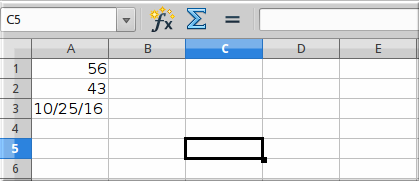
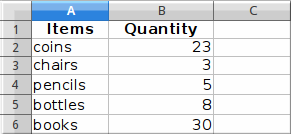


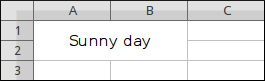
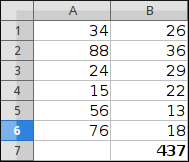
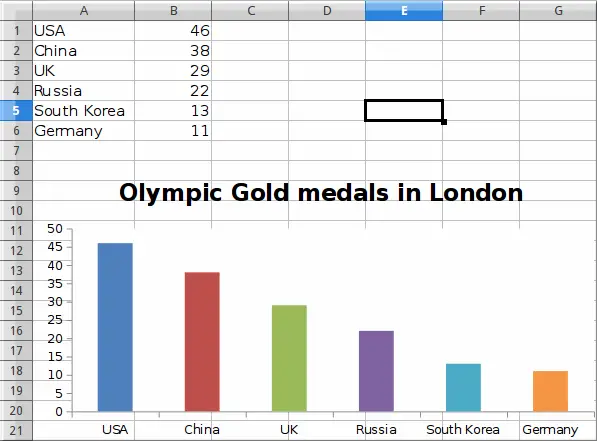

Dean Rubine

John Nakulski , I worked for Australia's largest phone company. Answered Mar 30, 2019 · Author has 1.1k answers and 1.5m answer views
Chris Summers , Worked in cellphone sales and service for 5 years, computer also for 15 years. Answered May 24, 2019 · Author has 7.9k answers and 5m answer views
Alberto Bucciante
Charles Verrier , Worked in IT for 30 years Answered Mar 27, 2019 · Author has 1.6k answers and 413.2k answer views